事前情報†
リソース†
- GROWI は markup ベースのページ作成ツール(OSS)
- WESEEK, Inc. が社内ツールとして開発メンテしているもの
- Crowi のフォーク
- pukiwiki の後継情報アグリゲーションサイトとして検討
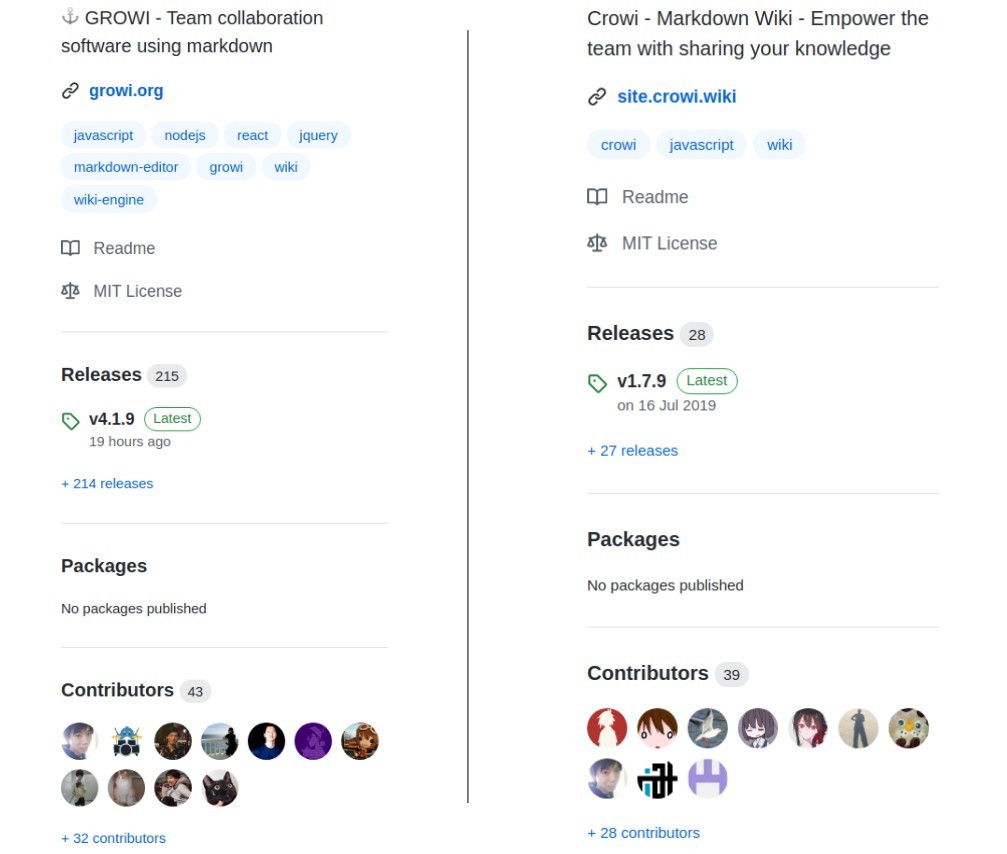
- 2020年時点でもコードメンテ、リリースの実態があり本家 (crowi、右) よりアクティブ
- なので、今回お試しで GROWI の方をインストールしてみる事にした
必要なパッケージ群をインストール†
- docker イメージ、heiroku イメージも用意されているが Ubuntu にインストール
- 公式ドキュメントでは Ubuntu 16.04 向けのインストール手順が公開も 18.04 はスコープ外
- Ubuntu18.04にGrowiをインストール を参考に 18.04 環境に移植
- 特に nodejs のバージョン(既にメンテが止まっている v8.4 に依存している)指定がポイント
必要パッケージ†
- node.js 8.x (DO NOT USE 9.x)
- npm 5.x
- yarn
- MongoDB 3.x
- Redis 3.x (Optional)
- Elasticsearch 5.x (Optional)
- Japanese (kuromoji) Analysis plugin
- ICU Analysis Plugin
node/npm†
curl で v8.4 の repo を指定(ワーニング表示後にインストールされた)†
[KGB] munakata:~$ curl -sL https://deb.nodesource.com/setup_8.x | sudo -E bash -

================================================================================
================================================================================

                              DEPRECATION WARNING

  Node.js 8.x LTS Carbon is no longer actively supported!

  You will not receive security or critical stability updates for this version.

  You should migrate to a supported version of Node.js as soon as possible.
  Use the installation script that corresponds to the version of Node.js you
  wish to install. e.g.

   * https://deb.nodesource.com/setup_10.x — Node.js 10 LTS "Dubnium"
   * https://deb.nodesource.com/setup_12.x — Node.js 12 LTS "Erbium" (recommended)
   * https://deb.nodesource.com/setup_14.x — Node.js 14 LTS "Fermium"

  Please see https://github.com/nodejs/Release for details about which
  version may be appropriate for you.

  The NodeSource Node.js distributions repository contains
  information both about supported versions of Node.js and supported Linux
  distributions. To learn more about usage, see the repository:
    https://github.com/nodesource/distributions

================================================================================
================================================================================

Continuing in 20 seconds ...


## Installing the NodeSource Node.js 8.x LTS Carbon repo...


## Populating apt-get cache...

+ apt-get update
取得:1 file:/var/opt/amdgpu-pro-local ./ InRelease
無視:1 file:/var/opt/amdgpu-pro-local ./ InRelease
取得:2 file:/var/opt/amdgpu-pro-local ./ Release [816 B]
取得:2 file:/var/opt/amdgpu-pro-local ./ Release [816 B]
取得:3 file:/var/opt/amdgpu-pro-local ./ Release.gpg
無視:3 file:/var/opt/amdgpu-pro-local ./ Release.gpg
エラー:4 http://archive.ubuntu.com/ubuntu bionic InRelease
  'archive.ubuntu.com' を解決できませんでした
ヒット:5 http://jp.archive.ubuntu.com/ubuntu bionic InRelease
取得:6 http://jp.archive.ubuntu.com/ubuntu bionic-updates InRelease [88.7 kB]
ヒット:7 https://dl.yarnpkg.com/debian stable InRelease
無視:8 https://repo.mongodb.org/apt/ubuntu bionic/mongodb-org/4.0 InRelease
取得:9 http://jp.archive.ubuntu.com/ubuntu bionic-backports InRelease [74.6 kB]
ヒット:10 https://repo.mongodb.org/apt/ubuntu bionic/mongodb-org/4.0 Release
ヒット:11 http://dl.google.com/linux/chrome/deb stable InRelease
取得:13 http://security.ubuntu.com/ubuntu bionic-security InRelease [88.7 kB]
ヒット:14 http://archive.canonical.com/ubuntu xenial InRelease
無視:15 https://artifacts.elastic.co/packages/5.x/apt stable InRelease
ヒット:16 https://artifacts.elastic.co/packages/5.x/apt stable Release
252 kB を 1秒 で取得しました (176 kB/s)
パッケージリストを読み込んでいます... 完了
W: http://archive.ubuntu.com/ubuntu/dists/bionic/InRelease の取得に失敗しました  'archive.ubuntu.com' を解決できませんでした
W: いくつかのインデックスファイルのダウンロードに失敗しました。これらは無視されるか、古いものが代わりに使われます。

## Confirming "bionic" is supported...

+ curl -sLf -o /dev/null 'https://deb.nodesource.com/node_8.x/dists/bionic/Release'

## Adding the NodeSource signing key to your keyring...

+ curl -s https://deb.nodesource.com/gpgkey/nodesource.gpg.key | apt-key add -
OK

## Creating apt sources list file for the NodeSource Node.js 8.x LTS Carbon repo...

+ echo 'deb https://deb.nodesource.com/node_8.x bionic main' > /etc/apt/sources.list.d/nodesource.list
+ echo 'deb-src https://deb.nodesource.com/node_8.x bionic main' >> /etc/apt/sources.list.d/nodesource.list

## Running `apt-get update` for you...

+ apt-get update
取得:1 file:/var/opt/amdgpu-pro-local ./ InRelease
無視:1 file:/var/opt/amdgpu-pro-local ./ InRelease
取得:2 file:/var/opt/amdgpu-pro-local ./ Release [816 B]
エラー:3 http://archive.ubuntu.com/ubuntu bionic InRelease
  'archive.ubuntu.com' を解決できませんでした
取得:2 file:/var/opt/amdgpu-pro-local ./ Release [816 B]
取得:4 file:/var/opt/amdgpu-pro-local ./ Release.gpg
無視:4 file:/var/opt/amdgpu-pro-local ./ Release.gpg
ヒット:5 http://jp.archive.ubuntu.com/ubuntu bionic InRelease
取得:6 http://jp.archive.ubuntu.com/ubuntu bionic-updates InRelease [88.7 kB]
ヒット:7 http://dl.google.com/linux/chrome/deb stable InRelease
取得:8 http://jp.archive.ubuntu.com/ubuntu bionic-backports InRelease [74.6 kB]
ヒット:9 https://dl.yarnpkg.com/debian stable InRelease
無視:10 https://repo.mongodb.org/apt/ubuntu bionic/mongodb-org/4.0 InRelease
ヒット:11 https://repo.mongodb.org/apt/ubuntu bionic/mongodb-org/4.0 Release
ヒット:12 http://archive.canonical.com/ubuntu xenial InRelease
取得:13 http://security.ubuntu.com/ubuntu bionic-security InRelease [88.7 kB]
取得:15 https://deb.nodesource.com/node_8.x bionic InRelease [4,595 B]
無視:16 https://artifacts.elastic.co/packages/5.x/apt stable InRelease
ヒット:17 https://artifacts.elastic.co/packages/5.x/apt stable Release
取得:19 https://deb.nodesource.com/node_8.x bionic/main i386 Packages [766 B]
取得:20 https://deb.nodesource.com/node_8.x bionic/main amd64 Packages [767 B]
258 kB を 2秒 で取得しました (136 kB/s)
パッケージリストを読み込んでいます... 完了
W: http://archive.ubuntu.com/ubuntu/dists/bionic/InRelease の取得に失敗しました  'archive.ubuntu.com' を解決できませんでした
W: いくつかのインデックスファイルのダウンロードに失敗しました。これらは無視されるか、古いものが代わりに使われます。

## Run `sudo apt-get install -y nodejs` to install Node.js 8.x LTS Carbon and npm
## You may also need development tools to build native addons:
     sudo apt-get install gcc g++ make
## To install the Yarn package manager, run:
     curl -sL https://dl.yarnpkg.com/debian/pubkey.gpg | sudo apt-key add -
     echo "deb https://dl.yarnpkg.com/debian/ stable main" | sudo tee /etc/apt/sources.list.d/yarn.list
     sudo apt-get update && sudo apt-get install yarn
nodejs のインストール (同時に npm も入った)†
[KGB] munakata:~$ sudo apt install -y nodejs
パッケージリストを読み込んでいます... 完了
依存関係ツリーを作成しています
状態情報を読み取っています... 完了
以下のパッケージが自動でインストールされましたが、もう必要とされていません:
  libboost-program-options1.65.1 libgoogle-perftools4 libpcrecpp0v5 libtcmalloc-minimal4 libyaml-cpp0.5v5 linux-headers-4.15.0-118
  linux-headers-4.15.0-118-generic linux-image-4.15.0-118-generic linux-modules-4.15.0-118-generic linux-modules-extra-4.15.0-118-generic
これを削除するには 'sudo apt autoremove' を利用してください。
以下のパッケージが新たにインストールされます:
  nodejs
アップグレード: 0 個、新規インストール: 1 個、削除: 0 個、保留: 0 個。
14.1 MB のアーカイブを取得する必要があります。
この操作後に追加で 70.5 MB のディスク容量が消費されます。
取得:1 https://deb.nodesource.com/node_8.x bionic/main amd64 nodejs amd64 8.17.0-1nodesource1 [14.1 MB]
14.1 MB を 4秒 で取得しました (3,391 kB/s)
以前に未選択のパッケージ nodejs を選択しています。
(データベースを読み込んでいます ... 現在 284730 個のファイルとディレクトリがインストールされています。)
.../nodejs_8.17.0-1nodesource1_amd64.deb を展開する準備をしています ...
nodejs (8.17.0-1nodesource1) を展開しています...
nodejs (8.17.0-1nodesource1) を設定しています ...
man-db (2.8.3-2ubuntu0.1) のトリガを処理しています ...

[KGB] munakata:~$ node -v
v8.17.0
[KGB] munakata:~$ npm -v
6.13.4
yarn のリポジトリ設定、インストール†
[KGB] munakata:~$ curl -sS https://dl.yarnpkg.com/debian/pubkey.gpg | sudo apt-key add -
OK

[KGB] munakata:~$ echo "deb https://dl.yarnpkg.com/debian/ stable main" | sudo tee /etc/apt/sources.list.d/yarn.list
deb https://dl.yarnpkg.com/debian/ stable main

[KGB] munakata:~$ sudo apt-get update && sudo apt-get install yarn
yarn はすでに最新バージョン (1.22.5-1) です。<--------- 一度上記手順でインストールしていたので

[KGB] munakata:~$ yarn -v
1.22.5
mongodb のインストール†
インストール†
[KGB] munakata:~$ sudo apt install -y mongodb mongodb-server mongo-tools
  (問題なく進んだので経過は省略)
起動とステータス確認†
[KGB] munakata:~$ sudo systemctl start mongodb
[KGB] munakata:~$ sudo systemctl status mongodb
● mongodb.service - An object/document-oriented database
   Loaded: loaded (/lib/systemd/system/mongodb.service; enabled; vendor preset: enabled)
   Active: active (running) since Tue 2020-10-20 11:08:54 JST; 1min 59s ago
     Docs: man:mongod(1)
 Main PID: 346 (mongod)
    Tasks: 23 (limit: 4915)
   CGroup: /system.slice/mongodb.service
           └─346 /usr/bin/mongod --unixSocketPrefix=/run/mongodb --config /etc/mongodb.conf

10月 20 11:08:54 mvc systemd[1]: Started An object/document-oriented database.
自動起動の有効化†
[KGB] munakata:~$ sudo systemctl enable mongodb
Synchronizing state of mongodb.service with SysV service script with /lib/systemd/systemd-sysv-install.
Executing: /lib/systemd/systemd-sysv-install enable mongodb
バージョン確認(exit で抜ける)†
[KGB] munakata:~$ mongo
MongoDB shell version v3.6.3
connecting to: mongodb://127.0.0.1:27017
MongoDB server version: 3.6.3
Welcome to the MongoDB shell.
For interactive help, type "help".
For more comprehensive documentation, see
	http://docs.mongodb.org/
Questions? Try the support group
	http://groups.google.com/group/mongodb-user
Server has startup warnings:
2020-10-20T11:08:54.284+0900 I STORAGE  [initandlisten]
2020-10-20T11:08:54.284+0900 I STORAGE  [initandlisten] ** WARNING: Using the XFS filesystem is strongly recommended with the WiredTiger
storage engine
2020-10-20T11:08:54.284+0900 I STORAGE  [initandlisten] **          See http://dochub.mongodb.org/core/prodnotes-filesystem
2020-10-20T11:08:55.309+0900 I CONTROL  [initandlisten]
2020-10-20T11:08:55.309+0900 I CONTROL  [initandlisten] ** WARNING: Access control is not enabled for the database.
2020-10-20T11:08:55.309+0900 I CONTROL  [initandlisten] **          Read and write access to data and configuration is unrestricted.
2020-10-20T11:08:55.309+0900 I CONTROL  [initandlisten]
> exit
bye
java のインストール†
apt で openjdk をインストール†
[KGB] munakata:~$ sudo apt install -y default-jre openjdk-11-jre-headless openjdk-8-jre-headless
  (問題なく進んだので経過は省略)
[KGB] munakata:~$ java --version
openjdk 11.0.8 2020-07-14
OpenJDK Runtime Environment (build 11.0.8+10-post-Ubuntu-0ubuntu118.04.1)
OpenJDK 64-Bit Server VM (build 11.0.8+10-post-Ubuntu-0ubuntu118.04.1, mixed mode, sharing)
インストール先を確認し JAVA_HOMEに java8 を設定†
[KGB] munakata:~$ update-alternatives --list java
/usr/lib/jvm/java-11-openjdk-amd64/bin/java
/usr/lib/jvm/java-8-openjdk-amd64/jre/bin/java
[KGB] munakata:~$ sudo vi /etc/profile.d/java.sh
[KGB] munakata:~$ cat /etc/profile.d/java.sh
JAVA_HOME=/usr/lib/jvm/java-8-openjdk-amd64

(一度ログアウト)

[KGB] munakata:~$ echo $JAVA_HOME
/usr/lib/jvm/java-8-openjdk-amd64
ヒープメモリーサイズは 4G に設定されている(メモリー総容量の 1/4 が規定値)†
[KGB (sudo)]:~# java -XX:+PrintFlagsFinal -version | grep -Ei "maxheapsize | maxram"
   size_t MaxHeapSize                              = 3940548608                                {product} {ergonomic}
 uint64_t MaxRAM                                   = 137438953472                           {pd product} {default}
    uintx MaxRAMFraction                           = 4                                         {product} {default}
   double MaxRAMPercentage                         = 25.000000                                 {product} {default}
openjdk version "11.0.8" 2020-07-14
OpenJDK Runtime Environment (build 11.0.8+10-post-Ubuntu-0ubuntu118.04.1)
OpenJDK 64-Bit Server VM (build 11.0.8+10-post-Ubuntu-0ubuntu118.04.1, mixed mode, sharing)
Elasticsearchのリポジトリ設定、インストール†
elasticsearch を apt でインストール†
[KGB] munakata:~$ sudo apt update
[KGB] munakata:~$ sudo apt install -y elasticsearch
plug-in インストール†
[KGB] munakata:~$ sudo /usr/share/elasticsearch/bin/elasticsearch-plugin install analysis-kuromoji
-> Downloading analysis-kuromoji from elastic
[=================================================] 100%
-> Installed analysis-kuromoji

[KGB] munakata:~$ sudo /usr/share/elasticsearch/bin/elasticsearch-plugin install analysis-icu
-> Downloading analysis-icu from elastic
[=================================================] 100%
-> Installed analysis-icu
起動とステータス確認†
[KGB] munakata:~$ sudo systemctl start elasticsearch

[KGB] munakata:~$ sudo systemctl status elasticsearch
● elasticsearch.service - Elasticsearch
   Loaded: loaded (/usr/lib/systemd/system/elasticsearch.service; enabled; vendor preset: enabled)
   Active: active (running) since Thu 2020-10-08 19:14:01 JST; 1 weeks 4 days ago
     Docs: http://www.elastic.co
 Main PID: 8414 (java)
    Tasks: 55 (limit: 4915)
   CGroup: /system.slice/elasticsearch.service
           └─8414 /usr/bin/java -Xms2g -Xmx2g -XX:+UseConcMarkSweepGC -XX:CMSInitiatingOccupancyFraction=75 -XX:+UseCMSInitiatingOccupancyOnl

10月 08 19:14:01 mvc systemd[1]: Starting Elasticsearch...
10月 08 19:14:01 mvc systemd[1]: Started Elasticsearch.
自動起動の有効化†
[KGB] munakata:~$ sudo systemctl enable elasticsearch
Synchronizing state of elasticsearch.service with SysV service script with /lib/systemd/systemd-sysv-install.
Executing: /lib/systemd/systemd-sysv-install enable elasticsearch
動作確認†
- curl でアクセスしてみる
[KGB (sudo)]:~# curl localhost:9200
{
  "name" : "qTywGV3",
  "cluster_name" : "elasticsearch",
  "cluster_uuid" : "QIjtkuqkQTmgaNh0XrRuNQ",
  "version" : {
    "number" : "5.6.16",
    "build_hash" : "3a740d1",
    "build_date" : "2019-03-13T15:33:36.565Z",
    "build_snapshot" : false,
    "lucene_version" : "6.6.1"
  },
  "tagline" : "You Know, for Search"
}
Redis†
リポジトリ追加†
[KGB] munakata:~$ sudo add-apt-repository ppa:chris-lea/redis-server
 Redis is an open source, advanced key-value store. It is often referred to as a data structure server since keys can contain strings, hashes, lists, sets and sorted sets.
 詳しい情報: https://launchpad.net/~chris-lea/+archive/ubuntu/redis-server
[ENTER] を押すと続行します。Ctrl-c で追加をキャンセルできます。
(以下省略)
バージョン確認†
[KGB] munakata:~$ sudo apt show redis-server
Package: redis-server
Version: 5:6.0.6-3chl1~bionic1
Priority: optional
Section: database
Source: redis
Maintainer: Chris Lamb <lamby@debian.org>
Installed-Size: 178 kB
Depends: lsb-base (>= 3.2-14), redis-tools (= 5:6.0.6-3chl1~bionic1)
Download-Size: 84.6 kB
APT-Sources: http://ppa.launchpad.net/chris-lea/redis-server/ubuntu bionic/main amd64 Packages
Description: ネットワークインターフェースを備えた永続的キーバリューデータベース
 Redis は memcache のようなキーバリューデータベースですが、データセットは不 揮発性です。さらに Redis
 は、リストやセットといったデータ構造のアトミックな 操作や検索をネイティブにサポートします。
 .
 データセットはすべてメモリ内に保存され、定期的にディスクに保存されます。

N: 追加レコードが 2 件あります。表示するには '-a' スイッチを付けてください。
インストール†
[KGB] munakata:~$ sudo apt install -y redis-server
 (以下省略)

[KGB] munakata:~$ redis-cli --version
redis-cli 6.0.6

[KGB] munakata:~$ redis-server --version
Redis server v=6.0.6 sha=00000000:0 malloc=jemalloc-5.1.0 bits=64 build=d463d609620685c0
起動とステータス確認†
[KGB] munakata:~$ sudo systemctl start redis-server
[KGB] munakata:~$ sudo systemctl status redis-server
● redis-server.service - Advanced key-value store
   Loaded: loaded (/lib/systemd/system/redis-server.service; disabled; vendor preset: enabled)
   Active: active (running) since Tue 2020-10-20 12:36:19 JST; 2min 4s ago
     Docs: http://redis.io/documentation,
           man:redis-server(1)
 Main PID: 10466 (redis-server)
    Tasks: 5 (limit: 4915)
   CGroup: /system.slice/redis-server.service
           └─10466 /usr/bin/redis-server 127.0.0.1:6379

10月 20 12:36:19 mvc systemd[1]: Starting Advanced key-value store...
10月 20 12:36:19 mvc systemd[1]: redis-server.service: Can't open PID file /var/run/redis/redis-server.pid (yet?) after start: No such file o
10月 20 12:36:19 mvc systemd[1]: Started Advanced key-value store.
自動起動の有効化†
[KGB] munakata:~$ sudo systemctl enable redis-server
Synchronizing state of redis-server.service with SysV service script with /lib/systemd/systemd-sysv-install.
Executing: /lib/systemd/systemd-sysv-install enable redis-server
Created symlink /etc/systemd/system/redis.service → /lib/systemd/system/redis-server.service.
GROWI 本体のインストール†
github から最新バージョンをフェッチ†
[KGB] munakata:~$ cd /opt
[KGB] munakata:/opt$ sudo git clone https://github.com/weseek/growi
Cloning into 'growi'...
remote: Enumerating objects: 387, done.
remote: Counting objects: 100% (387/387), done.
remote: Compressing objects: 100% (263/263), done.
remote: Total 156607 (delta 200), reused 225 (delta 119), pack-reused 156220
Receiving objects: 100% (156607/156607), 40.27 MiB | 1.63 MiB/s, done.
Resolving deltas: 100% (116863/116863), done.
[KGB] munakata:/opt$ cd growi/
[KGB] munakata:/opt/growi$ sudo git tag -l
 (最新バージョンが v4.1.9 である事を確認)

[KGB] munakata:/opt/growi$ sudo git checkout -b v4.1.9 refs/tags/v4.1.9
Switched to a new branch 'v4.1.9'
yarn でインストール†
[KGB] munakata:/opt/growi$ sudo yarn
yarn install v1.22.5
[1/5] Validating package.json...
error growi@4.1.9: The engine "node" is incompatible with this module. Expected version "^12 || ^14". Got "8.17.0"
error Found incompatible module.
info Visit https://yarnpkg.com/en/docs/cli/install for documentation about this command.
- わざわざ古い node v8.x をインストールしたが、node が古いと怒られた、ドキュメントが古いまま...
インストール済みの npm を使って n コマンドをインストール†
[KGB] munakata:/opt/growi$ sudo npm install -g n
/usr/bin/n -> /usr/lib/node_modules/n/bin/n
+ n@6.7.0
added 1 package from 4 contributors in 1.338s
nodejs のアップデート†
- nodejs リリース一覧 から最新の LTS バージョンを確認 → 12.19.0 が Erbium の最新
- 12.x は GROWI 4.1.9 のサポートバージョン
- n コマンドで最新の Stable 版をインストール
[KGB] munakata:/opt/growi$ sudo n lts
   installed : v12.19.0 (with npm 6.14.8)

Note: the node command changed location and the old location may be remembered in your current shell.
         old : /usr/bin/node
         new : /usr/local/bin/node
To reset the command location hash either start a new shell, or execute PATH="$PATH"
- path の変更を反映
[KGB] munakata:/opt/growi$ which node
/usr/local/bin/node

(shell を再起動)

[KGB] munakata:~$ node -v
v12.19.0
yarn 再実行†
[KGB] munakata:/opt$ cd growi
[KGB] munakata:/opt/growi$ sudo yarn
yarn install v1.22.5
[1/5] Validating package.json...
[2/5] Resolving packages...
[3/5] Fetching packages...
info fsevents@1.2.13: The platform "linux" is incompatible with this module.
info "fsevents@1.2.13" is an optional dependency and failed compatibility check. Excluding it from installation.
info fsevents@2.1.2: The platform "linux" is incompatible with this module.
info "fsevents@2.1.2" is an optional dependency and failed compatibility check. Excluding it from installation.
[4/5] Linking dependencies...
warning " > multer-autoreap@1.0.3" has incorrect peer dependency "express@^4.16.3".
warning " > react-card-flip@1.0.10" has incorrect peer dependency "react@^16.8.6".
warning " > react-card-flip@1.0.10" has incorrect peer dependency "react-dom@^16.8.6".
warning " > @atlaskit/drawer@5.3.7" has incorrect peer dependency "styled-components@^3.2.6".
warning "@atlaskit/drawer > @atlaskit/avatar@17.1.11" has incorrect peer dependency "styled-components@^3.2.6".
warning "@atlaskit/drawer > @atlaskit/blanket@10.0.18" has incorrect peer dependency "styled-components@^3.2.6".
warning "@atlaskit/drawer > @atlaskit/icon@20.1.2" has incorrect peer dependency "styled-components@^3.2.6".
warning "@atlaskit/drawer > @atlaskit/item@11.0.2" has incorrect peer dependency "styled-components@^3.2.6".
warning "@atlaskit/drawer > @atlaskit/theme@9.5.2" has incorrect peer dependency "styled-components@^3.2.6".
warning "@atlaskit/navigation-next > @atlaskit/tooltip@15.2.7" has incorrect peer dependency "styled-components@^3.2.6".
warning " > @atlaskit/navigation-next@8.0.5" has incorrect peer dependency "styled-components@^3.2.6".
warning "@atlaskit/navigation-next > @atlaskit/spinner@12.1.7" has incorrect peer dependency "styled-components@^3.2.6".
warning "@atlaskit/navigation-next > react-beautiful-dnd@12.2.0" has incorrect peer dependency "react@^16.8.5".
warning "@atlaskit/navigation-next > react-beautiful-dnd@12.2.0" has incorrect peer dependency "react-dom@^16.8.5".
warning "@atlaskit/navigation-next > unstated@1.2.0" has unmet peer dependency "prop-types@^15.5.0".
warning "unstated > create-react-context@0.1.6" has unmet peer dependency "prop-types@^15.0.0".
warning " > bootstrap@4.5.0" has unmet peer dependency "jquery@1.9.1 - 3".
warning " > bootstrap@4.5.0" has unmet peer dependency "popper.js@^1.16.0".
warning "eslint-config-weseek > eslint-config-airbnb@17.1.0" has incorrect peer dependency "eslint@^4.19.1 || ^5.3.0".
warning "eslint-config-weseek > eslint-config-airbnb@17.1.0" has unmet peer dependency "eslint-plugin-jsx-a11y@^6.1.1".
warning "eslint-config-weseek > eslint-config-airbnb > eslint-config-airbnb-base@13.1.0" has incorrect peer dependency "eslint@^4.19.1 || ^5.3.0".
warning "eslint-plugin-jest > @typescript-eslint/experimental-utils > @typescript-eslint/typescript-estree > tsutils@3.17.1" has unmet peer
dependency "typescript@>=2.8.0 || >= 3.2.0-dev || >= 3.3.0-dev || >= 3.4.0-dev || >= 3.5.0-dev || >= 3.6.0-dev || >= 3.6.0-beta || >= 3.7.0-dev || >= 3.7.0-beta".
warning " > react-frame-component@4.0.0" has unmet peer dependency "prop-types@^15.5.9".
warning " > styled-components@5.0.1" has unmet peer dependency "react-is@>= 16.8.0".
warning " > stylelint-config-recess-order@2.0.1" has incorrect peer dependency "stylelint@^9.9.0".
warning "stylelint-config-recess-order > stylelint-order@2.1.0" has incorrect peer dependency "stylelint@^9.10.1".
warning "swagger2openapi > better-ajv-errors@0.6.6" has unmet peer dependency "ajv@4.11.8 - 6".
[5/5] Building fresh packages...
Done in 25.54s.
GROWI の直接起動†
- 当初 elasticsearch の引数を 127.0.0.1 にしていて起動できなかった。
- 下記で(ワーニングは大量に出るが)正常起動して、初期設定画面が出た。
[KGB (sudo)]:/opt/growi# sudo NODE_ENV=production MONGO_URI=mongodb://localhost:27017/growi ELASTICSEARCH_URI=http://192.168.1.26:9200/growi REDIS_URI=redis://localhost:6379 PASSWORD_SEED=7mochahiko FILE_UPLOAD=local npm start
systemd への登録と自動起動の設定†
- systemd 設定ファイル(/etc/systemd/system/growi.service)の作成
[Unit]
Description = growi
After=network-online.target mongod.service
ConditionPathExists=/opt/growi

[Service]
ExecStart=/opt/growi/growi-start.sh
Restart=no
Type=simple

[Install]
WantedBy=multi-user.target
- 起動スクリプト(/opt/growi/growi-start.sh)
#!/bin/sh
cd /opt/growi
NODE_ENV=production \
MONGO_URI=mongodb://localhost:27017/growi \
ELASTICSEARCH_URI=http://localhost:9200/growi \
REDIS_URI=redis://localhost:6379 \
PASSWORD_SEED=7mochahiko \
FILE_UPLOAD=local \
npm start
Apache サーバー(svr.hmuna.com)設定†
virtual domain 設定†
dns 設定†
サーバー証明書†
Let's encrypt から公式サーバー証明書を取得†
- Your certificate and chain have been saved at /etc/letsencrypt/live/svr.hmuna.com/fullchain.pem
- Your key file has been saved at /etc/letsencrypt/live/svr.hmuna.com/privkey.pem
[KGB (sudo)]:~# add-apt-repository ppa:certbot/certbot

[KGB (sudo)]:~# apt install python-certbot-apache

[KGB (sudo)]:~# sudo certbot --apache
Saving debug log to /var/log/letsencrypt/letsencrypt.log
Plugins selected: Authenticator apache, Installer apache
Enter email address (used for urgent renewal and security notices) (Enter 'c' to
cancel): admin@hmuna.com

- - - - - - - - - - - - - - - - - - - - - - - - - - - - - - - - - - - - - - - -
Please read the Terms of Service at
https://letsencrypt.org/documents/LE-SA-v1.2-November-15-2017.pdf. You must
agree in order to register with the ACME server at
https://acme-v02.api.letsencrypt.org/directory
- - - - - - - - - - - - - - - - - - - - - - - - - - - - - - - - - - - - - - - -
(A)gree/(C)ancel: A

- - - - - - - - - - - - - - - - - - - - - - - - - - - - - - - - - - - - - - - -
Would you be willing to share your email address with the Electronic Frontier
Foundation, a founding partner of the Let's Encrypt project and the non-profit
organization that develops Certbot? We'd like to send you email about our work
encrypting the web, EFF news, campaigns, and ways to support digital freedom.
- - - - - - - - - - - - - - - - - - - - - - - - - - - - - - - - - - - - - - - -
(Y)es/(N)o: Y

Which names would you like to activate HTTPS for?
- - - - - - - - - - - - - - - - - - - - - - - - - - - - - - - - - - - - - - - -
1: kgb.hmuna.com
2: svr.hmuna.com
- - - - - - - - - - - - - - - - - - - - - - - - - - - - - - - - - - - - - - - -
Select the appropriate numbers separated by commas and/or spaces, or leave input
blank to select all options shown (Enter 'c' to cancel): 2
Obtaining a new certificate
Performing the following challenges:
http-01 challenge for svr.hmuna.com
Waiting for verification...
Cleaning up challenges
Created an SSL vhost at /etc/apache2/sites-available/svr.hmuna.com-le-ssl.conf
Deploying Certificate to VirtualHost /etc/apache2/sites-available/svr.hmuna.com-le-ssl.conf
Enabling available site: /etc/apache2/sites-available/svr.hmuna.com-le-ssl.conf

Please choose whether or not to redirect HTTP traffic to HTTPS, removing HTTP access.
- - - - - - - - - - - - - - - - - - - - - - - - - - - - - - - - - - - - - - - -
1: No redirect - Make no further changes to the webserver configuration.
2: Redirect - Make all requests redirect to secure HTTPS access. Choose this for
new sites, or if you're confident your site works on HTTPS. You can undo this
change by editing your web server's configuration.
- - - - - - - - - - - - - - - - - - - - - - - - - - - - - - - - - - - - - - - -
Select the appropriate number [1-2] then [enter] (press 'c' to cancel): 2
Redirecting vhost in /etc/apache2/sites-enabled/svr.hmuna.com.conf to ssl vhost in /etc/apache2/sites-available/svr.hmuna.com-le-ssl.conf

- - - - - - - - - - - - - - - - - - - - - - - - - - - - - - - - - - - - - - - -
Congratulations! You have successfully enabled https://svr.hmuna.com

You should test your configuration at:
https://www.ssllabs.com/ssltest/analyze.html?d=svr.hmuna.com
- - - - - - - - - - - - - - - - - - - - - - - - - - - - - - - - - - - - - - - -

IMPORTANT NOTES:
 - Congratulations! Your certificate and chain have been saved at:
   /etc/letsencrypt/live/svr.hmuna.com/fullchain.pem
   Your key file has been saved at:
   /etc/letsencrypt/live/svr.hmuna.com/privkey.pem
   Your cert will expire on 2021-01-27. To obtain a new or tweaked
   version of this certificate in the future, simply run certbot again
   with the "certonly" option. To non-interactively renew *all* of
   your certificates, run "certbot renew"
 - Your account credentials have been saved in your Certbot
   configuration directory at /etc/letsencrypt. You should make a
   secure backup of this folder now. This configuration directory will
   also contain certificates and private keys obtained by Certbot so
   making regular backups of this folder is ideal.
 - If you like Certbot, please consider supporting our work by:

   Donating to ISRG / Let's Encrypt:   https://letsencrypt.org/donate
   Donating to EFF:                    https://eff.org/donate-le
証明書の更新†
- dry run で更新処理が正常に実施される事を確認
[KGB (sudo)]:~# certbot renew --dry-run
Saving debug log to /var/log/letsencrypt/letsencrypt.log

- - - - - - - - - - - - - - - - - - - - - - - - - - - - - - - - - - - - - - - -
Processing /etc/letsencrypt/renewal/svr.hmuna.com.conf
- - - - - - - - - - - - - - - - - - - - - - - - - - - - - - - - - - - - - - - -
Cert not due for renewal, but simulating renewal for dry run
Plugins selected: Authenticator apache, Installer apache
Renewing an existing certificate
Performing the following challenges:
http-01 challenge for svr.hmuna.com
Waiting for verification...
Cleaning up challenges

- - - - - - - - - - - - - - - - - - - - - - - - - - - - - - - - - - - - - - - -
new certificate deployed with reload of apache server; fullchain is
/etc/letsencrypt/live/svr.hmuna.com/fullchain.pem
- - - - - - - - - - - - - - - - - - - - - - - - - - - - - - - - - - - - - - - -

- - - - - - - - - - - - - - - - - - - - - - - - - - - - - - - - - - - - - - - -
** DRY RUN: simulating 'certbot renew' close to cert expiry
**          (The test certificates below have not been saved.)

Congratulations, all renewals succeeded. The following certs have been renewed:
  /etc/letsencrypt/live/svr.hmuna.com/fullchain.pem (success)
** DRY RUN: simulating 'certbot renew' close to cert expiry
**          (The test certificates above have not been saved.)
- - - - - - - - - - - - - - - - - - - - - - - - - - - - - - - - - - - - - - - -

IMPORTANT NOTES:
 - Your account credentials have been saved in your Certbot
   configuration directory at /etc/letsencrypt. You should make a
   secure backup of this folder now. This configuration directory will
   also contain certificates and private keys obtained by Certbot so
   making regular backups of this folder is ideal.
- certbot インストール時に証明書自動更新処理も設定された(毎日二回実行され有効期限が 30日以下の証明書を自動更新する)
[KGB (sudo)]:~# cat /etc/cron.d/certbot
# /etc/cron.d/certbot: crontab entries for the certbot package
#
# Upstream recommends attempting renewal twice a day
#
# Eventually, this will be an opportunity to validate certificates
# haven't been revoked, etc.  Renewal will only occur if expiration
# is within 30 days.
SHELL=/bin/sh
PATH=/usr/local/sbin:/usr/local/bin:/sbin:/bin:/usr/sbin:/usr/bin

0 */12 * * * root test -x /usr/bin/certbot -a \! -d /run/systemd/system && perl -e 'sleep int(rand(43200))' && certbot -q renew
Apache サーバー設定(動作したもの)†
- リバースプロキシー設定で https://svr.hmuna.com/ でアクセスできた
<IfModule mod_ssl.c>
<VirtualHost *:443>
#-------------------------------------------------------------------------------
#  svr.hmuna.com (SSL)
#-------------------------------------------------------------------------------
        ServerName svr.hmuna.com
        ServerAdmin server-admin@hmuna.com
        DocumentRoot /opt/growi
        #ProxyPass / http://svr.hmuna.com:3000/
        ProxyPass / http://localhost:3000/
        #ProxyPassReverse / http://svr.hmuna.com:3000/
        ProxyPassReverse / http://localhost:3000/

        # Enable SSL for this virtual host.
        SSLEngine on

        # Possible values include: debug, info, notice, warn, error, crit, alert, emerg.
        #LogLevel error
        LogLevel debug
        #LogLevel alert
        ErrorLog /var/log/apache2/error_svr.log
        SetEnvIf Remote_Addr "192.168.1." no_log

        <Directory /opt/growi>
                Options +FollowSymLinks
                AllowOverride None
                #-------------------------------------------------------------------------------------------
                #  http://wiki.hmuna.com アクセスを強制的に https://wiki.hmuna.com に転送する設定
                #-------------------------------------------------------------------------------------------
                #Redirect / https://svr.hmuna.com/
        </Directory>

SSLCertificateFile /etc/letsencrypt/live/svr.hmuna.com/fullchain.pem
SSLCertificateKeyFile /etc/letsencrypt/live/svr.hmuna.com/privkey.pem
Include /etc/letsencrypt/options-ssl-apache.conf
</VirtualHost>
</IfModule>
参考 URL†
pukiwiki コンテンツの移植†
![[PukiWiki]](image/taikyoku.gif "[PukiWiki]")