![[PukiWiki]](image/taikyoku.gif "[PukiWiki]")
/dev/hda1  ------ /boot
/dev/hda2  ------ swap
/dev/hda3  ------ /
/dev/hdd1  ------ /var
/dev/hdd2  ------ /home
/etc/fstab の記述
[root@rh01 root]# cat /etc/fstab
LABEL=/                 /                       ext3    defaults        1 1
LABEL=/boot             /boot                   ext3    defaults        1 2
none                    /dev/pts                devpts  gid=5,mode=620  0 0
LABEL=/home             /home                   ext3    defaults        1 2
none                    /proc                   proc    defaults        0 0
none                    /dev/shm                tmpfs   defaults        0 0
LABEL=/var              /var                    ext3    defaults        1 2
/dev/hda2               swap                    swap    defaults        0 0
/dev/cdrom              /mnt/cdrom              udf,iso9660  noauto,owner,kudzu,ro 0 0
/dev/fd0                /mnt/floppy             auto    noauto,owner,kudzu 0 0
現在の起動時の設定を確認する
[root@rh01 root]# chkconfig --list
kudzu           0:off   1:off   2:off   3:off   4:off   5:off   6:off
syslog          0:off   1:off   2:on    3:on    4:on    5:on    6:off
netfs           0:off   1:off   2:off   3:on    4:on    5:on    6:off
network         0:off   1:off   2:on    3:on    4:on    5:on    6:off
random          0:off   1:off   2:on    3:on    4:on    5:on    6:off
rawdevices      0:off   1:off   2:off   3:on    4:on    5:on    6:off
pcmcia          0:off   1:off   2:off   3:off   4:off   5:off   6:off
( 以下 サービスのリストが続く、サービス名を指定することも可能 )
サービスの起動/停止を指定する
[root@rh01 root]# chkconfig --list sendmail
sendmail        0:off   1:off   2:on    3:on    4:on    5:on    6:off

[root@rh01 root]# chkconfig --level 2345 sendmail off

[root@rh01 root]# chkconfig --list sendmail
sendmail        0:off   1:off   2:off   3:off   4:off   5:off   6:off
netstat -ln
例えば http サーバーを起動している場合 80番ポートが LISTEN になっていることを
確認することができる。 WindowsNT 系では netstat -an というコマンドになる。
[root@muna-linux root]# netstat -ln
Active Internet connections (only servers)
Proto Recv-Q Send-Q Local Address           Foreign Address         State
tcp        0      0 0.0.0.0:32768           0.0.0.0:*               LISTEN
tcp        0      0 127.0.0.1:32769         0.0.0.0:*               LISTEN
tcp        0      0 0.0.0.0:32771           0.0.0.0:*               LISTEN
tcp        0      0 0.0.0.0:139             0.0.0.0:*               LISTEN
tcp        0      0 127.0.0.1:783           0.0.0.0:*               LISTEN
tcp        0      0 0.0.0.0:111             0.0.0.0:*               LISTEN
tcp        0      0 0.0.0.0:6000            0.0.0.0:*               LISTEN
tcp        0      0 0.0.0.0:              0.0.0.0:*               LISTEN
tcp        0      0 0.0.0.0:22              0.0.0.0:*               LISTEN
tcp        0      0 127.0.0.1:631           0.0.0.0:*               LISTEN
tcp        0      0 0.0.0.0:23              0.0.0.0:*               LISTEN
udp        0      0 0.0.0.0:32768           0.0.0.0:*
udp        0      0 192.168.1.11:137        0.0.0.0:*
udp        0      0 0.0.0.0:137             0.0.0.0:*
udp        0      0 192.168.1.11:138        0.0.0.0:*
udp        0      0 0.0.0.0:138             0.0.0.0:*
udp        0      0 0.0.0.0:854             0.0.0.0:*
udp        0      0 0.0.0.0:111             0.0.0.0:*
udp        0      0 0.0.0.0:631             0.0.0.0:*

Active UNIX domain sockets (only servers)
Proto RefCnt Flags       Type       State         I-Node Path
unix  2      [ ACC ]     STREAM     LISTENING     4659   /tmp/.gdm_socket
unix  2      [ ACC ]     STREAM     LISTENING     4994   /tmp/.fam_socket
unix  2      [ ACC ]     STREAM     LISTENING     4763   /tmp/ssh-XXJbpVMD/agent.4864
unix  2      [ ACC ]     STREAM     LISTENING     4762   /tmp/.ki2-unix/_0-ja_JP
unix  2      [ ACC ]     STREAM     LISTENING     44   /tmp/orbit-root/linc-1300-0-1c094e15ba75
unix  2      [ ACC ]     STREAM     LISTENING     4911   /tmp/orbit-root/linc-134b-0-1b4d5c157ffa0
unix  2      [ ACC ]     STREAM     LISTENING     4967   /tmp/orbit-root/linc-134f-0-4a45e296a83
unix  2      [ ACC ]     STREAM     LISTENING     4976   /tmp/orbit-root/linc-134d-0-12cfb2a0a12f9
unix  2      [ ACC ]     STREAM     LISTENING     5053   /tmp/orbit-root/linc-1361-0-42262b252d9de
unix  2      [ ACC ]     STREAM     LISTENING     5074   /tmp/orbit-root/linc-135d-0-42262b256a4ff
unix  2      [ ACC ]     STREAM     LISTENING     5118   /tmp/orbit-root/linc-135f-0-30e19c0bd208d
unix  2      [ ACC ]     STREAM     LISTENING     5140   /tmp/orbit-root/linc-1365-0-1ecac24c584
unix  2      [ ACC ]     STREAM     LISTENING     5288   /tmp/orbit-root/linc-1371-0-567910ef54125
unix  2      [ ACC ]     STREAM     LISTENING     5319   /tmp/orbit-root/linc-1369-0-4044d2528d7d
unix  2      [ ACC ]     STREAM     LISTENING     6234    /tmp/orbit-root/linc-13aa-0-3d7824df171fc
unix  2      [ ACC ]     STREAM     LISTENING     4515   /tmp/.font-unix/fs7100
unix  2      [ ACC ]     STREAM     LISTENING     4669   /tmp/.X11-unix/X0
unix  2      [ ACC ]     STREAM     LISTENING     4343   /dev/gpmctl
unix  2      [ ACC ]     STREAM     LISTENING     4899   /tmp/.ICE-unix/4864
unix  2      [ ACC ]     STREAM     LISTENING     4353   /tmp/.iroha_unix/IROHA
unix  2      [ ACC ]     STREAM     LISTENING     4796      /tmp/orbit-root/linc-1349-0-7b1d6a683abe4
[root@muna-linux root]#
[ Font の実体 ] ( X Font Server を利用している環境 )

Redhat: /usr/share/fonts/
Vine  : /usr/X11R6/lib/X11/fonts

[ xfs の設定ファイル ]

/etc/X11/fs/config
Redhat9 のデータ ---------->  rh9_fonts_list.txt
Fedra core 1 のデータ -----> fedra_fonts_list.txt
Redhat 9.0 config --------> fs_config_rh9.txt
Fedra Core 1.0 config ----> fs_config_fedra.txt
[ Redhat 9.0 で使われている 東風フォント ]

[root@muna-linux /]# ls -l /usr/share/fonts/ja/TrueType/
合計 9700
-rw-r--r--    1 root     root         1548  1月 31  2003 fonts.alias
-rw-r--r--    1 root     root         8313  5月  5 21:33 fonts.cache-1
-rw-r--r--    1 root     root         3823  5月  5 21:34 fonts.dir
-rw-r--r--    1 root     root         3823  5月  5 21:34 fonts.scale
-rw-r--r--    1 root     root      4043488  1月 31  2003 kochi-gothic.ttf
-rw-r--r--    1 root     root        17318  1月 31  2003 kochi-gothic.tti
-rw-r--r--    1 root     root      51972  1月 31  2003 kochi-mincho.ttf
-rw-r--r--    1 root     root        17318  1月 31  2003 kochi-mincho.tti
Kochi Font Archive -----> kochi.tgz
[東風フォント制作活動終了]
古川さんによって行われていたフリーのアウトラインフォント「東風フォント」
の制作活動が終了となりました。
http://www.on.cs.keio.ac.jp/~yasu/jp_fonts.html
slashdotジャパン「東風フォント製作中止に」: http://slashdot.jp/articles/03/10/22/0811250.shtml?topic=36
[ Fedra Core では 東風フォント の代替フォントが組み込まれている ]

[root@hmuna ja]# ls -l /usr/share/fonts/ja/TrueType/
合計 16444
-rw-r--r--    1 root     root         1548  8月 11  2003 fonts.alias
-rw-r--r--    1 root     root         8343  6月 29 13:26 fonts.cache-1
-rw-r--r--    1 root     root         3465  6月 29 13:26 fonts.dir
-rw-r--r--    1 root     root         3465  6月 29 13:26 fonts.scale
-rw-r--r--    1 root     root      7770652  8月 11  2003 kochi-gothic-subst.ttf
-rw-r--r--    1 root     root        17318  8月 11  2003 kochi-gothic-subst.tti
-rw-r--r--    1 root     root      8967464  8月 11  2003 kochi-mincho-subst.ttf
-rw-r--r--    1 root     root        17318  8月 11  2003 kochi-mincho-subst.tti
[ Fedra に 東風フォント をコピーして関連ファイルをリネーム ]

[root@hmuna wk]# ls -l /usr/share/fonts/ja/TrueType/
合計 32108
-rw-r--r--    1 root     root         1548  7月  7 21:49 fonts.alias
-rw-r--r--    1 root     root         1548  8月 11  2003 fonts.alias_fedraorig
-rw-r--r--    1 root     root         8313  7月  7 21:49 fonts.cache-1
-rw-r--r--    1 root     root         8343  6月 29 13:26 fonts.cache-1_fedraorig
-rw-r--r--    1 root     root         3823  7月  7 21:49 fonts.dir
-rw-r--r--    1 root     root         3465  6月 29 13:26 fonts.dir_fedraorig
-rw-r--r--    1 root     root         3823  7月  7 21:49 fonts.scale
-rw-r--r--    1 root     root         3465  6月 29 13:26 fonts.scale_fedraorig
-rw-r--r--    1 root     root      7770652  8月 11  2003 kochi-gothic-subst.ttf
-rw-r--r--    1 root     root        17318  8月 11  2003 kochi-gothic-subst.tti
-rw-r--r--    1 root     root      4043488  7月  7 21:44 kochi-gothic.ttf
-rw-r--r--    1 root     root        17318  7月  7 21:44 kochi-gothic.tti
-rw-r--r--    1 root     root      8967464  8月 11  2003 kochi-mincho-subst.ttf
-rw-r--r--    1 root     root        17318  8月 11  2003 kochi-mincho-subst.tti
-rw-r--r--    1 root     root      51972  7月  7 21:44 kochi-mincho.ttf
-rw-r--r--    1 root     root        17318  7月  7 21:44 kochi-mincho.tti
 単純にコピーしただけでは 動作しなかったので強引に逆に -subst にリネーム

[root@hmuna TrueType]# mv kochi-gothic-subst.ttf kochi-gothic-subst.ttf_orig
[root@hmuna TrueType]# mv kochi-gothic-subst.tti kochi-gothic-subst.tti_orig
[root@hmuna TrueType]# mv kochi-mincho-subst.ttf kochi-mincho-subst.ttf_orif
[root@hmuna TrueType]# mv kochi-mincho-subst.tti kochi-mincho-subst.tti_orig
[root@hmuna TrueType]# mv kochi-gothic.ttf kochi-gothic-subst.ttf
[root@hmuna TrueType]# mv kochi-gothic.tti kochi-gothic-subst.tti
[root@hmuna TrueType]# mv kochi-mincho.ttf kochi-mincho-subst.ttf
[root@hmuna TrueType]# mv kochi-mincho.tti kochi-mincho-subst.tti
[root@hmuna TrueType]# ls -l
合計 32108
-rw-r--r--    1 root     root         1548  7月  7 21:49 fonts.alias
-rw-r--r--    1 root     root         1548  8月 11  2003 fonts.alias_fedraorig
-rw-r--r--    1 root     root         8313  7月  7 21:49 fonts.cache-1
-rw-r--r--    1 root     root         8343  6月 29 13:26 fonts.cache-1_fedraorig
-rw-r--r--    1 root     root         3823  7月  7 21:49 fonts.dir
-rw-r--r--    1 root     root         3465  6月 29 13:26 fonts.dir_fedraorig
-rw-r--r--    1 root     root         3823  7月  7 21:49 fonts.scale
-rw-r--r--    1 root     root         3465  6月 29 13:26 fonts.scale_fedraorig
-rw-r--r--    1 root     root      4043488  7月  7 21:44 kochi-gothic-subst.ttf
-rw-r--r--    1 root     root      7770652  8月 11  2003 kochi-gothic-subst.ttf_orig
-rw-r--r--    1 root     root        17318  7月  7 21:44 kochi-gothic-subst.tti
-rw-r--r--    1 root     root        17318  8月 11  2003 kochi-gothic-subst.tti_orig
-rw-r--r--    1 root     root      51972  7月  7 21:44 kochi-mincho-subst.ttf
-rw-r--r--    1 root     root        17318  7月  7 21:44 kochi-mincho-subst.tti
-rw-r--r--    1 root     root      8967464  8月 11  2003 kochi-mincho-subst.ttf_orig
-rw-r--r--    1 root     root        17318  8月 11  2003 kochi-mincho-subst.tti_orig
Fedora Core 2まではyumコマンドでカーネルソースをダウンロードできたのだが、Fedora Core 3ではそれが提供されていない。
そのため、FTPサイトなどからカーネルソースをダウンロードして、インストールしなければならない。
# uname -r -m
2.6.9-1.681_FC3smp i686
# rpm -ihv kernel-2.6.9-1.681_FC3.src.rpm
   1:kernel             ###################################### [100%]
# rpmbuild -bp --target i686 /usr/src/redhat/SPECS/kernel-2.6.spec
作成中ターゲットプラットフォーム: i686
(省略)
# mv /usr/src/redhat/BUILD/kernel-2.6.9/linux-2.6.9 /usr/src
# ls /usr/src/linux-2.6.9/
COPYING        Makefile        configs  include  lib      security
CREDITS        README          crypto   init     mm       sound
Documentation  REPORTING-BUGS  drivers  ipc      net      usr
MAINTAINERS    arch            fs       kernel   scripts
yum の設定ファイル /etc/yum.conf → yum.conf
yum download サイト一覧 ---------→ http://fedora.redhat.com/download/mirrors.html
baseurl=http://ftp.kddlabs.co.jp/pub/Linux/distributions/fedora/core/$releasever/$basearch/os/i
gpgcheck=1
chkconfig yum on
service yum status
service yum start
#!/bin/sh

if [ -f /var/lock/subsys/yum ]; then
	/usr/bin/yum -R 10 -e 0 -d 0 -y update yum
	/usr/bin/yum -R 120 -e 0 -d 0 -y update
fi
利用可能なソフトウェアの一覧を表示させます。
更新可能なパッケージがあるかどうかの確認ができます。
U新しいパッケージがあれば、全て更新します。
指定した特定のパッケージをインストールします。(この場合、依存関係も含まれます。)
パッケージ名をもとにして、その詳細などを検索できます。
あるパッケージについての基本情報を表示できます。
All of the above commands can take shell-style wildcards (*,?) instead of a package name. Check the yum man page for more details. 上に挙げたコマンドを実行する際、パッケージ名の代わりに、ワイルドカードなどを使うことも可能です。詳しくは、YUM のマニュアルのページを見てください。
# yum install samba

You have enabled checking of packages via GPG keys. This is a good
thing. However, you do not have any GPG public keys installed. You need to
download the keys for packages you wish to install and install them.
You can do that by running the command:
    rpm --import public.gpg.key
For more information contact your distribution or package provider.
[root@localhost ~]# rpm --import public.gpg.key
エラー: public.gpg.key: import read failed.
# rpm --import /usr/share/rhn/RPM-GPG-KEY-fedora
# yum update
Setting up Update Process
Setting up Repo:  base
repomd.xml           100% |=========================| 1.1 kB    00:00
Setting up Repo:  updates-released
repomd.xml           100% |=========================|  951 B    00:00
nslookup ドメイン名
DNS サーバーに配信されている ドメイン名のアドレスを検索することができる
通常は トップドメイン[ hmuna.com 等 ] を検索するが、ローカルの Name Server
[ ns1.hmuna.com ]や Web Server [ www.hmuna.com ]などサブドメインを指定
して検索することもできる。 このアドレスが不一致になっている時は DNS レコード
の更新が正しく行われていないので解析と対策が必要。 DNS サービスを複数運用して
いる場合など、片方の更新がエラーになっている可能性がある。 ( DDNS の場合 )
[root@muna-linux root]# nslookup hmuna.com
Note:  nslookup is deprecated and may be removed from future releases.
Consider using the `dig' or `host' programs instead.  Run nslookup with
the `-sil[ent]' option to prevent this message from appearing.
Server:         192.168.1.1
Address:        192.168.1.1#53

Non-authoritative answer:
Name:   hmuna.com
Address: 210.130.99.82

[root@muna-linux root]# nslookup www.hmuna.com
Note:  nslookup is deprecated and may be removed from future releases.
Consider using the `dig' or `host' programs instead.  Run nslookup with
the `-sil[ent]' option to prevent this message from appearing.
Server:         192.168.1.1
Address:        192.168.1.1#53

Non-authoritative answer:
Name:   www.hmuna.com
Address: 210.130.99.82

[root@muna-linux root]# nslookup ns1.hmuna.com
Note:  nslookup is deprecated and may be removed from future releases.
Consider using the `dig' or `host' programs instead.  Run nslookup with
the `-sil[ent]' option to prevent this message from appearing.
Server:         192.168.1.1
Address:        192.168.1.1#53

Name:   ns1.hmuna.com
Address: 210.130.99.82
diff コマンドを利用してパッチ情報を作成する
ここでは-u(unified形式)を利用してゆくが-c(context形式)でもかまわない。
diff -u 変更前ファイル 変更後ファイル > patch.txt
(ファイルの順番に注意。最新は2の方なので)
パッチの当て方
patch < patch.txt
Hmm...  Looks like a unified diff to me...
The text leading up to this was:
--------------------------
|--- test       Thu May  8 14:57:14 2003
|+++ test2      Thu May  8 15:02:48 2003
--------------------------
Patching file test using Plan A...
Hunk #1 succeeded at 1.
done
diff -c FROM_FILE TO_FILE > PATCH_FILE
diff -c FROM_DIRECTORY TO_DORECTORY > PATCH_FILE
diff -cr FROM_DIRECTORY TO_DORECTORY > PATCH_FILE
diff -crN FROM_DIRECTORY TO_DORECTORY > PATCH_FILE
patch < PATCH_FILE
patch -p0 -d . < PATCH_FILE
patch -p -d . -E < PATCH_FILE
/etc/indetd.d/telnet を編集する
service telnet
{
flags = REUSE
socket_type = stream
wait = no
user = root
server = /usr/sbin/in.telnetd
log_on_failure += USERID
disable = no  ・・・ 初期値としては、"yes"に
}             成っているが"no"に変える
Fedoraでは日本語でセットアップしても文字コードセットがUTF8になってしまうため、TeraTermPro等のターミナルでは、文字化けしちゃいます。
そこで、文字コードセットをUTF8からEUCに変更する方法です。
LANG="ja_JP.UTF-8"
SUPPORTED="en_US.UTF-8:en_US:en:ja_JP.UTF-8:ja_JP:ja"
SYSFONT="latarcyrheb-sun16"
変更後
#LANG="ja_JP.UTF-8"
#SUPPORTED="en_US.UTF-8:en_US:en:ja_JP.UTF-8:ja_JP:ja"
LANG="ja_JP.eucJP"
SUPPORTED="ja_JP.eucJP:ja_JP.ujis:ja_JP:ja"
SYSFONT="latarcyrheb-sun16"
[root@spirit ja_JP_EUC]# for fname in *.hlp; do
> nkf -e $fname > $fname.hlp_E;
> done
[root@spirit ja_JP_EUC]# for fname in *.hlp.hlp; do
> mv $fname ${fname%.hlp_E}.hlp;
> doneroot@mythen:# find . *.txt -exec nkf -w --overwrite {} \;
[root@spirit ~]# mkisofs -r -l -J -o /home/munakata/sh2a-linux.iso /media/cdrecorder/
INFO:   EUC-JP character encoding detected by locale settings.
        Assuming EUC-JP encoded filenames on source filesystem,
        use -input-charset to override.
Using FS000 for  ./rr_moved/fs (fs)
Using H000 for  ./rr_moved/h (h)
 (snip)
1.77% done, estimate finish Tue Dec  5 08:04:56 2006
3.55% done, estimate finish Tue Dec  5 08:06:48 2006
 (snip)
97.60% done, estimate finish Tue Dec  5 08:05:43 2006
99.37% done, estimate finish Tue Dec  5 08:05:40 2006
Total translation table size: 0
Total rockridge attributes bytes: 1801799
Total directory bytes: 4501504
Path table size(bytes): 20078
Max brk space used f34000
281779 extents written (550 MB)
mount -t iso9660 -o loop (iso image) /mnt/cdrom
cp /mnt/cdrom/FC...iso /usr/src/redhat/SRPM
cd /usr/src/redhat
rpmbuild --rebuild SRPMS/kernel-util-***
boot:linux single
#mount -o remount,rw /
#passwd
現在使用しているパスワードが要求されるので初期パスワードを入力します。
Old Password:
新しく設定するパスワードを入力します。
New Password:
確認のために再度、新しく設定するパスワードを入力します。
Retype New Password:
設定が完了したらログアウトします。
#exit
"root"を入力します。
login: root
次に新しく変更したパスワードを入力してログインできることを確認します。
password:
問題無くログイン出来る事を確認したらログアウトします。
#exit
# ftp 192.168.11.253
Connected to 192.168.11.253 (192.168.11.253).
220 (vsFTPd 2.0.1)
Name (192.168.11.253:zem): root
530 Permission denied.
Login failed.
# ftp 192.168.11.253
Connected to 192.168.11.253 (192.168.11.253).
220 (vsFTPd 2.0.1)
Name (192.168.11.253:zem): root
331 Please specify the password.
Password:
230 Login successful.
| 拡張子 | 圧縮形式 | コマンド |
| .tar.gz または .tgz | gzip | $ tar zxvf 解凍対象 |
| .tar.bz2 または .tbz | bzip2 | $ tar jxvf 解凍対象 |
| .gz | gzip | $ gunzip 解凍対象 または $ gzip -d 解凍対象 |
| .bz2 | bzip2 | $ bunzip2 解凍対象 または $ bzip2 -d 解凍対象 |
| .lha または .lzh | LZH | $ lha x 解凍対象 |
| .zip | zip | $ unzip 解凍対象 |
| .jar | JAR | $ jar xf 解凍対象 |
| 拡張子 | 圧縮形式 | コマンド |
| .tar.gz | gzip | $ tar zcvf ファイル名.tar.gz 圧縮対象 |
| .tar.bz2 | bzip2 | $ tar jcvf ファイル名.tar.bz2 圧縮対象 |
| .gz | gzip | $ gzip 圧縮対象 |
| .bz2 | bzip2 | $ bzip2 圧縮対象 |
| .lha | LZH | $ lha c ファイル名.lzh 圧縮対象 |
| .zip | zip | $ zip ファイル名.zip 圧縮対象 |
| .jar | JAR | $ jar cf ファイル名.jar 圧縮対象 |
| -c (create) | 新しいアーカイブを作成する |
| -x (extract) | アーカイブからファイルを抽出する |
| -v (verbose) | 処理したファイルの一覧を詳しく出力する |
| -z (gzip,unzip) | アーカイブを gzip にファルタする |
| -j (bzip2) | アーカイブを bzip2 にフィルタする |
| -d (decompress) | 解凍(伸展)する |
| -c (stdout) | 出力を標準出力に書き出し,元ファイルは変更しない |
| -l (list) | 圧縮された個々のファイルについての情報を列挙 |
| -r (recursive) | ディレクトリ構造を再帰的にたどる |
| -d (decompress) | 解凍(伸展)する |
| -c (stdout) | 出力を標準出力に書き出し,元ファイルは変更しない |
| -z (compress) | 起動された名前にかかわらず圧縮 |
| x | アーカイブファイルからファイルを抽出する |
| c | アーカイブファイルの作成する |
| c | アーカイブを新規作成する |
| t | アーカイブの内容を一覧表示する |
| x | 指定の(またはすべての)ファイルをアーカイブから抽出する |
| u | 既存アーカイブを更新する |
| v | 標準出力に詳細な出力を生成する |
| f | アーカイブファイル名を指定する |
| m | 指定のマニフェストファイルからマニフェスト情報を取り込む |
| O | 格納のみ.ZIP 圧縮を使用しない |
| M | エントリのマニフェストファイルを作成しない |
| i | 指定の jar ファイルのインデックス情報を生成する |
| C | 指定のディレクトリに変更し,以下のファイルを取り込 |
Linux には、複数のリソースチェックコマンドが用意されています。
[root@power root]# top -b -n 1
top - 10:14:01 up 17 days, 21:34,  4 users,  load average: 0.00, 0.00, 0.00
Tasks: 146 total,   1 running, 145 sleeping,   0 stopped,   0 zombie
Cpu(s):  6.3% us,  0.6% sy,  0.0% ni, 89.9% id,  3.1% wa,  0.1% hi,  0.0% si
Mem:   1034748k total,   979436k used,    55312k free,   136484k buffers
Swap:  2048248k total,       48k used,  2048200k free,   428548k cached

  PID USER      PR  NI  VIRT  RES  SHR S %CPU %MEM    TIME+  COMMAND
    1 root      16   0  3368  460  392 S  0.0  0.0   0:02.28 init
    2 root      34  19     0    0    0 S  0.0  0.0   0:04.99 ksoftirqd/0
    3 root       5 -10     0    0    0 S  0.0  0.0   0:05.35 events/0
    4 root       6 -10     0    0    0 S  0.0  0.0   0:00.01 khelper
[root@power root]# w
 10:12:42 up 17 days, 21:33,  4 users,  load average: 0.00, 0.00, 0.00
USER     TTY      FROM              LOGIN@   IDLE   JCPU   PCPU WHAT
root     :0       -                22Oct05 ?xdm?  16:52   0.39s /usr/bin/gnome-session
root     pts/2    114.8.221.202.ts 10:11    0.00s  0.00s  0.00s w
root     pts/1    114.8.221.202.ts 09:46   23:39   0.00s  0.00s -bash
[root@power root]# uptime
 10:13:20 up 17 days, 21:33,  4 users,  load average: 0.00, 0.00, 0.00
[root@power root]# vmstat
procs -----------memory---------- ---swap-- -----io---- --system-- ----cpu----
 r  b   swpd   free   buff  cache   si   so    bi    bo   in    cs us sy id wa
 0  0     48  54672 136364 428548    0    0     8    17    5     9  6  1 90  3
[root@power root]# which iptables
/sbin/iptables
[root@power root]# rpm -qif /sbin/iptables
Name        : iptables                     Relocations: /usr
Version     : 1.2.9                             Vendor: Red Hat, Inc.
Release     : 2.3.1                         Build Date: 2004年03月05日 15時00分28秒
Install Date: 2004年12月24日 16時55分59秒      Build Host: porky.devel.redhat.com
Group       : システム環境/ベース
Source RPM: iptables-1.2.9-2.3.1.src.rpm
Size        : 383050
License     : GPL
Signature   : DSA/SHA1, 2004年05月07日 08時10分10秒, Key ID b44269d04f2a6fd2
Packager    : Red Hat, Inc. <http://bugzilla.redhat.com/bugzilla>
URL         : http://www.netfilter.org/
Summary     : Linux のパケットフィルタリング機能を管理するためのツール
Description : Iptables ユーティリティは、ネットワークパケットフィルタリング
              コードをLinux カーネルの中で制御します。ファイアウォールや IP
              マスカレードをセットアップする必要がある場合には、このパッケージ
をインストールする必要があります。[root@power root]# rpm -ql iptables-1.2.9-2.3.1 /etc/rc.d/init.d/iptables /etc/sysconfig/iptables-config /lib/iptables /lib/iptables/libipt_CLASSIFY.so /lib/iptables/libipt_CONNMARK.so /lib/iptables/libipt_DNAT.so /lib/iptables/libipt_DSCP.so /lib/iptables/libipt_ECN.so /lib/iptables/libipt_LOG.so /lib/iptables/libipt_MARK.so /lib/iptables/libipt_MASQUERADE.so /lib/iptables/libipt_MIRROR.so /lib/iptables/libipt_NETMAP.so
[root@power root]# file /sbin/iptables
/sbin/iptables: ELF 32-bit LSB executable, Intel 80386, version 1 (SYSV),
for GNU/Linux 2.2.5, dynamically linked (uses shared libs), stripped
[root@power root]# strip (プログラム名)
[root@power root]# strip -s (ライブラリー名)
#!/bin/sh

cd (ターゲットディレクトリ)

for i in `find . -type f`
do
 A=`file $q | grep archive`
 if [[ ! -z $A ]] ; then
  strip 0S $1
 fi
  B=`file $1 | grep "not stripped"`
 if [[ ! -z $B ]] ; then
  C=`echo $1 | grep lib`
  if [[ ! -z $C ]] ; then
   strip -S $1
  else
   strip $1
  fi
 fi
done
[root@power root]# strace /sbin/iptables
execve("/sbin/iptables", ["/sbin/iptables"], [/* 27 vars */]) = 0
uname({sys="Linux", node="power.hmuna.com", ...}) = 0
brk(0)                                  = 0x9ea8000
open("/etc/ld.so.preload", O_RDONLY)    = -1 ENOENT (No such file or directory)
open("/etc/ld.so.cache", O_RDONLY)      = 3
fstat64(3, {st_mode=S_IFREG|0644, st_size=85651, ...}) = 0
old_mmap(NULL, 85651, PROT_READ, MAP_PRIVATE, 3, 0) = 0xb7f98000
close(3)                                = 0
open("/lib/libdl.so.2", O_RDONLY)       = 3
read(3, "\177ELF\1\1\1\0\0\0\0\0\0\0\0\0\3\0\3\0\1\0\0\0\300HK\000"..., 512) = 512
fstat64(3, {st_mode=S_IFREG|0755, st_size=16708, ...}) = 0
old_mmap(0x4b3000, 12412, PROT_READ|PROT_EXEC, MAP_PRIVATE, 3, 0) = 0x4b3000
old_mmap(0x4b5000, 8192, PROT_READ|PROT_WRITE, MAP_PRIVATE|MAP_FIXED, 3, 0x1000) = 0x4b5000
close(3)                                = 0
open("/lib/tls/libc.so.6", O_RDONLY)    = 3
read(3, "\177ELF\1\1\1\0\0\0\0\0\0\0\0\0\3\0\3\0\1\0\0\0\300\233"..., 512) = 512
fstat64(3, {st_mode=S_IFREG|0755, st_size=1459344, ...}) = 0
old_mmap(NULL, 4096, PROT_READ|PROT_WRITE, MAP_PRIVATE|MAP_ANONYMOUS, -1, 0) = 0xb7f97000
old_mmap(0x395000, 1162188, PROT_READ|PROT_EXEC, MAP_PRIVATE, 3, 0) = 0x395000
old_mmap(0x4ab000, 16384, PROT_READ|PROT_WRITE, MAP_PRIVATE|MAP_FIXED, 3, 0x116000) = 0x4ab000
old_mmap(0x4af000, 7116, PROT_READ|PROT_WRITE, MAP_PRIVATE|MAP_FIXED|MAP_ANONYMOUS, -1, 0) = 0x4af000
close(3)                                = 0
mprotect(0x4b5000, 4096, PROT_READ)     = 0
mprotect(0x4ab000, 4096, PROT_READ)     = 0
mprotect(0x391000, 4096, PROT_READ)     = 0
set_thread_area({entry_number:-1 -> 6, base_addr:0xb7f97860, limit:1048575, seg_32bit:1, contents:0, read_exec_only:0, limit_in_pages:1, seg_not_present:0, useable:1}) = 0
munmap(0xb7f98000, 85651)               = 0
write(2, "iptables v1.2.9: ", 17iptables v1.2.9: )       = 17
write(2, "no command specified", 20no command specified)    = 20
write(2, "\n", 1 )                       = 1
write(2, "Try `iptables -h\' or \'iptables -"..., 61Try `iptables -h' or 'iptables --help' for more information.) = 61
exit_group(2)                           = ?
[root@power root]#[root@power root]# pstree
init─┬─acpid
├─2*[antivir]
├─atd
├─avgated
├─avgatefwd───2*[avgatefwd]
├─bonobo-activati
├─cannaserver
├─clock-applet
├─courierlogger───authdaemond.pla───5*[authdaemond.pla]
├─4*[courierlogger]
├─3*[couriertcpd]
├─couriertcpd───couriertls───imapd
├─cpuspeed
├─crond
├─cupsd
├─dbus-daemon-1
├─dhcpd
├─eggcups
├─events/0─┬─aio/0
│ ├─kacpid
│ ├─kblockd/0
│ ├─khelper
│ └─2*[pdflush]
├─firefox───run-mozilla.sh───firefox-bin
├─gconfd-2/lib/modules/(2.6.xx-kernel 名)/kernel/drivers
modprobe (パス)ドライバー名[xxx.ko]上記のデフォルトパスの場合にはパス名の指定は不要
> init.sh実行後にexportを確認したのですが
> LD_LIBRARY_PATH=/usr/local/pkg/directfb/libが追加されていないようです。
>
> コンソールでexport LD_LIBRARY_PATH=/usr/local/pkg/directfb/libを
> 入力すると正しく追加され、df_andiも実行できるようになりました。
>
> シェル内ではexportできないのでしょうか?
> 恐れ入りますが、ご対応の程お願い致します。
% . init.sh ~のような実行の仕方をした場合は、別プロセスを実行せずに処理されるため、export の結果も反映されます。
[root@spirit ~]# lsmod
Module                  Size  Used by
i915                   81221  2
parport_pc             24577  1
lp                     12077  0
parport                37129  2 parport_pc,lp
i2c_dev                11329  0
i2c_core               22081  1 i2c_dev
sunrpc                162725  1
iptable_filter          2753  1
ip_tables              16705  3 ipt_REJECT,ipt_state,iptable_filter
button                  6481  0
[root@spirit ~]# ls -al /dev/ttyS0
crw-rw----  1 root uucp 4, 64  5月 20 23:04 /dev/ttyS0

[root@spirit ~]# chmod o+rw /dev/ttyS0

[root@spirit ~]# ls -al /dev/ttyS0
crw-rw-rw-  1 root uucp 4, 64  5月 20 23:04 /dev/ttyS0
[root@spirit ~]# LANG=ja_JP.eucJP xterm &
[root@spirit ~]# minicom -o -s
[root@spirit ~]# minicom -o (セットアップファイル名)
[root@spirit ~]# cat /etc/sudoers
 ( snip )
# User privilege specification
root    ALL=(ALL) ALL
munakata ALL=(ALL) ALL  <---- 追加する
| i | カーソルの前に入力 |
| a | カーソルの後に入力 |
| I | カーソルを行頭に移動し、その直前に入力 |
| A | カーソルを行末に移動し、その直後に入力 |
| o | カーソル行の下に空行を作成し入力 |
| O | カーソル行の上に空行を作成し入力 |
| .[Enter] | 直前のコマンドの中止(UNDO) |
| u(小文字) | 直前に実行したコマンドの取り消し ↑と同じかな?(要調査) |
| U(大文字) | カーソル行に行った変更を全て取り消す |
| 0(zero) | 行頭に移動 |
| $ | 行末に移動 |
| (行末で) 大文字 J | 改行の削除 |
| :e![Enter] | ファイルの読み直し (保存前の変更を全て取り消す) |
| yy | カーソル行をコピー |
| 10yy | カーソル行から10行をコピー |
| a10yy | カーソル行から10行を コピーバッファ[a-z]にコピー |
| p(小文字) | カーソル行の下に ペースト |
| P(大文字) | カーソル行の上に ペースト |
| "aP(大文字) | カーソル行の上に バッファー[a-z]をペースト |
| :%s/置換前/置換後/[Enter] | カーソル付近の一文字置換 |
| :%s/置換前/置換後/g[Enter] | 文書全体の一括置換 |
| B,Es/置換前/置換後/g[Enter] | B行目〜E行目までの一括置換 |
| C | カーソルから右を削除して入力モードに遷移 |
| :noh | 検索によるハイライトを消す |
| :!(UNIX コマンド) | コマンドの実行 |
| :r(ファイル名) | カレント行にファイルを読み込む |
| :r!(UNIX コマンド) | コマンド実行結果をカレント行に貼り付ける |
| mx(x はアルファベット) | マーク |
| ‘x(x はアルファベット) | ジャンプ |
| set listchars=tab:>- | tab の可視化 |
| set list |
[root@spirit pukiwiki]# cat ~/.exrc
set number
set showmatch
set encoding=utf-8
set fileencodings=ucs-bom,iso-2022-jp-3,iso-2022-jp,eucjp-ms,euc-jisx0213,euc-jp,sjis,cp932,utf-8
| set fileencoding=文字コード | set fenc(短縮形) |
| set fileencoding=euc-jp | エンコーディングEUC-JPに変更 |
| set fileencoding=shift_jis | エンコーディングSHIFT_JISに変更 |
| set fileencoding=utf-8 | エンコーディングUTF-8に変更 |
| set fileformat=ファイルフォーマットの種類 | set ff(短縮形) |
| set fileformat=dos | 改行をWindowsの形式に変更 |
| set fileformat=mac | 改行をMacの形式に変更 |
| set fileformat=unix | 改行をUnixの形式に変更 |
[root@spirit cron.daily]# cat /etc/cron.daily/mail_daily_image_copy
#!/bin/sh

# stop mail delivery serice
service postfix stop

# backup each Maildir updates files
rsync -avz /home/munakata/Maildir    /opt/backup/mail/munakata_image > /dev/null
rsync -avz /home/public_mail/Maildir /opt/backup/mail/public_image   > /dev/null
rsync -avz /home/stored_mail/Maildir /opt/backup/mail/stored_image   > /dev/nuli

# restart mail delivery serice
service postfix start
#!/bin/sh
# sync server:/home/httpd/html to client:/work/html
while [ -n "$(echo $1 | grep '^-')" ]; do
    options="$options $1"
    shift
done
rsync -auv $options --exclude "*~" server:/home/httpd/html/ /work/html/
[root@backup script]# cat ./peewee_sync.sh
#!/bin/sh
# sync spirit.hmuna.com master peewee data to "backup.hmuna.com" remote copy
while [ -n "$(echo $1 | grep '^-')" ]; do
     optins="$options $1"
     shift
done
rsync -avx --delete -e ssh $options --exclude "*~" spirit.hmuna.com:/home/peewee/ /opt/backup/peewee_backup/
[root@spirit ~]# source /etc/profile <--- 環境変数の即時有効化
[root@spirit ~]# ls -l /etc/profile.d/
合計 96
-rwxr-xr-x  1 root root  720  8月 23  2005 colorls.csh
-rwxr-xr-x  1 root root  713  8月 23  2005 colorls.sh
-rwxr-xr-x  1 root root  192  2月 22  2005 glib2.csh
-rwxr-xr-x  1 root root  190  2月 22  2005 glib2.sh
-rwxr-xr-x  1 root root   58  3月  8 23:13 gnome-ssh-askpass.csh
-rwxr-xr-x  1 root root   70  3月  8 23:13 gnome-ssh-askpass.sh
-rwxr-xr-x  1 root root  218  3月  9 06:49 krb5.csh
-rwxr-xr-x  1 root root  210  3月  9 06:49 krb5.sh
-rwxr-xr-x  1 root root 2182  3月  9 12:35 lang.csh
-rwxr-xr-x  1 root root 2470  3月  9 12:35 lang.sh
-rwxr-xr-x  1 root root  122  2月 22  2005 less.csh
-rwxr-xr-x  1 root root  108  2月 22  2005 less.sh
-rwxr-xr-x  1 root root   13  8月 22  2005 vim.csh
-rwxr-xr-x  1 root root  181  8月 22  2005 vim.sh
-rwxr-xr-x  1 root root  170  2月 22  2005 which-2.sh
[root@spirit ~]# echo $PATH
/usr/kerberos/sbin:/usr/kerberos/bin:/usr/local/sbin:/usr/local/bin:/sbin:/bin: ・・・・・・・
[root@spirit ~]# export
declare -x ANT_HOME="/usr/local/ant-1.6.5"
declare -x CATALINA_BASE="/usr/java/tomcat-5.5.17"
declare -x CATALINA_HOME="/usr/java/tomcat-5.5.17"
man bashから
bash が対話的なログインシェルとして起動されるか、 --login オプション付きの非対話的シェルとして
起動されると、 /etc/profile ファイルが存在すれば、 bash はまずここからコマンドを読み込んで実行します。
このファイルを読んだ後、 bash は ~/.bash_profile, ~/.bash_login, ~/.profile をこの順番で探します 。
bashは 、 この中で最初に見つかり、かつ読み込みが可能であるファイルからコマンドを読み込んで実行します。

noprofile オプションを使ってシェルを起動すれば、この動作を行わないようにできます。

ログインシェルが終了するときには、 ~/.bash_logout ファイルがあれば、 bash はこれを読み込んで実行します。

ログインシェルでない対話的シェルとして起動されると、 ~/.bashrc ファイルがあれば、 bash はここから
コマンドを読み込み、実行します。この動作は --norc オプションで行わないようにできます。
--rcfile file オプションを使うと、コマンドの読み込みと実行を ~/.bashrc からでなく file から行わせることができます。

これと、
http://lists.debian.or.jp/debian-users/200209/msg00356.html
| 意 味 | Bシェル | Cシェル | BAシェル |
| 標準出力をfに書く | >f | >f | >f |
| 標準入力をfから読み込む | <f | <f | <f |
| 標準出力をfに追加する | >>f | >>f | >>f |
| 標準エラー出力をfに書く | 2>f | 無し | 2>f |
| 標準エラー出力をfに追加する | 2>>f | 無し | 2>>f |
| 標準エラー出力を標準出力と同じところに書く | 2>&1 | 無し | 2>&1 |
| 標準出力,標準エラー出力,ともにfに書く | >f 2>&1 | >&f | >f 2>&1 |
| 標準出力,標準エラー出力,ともにfに追加する | >>f 2>&1 | >>&f | >>f 2>&1 |
| 標準出力を強制的にfに書く | 無し | >!f | 無し |
| 標準出力を強制的にfに追加する | 無し | >>!f | 無し |
[root@spirit ~]# chmod 000 /etc/log.d/scripts/services/amavis

[root@spirit ~]# ls -l /etc/log.d/scripts/services/
合計 772
-rwxr-xr-x  1 root root  1519  8月 23  2005 afpd
----------  1 root root  7326  8月 23  2005 amavis
-rwxr-xr-x  1 root root   592  8月 23  2005 arpwatch
-rwxr-xr-x  1 root root  3487  8月 23  2005 automount
--------------------- amavis Begin ------------------------
sh: /etc/log.d/scripts/services/amavis: Permission denied
---------------------- amavis End -------------------------
[root@spirit Maildir]# find /home/headline/Maildir/cur -maxdepth 1 -type f -mtime +0 |/usr/bin/xargs /bin/rm -f
checking filesystems
FSCK.ext3: permission denied while trying to open /dev/ida!c0d0p2

You must have r/w access to the filesystem or be root ( FAILED)
An error occured during the file system check
Dropping you to a shell; the system will reboot
When you leave the shell
Warning ---SELinux is active
Disabling security, enforcement for system recovery
Run 'setenforce 1' to reenable
Give root password for maintenance
( or type control-D to continue )
selinux=disabled
[root@spirit]#yum remove man
[root@spirit]#yum remove man-pages.noarch
[root@spirit]#yum remove man-pages-ja.noarch
[root@spirit Downloads]# cd lv451
[root@spirit lv451]# cd build/
[root@spirit build]# ../src/configure
[root@spirit build]# make
[root@spirit build]# make install

[root@spirit build]# lv -V
# lv v.4.51 (Jan.16th,2004)
# All rights reserved. Copyright (C) 1996-2004 by NARITA Tomio
# ABSOLUTELY NO WARRANTY; for details type `lv -h'

[root@spirit build]# /usr/bin/makewhatis
[root@spirit build]# which lv
/usr/local/bin/lv
man-pages-ja-20060915.tar.gz[root@spirit man-pages-ja-20060915]# make config perl -w script/configure.perl [INSTALLATION INFORMATION] (just Return if you accept default) Install directory [/usr/share/man/ja_JP.eucJP] ?: ja <---- ja に変更する ( snip ) [root@spirit man-pages-ja-20060915]# make [root@spirit man-pages-ja-20060915]# make install
ソース を落とす[root@spirit man-1.5p]# ./configure +lang ja [root@spirit man-1.5p]# make [root@spirit man-1.5p]# make install
usr/lib/man.conf の中の PAGER を lv に変更する#PAGER /usr/bin/less -is PAGER /usr/local/bin/lv
Linux カーネルのソースコードに付属する checkstack.pl を使うと、C/C++ のプログラムの関数のスタック消費量を調べることができます。checkstack.pl は objdump -d のディスアセンブルの出力からスタックポインタの操作をパターンマッチしてスタックの消費量を計算しています。
% apt-get source kernel-source-2.6.8
% objdump -d foo.o | perl checkstack.pl
foo.o の部分は ELFバイナリなら実行ファイルでも共有ライブラリでも大丈夫です。ただし、関数名を表示するにはバイナリにシンボル情報が入っている必要があります。strip したバイナリに対しては関数のアドレスのみが表示されるため、あまりうれしくありません。
#include <signal.h>
void *p;
void func() {
    struct sigaction x;
    p = &x;
}
% gcc -c test.c
% objdump -d test.o| checkstack.pl
0x0003 func:                        144
結果は、144バイトになりました。sizeof(struct sigaction) の結果は 140バイトですが、x86_32 用のコードでは gcc はデフォルトでスタックポインタを 16バイトでアライメントして操作しています。サイズによる最適化オプション -Os をつけると 140 になります。
% gcc -c -Os test.c
% objdump -d test.o| checkstack.pl
0x0003 func:                        140
#include <signal.h>
void *p, *q;
void func() {
    struct sigaction x;
    struct sigaction y;
    p = &x;
    q = &y;
}
プログラムを次のように変更して struct sigaction の変数を 2つに増やすと、それぞれ -Os なしは 288バイト、 -Os つきは 280 バイトになります。
#include <signal.h>
void *p, *q;
void func() {
    struct sigaction x;
    struct sigaction y;
    p = &x;
    q = &y;
}
ところで、手元の checkstack.pl はスタックの消費量が 100 バイト以下の関数は無視するようにコードが書かれていました。100バイト以下の関数も表示する場合は以下のラインをコメントアウトします。
next if ($size < 100);
/^.*[as][du][db] \$(0x$x{1,8}),\%esp$/
echo 2 >/prco/sys/vm/overcommit_memory
echo 2 >/prco/sys/vm/overcommit_memory
echo 100 > /proc/sys/vm/overcommit_ratio
アプリケーションの実行
http://www.kmckk.co.jp/linux/linux1.html
[root@spirit ~]# cat maillog.4 maillog.3 maillog.2 maillog.1 maillog > maillog_combined
[root@spirit ~]# cat /etc/crontab
SHELL=/bin/bash
PATH=/sbin:/bin:/usr/sbin:/usr/bin
MAILTO=root
HOME=/

# run-parts
01 * * * * root run-parts /etc/cron.hourly
02 4 * * * root run-parts /etc/cron.daily
22 4 * * 0 root run-parts /etc/cron.weekly
42 4 1 * * root run-parts /etc/cron.monthly
日立SK 開発事業部 第2開発本部 第3設計部(s2開32)菅野紀顕 の回答
[root@spirit] aticonfig --initial  --input=/etc/X11/xorg.conf
[root@spirit] startx
# sh NVIDIA-Linux-version.run --x-module-path=`X -showDefaultModulePath 2>&1 | cut -d, -f1` --x-library-path=`X -showDefaultLibPath 2>&1`
[root@localhost src]# git-clone git://git.kernel.org/pub/scm/linux/kernel/git/torvalds/linux-2.6.git
Initialized empty Git repository in /home/munakata/src/linux-2.6/.git/
remote: Generating pack...
remote: Done counting 552198 objects.
remote: Deltifying 552198 objects...
remote:  100% (552198/552198) done
Indexing 552198 objects...
[root@spirit peewee]# find . -type f -exec chmod 666 {} \;
[root@spirit peewee]# find . -type d -exec chmod 755 {} \;
# mount -t vfat -o umask=000 /dev/sd.. /mnt/sd
ユーザ空間へのデータコピーは mm/filemap.c の中にある file_read_actor() でやっています(947 行目当たり)。この中 で、何バイトをコピーしていそうか見て頂くと( 971 行目を使っているか、など)、もしかしたら何かが見えるかもしれま せん。
unrar )†wget http://dag.wieers.com/packages/unrar/unrar-3.6.2-1.el4.rf.i386.rpm rpm -Uvh unrar-3.6.2-1.el4.rf.i386.rpm
unrar x -kb "archibed_file.rar"
'c:\Program Files\Hidemaru\Hidemaru.exe' '%s'
Just to follow. Linux kernel for SuperH always uses the
following math to convert Intevent Code to IRQ number:

	(intevent >> 5) - 16 = IRQ number

Goda-san's calculation

	(intevent - 0x200) / 0x20

is basically the same as above. ;) You can find this in
include/asm-sh/irq.h, evt2irq() macro.
ライブラリ内でSEGV が発生した場合を例にして、 SEGV の発生箇所を特定する方法を記述します。
$ less segvtestlib.c
#include <stdio.h>

int test_func(void) {
    int *ptr = NULL;

    *ptr = 1;

    return 0;
}

$ less segvtest2.c
#include <stdio.h>

extern int test_func(void);
int main() {

    test_func();
    return 0;
}
$ sh4eb-linux-gcc -shared -Wl,-soname,libsegv.so -o libsegv.so.1 segvtestlib.c
$ ln -s libsegv.so.1 libsegv.so
$ sh4eb-linux-gcc segvtest2.c -o segvtest2 -lsegv -L.
添付したカーネルを使用してターゲットボードを立ち上げ、 プログラムを実行してください。
# ./segvtest2
info.si_addr= 0
pc=2957b6d0 pr=0040062c
pid=741
tid=741
name=segvtest2
SEGV の発生したPCや、 SEGV を発生させたpid, tid、 SEGV を発生させたプログラム名を確認してください。
(注意) tid は、スレッドID です。 スレッドを作成された際にスレッドID をログに表示しておくと、 そのスレッドがエラーを吐いたか確認できるかと思います。 この際に、gettid(2) を使いスレッドのIDを表示するのではなく、 syscall(__NR_gettid) を使ってください。 (gettid(2) では、pid の値が帰ってきてしまいます)
なお、syscall(__NR_gettid)を使用するために、 以下のマクロを定義し、ヘッダを読み込んでください。
#define _GNU_SOURCE
#include <unistd.h>
#include <sys/syscall.h>
syscall(__NR_gettid)
# ldd segvtest2
        libsegv.so => ./libsegv.so (0x2957b000)
        libgcc_s.so.1 => /usr/lib/libgcc_s.so.1 (0x2958c000)
        libc.so.6 => /lib/libc.so.6 (0x295ad000)
        /lib/ld-linux.so.2 (0x29556000)
前手順で判明したPC より、libsegv.so 内で問題が発生しているのが分かります。
0x2957b6d0 - 0x2957b000 = 0x06d0 ライブラリの上記の位置で問題が発生しています。
・開発機上で以下を実行しライブラリ内の何処で問題 が発生しているかを確認してください。
(nmコマンドが、ターゲットボード上に存在するなら ターゲットボード上で実行しても構わないです)
$ sh4eb-linux-nm ./libsegv.so.1 |sort | less

         w _Jv_RegisterClasses
         w __cxa_finalize@@GLIBC_2.2
         w __deregister_frame_info@@GLIBC_2.2
         w __register_frame_info@@GLIBC_2.2
00000480 T _init
00000580 t __do_global_dtors_aux
00000620 t frame_dummy
000006c0 T test_func
000006e0 t __do_global_ctors_aux
00000720 W __gmon_start__
00000740 T _fini
00000778 r __EH_FRAME_BEGIN__
00000778 r __FRAME_END__
0001077c d __CTOR_LIST__
00010780 d __CTOR_END__
00010784 d __DTOR_LIST__
.....
問題発生箇所が、0x06d0 なので、 test_func の中で問題が発生しているのが分かります。
途中でリセットすると、起動できなくなるので、注意してください。
http://mediainfo.sourceforge.net/ja (日本語) http://mediainfo.sourceforge.net/en (English)
Just FYI, some of these writeback parameters can be tuned from /proc:
damm@rx1 / $ cat /proc/sys/vm/dirty_background_ratio5
Some /proc/sys/ parameters (like the above) will affect performance.
Hi Paul,

 The cause of the problem that we had has been understood.
 Between kernel-2.6.21 and 2.6.22, the following setting is different.

 diff -Nur linux-2.6.21.7/mm/page-writeback.c linux-2.6.22/mm/page-writeback.c
 --- linux-2.6.21.7/mm/page-writeback.c  2007-08-05 01:11:13.000000000 +0900
 +++ linux-2.6.22/mm/page-writeback.c    2007-07-09 08:32:17.000000000 +0900
 @@ -67,12 +67,12 @@
  /*
  * Start background writeback (via pdflush) at this percentage
  */
 -int dirty_background_ratio = 10;
 +int dirty_background_ratio = 5;

  /*
  * The generator of dirty data starts writeback at this percentage
  */
 -int vm_dirty_ratio = 40;
 +int vm_dirty_ratio = 10;

 5% of the main memory is made a threshold, and pdflush is executed.
 Pdflush is executed by exceeding this limen when "File Copy 4096 bufsize 8000 maxblocks"
 is being tested. Therefore, I understood that the score decreased.

 And, kernel-2.6.30 changes this setting again.

 http://www.kernel.org/pub/linux/kernel/v2.6/testing/patch-2.6.30-rc8.bz2

 diff --git a/mm/page-writeback.c b/mm/page-writeback.c
 index 74dc57c..bb553c3 100644
 --- a/mm/page-writeback.c
 +++ b/mm/page-writeback.c
 @@ -66,7 +66,7 @@ static inline long sync_writeback_pages(void)
 /*
  * Start background writeback (via pdflush) at this percentage
 */
 -int dirty_background_ratio = 5;
 +int dirty_background_ratio = 10;

  /*
  * dirty_background_bytes starts at 0 (disabled) so that it is a function of
 @@ -83,7 +83,7 @@ int vm_highmem_is_dirtyable;
  /*
  * The generator of dirty data starts writeback at this percentage
  */
 -int vm_dirty_ratio = 10;
 +int vm_dirty_ratio = 20;

 *** Original linux-2.6.27 for R0P7785LC
 File Copy 1024 bufsize 2000 maxblocks          3960.0      58262.6    147.1
 File Copy 256 bufsize 500 maxblocks            1655.0      19330.0    116.8
 File Copy 4096 bufsize 8000 maxblocks          5800.0      10793.1     18.6

 *** linux-2.6.27( changes to dirty_background_ratio=10 and vm_dirty_ratio=20.)
 File Copy 1024 bufsize 2000 maxblocks          3960.0      58957.9    148.9
 File Copy 256 bufsize 500 maxblocks            1655.0      20071.5    121.3
 File Copy 4096 bufsize 8000 maxblocks          5800.0     113057.7    194.9
boot=casper ---> boot=/dev/sda1 (Linux を起動したいパーティション名)
sudo /usr/sbin/grub-install /dev/sda
通常はこれで Grub が再設定されるが、これが Windows との dual boot の場合などでうまく行かない場合には
FreeDOS の iso イメージを焼いてシステムを起動し
fdisk /mbr 1
で一番目のディスクの MBR への書き込みが行われる。 以降は上記 Ubuntu Live CD の手順を実行すればよい。
$ sudo apt-get install startupmanager
これを使えば/boot/grub/menu.lstを直接編集せずにGrubの設定を変更出来る。
dpkg --info gcc-4.3-sh4-linux-gnu_4.3.4-1_i386.deb を実行したときに
出力される Depends の行が依存するパッケージです。
% MP4Box -raw 2 tronlegacy.mp4
Extracting MPEG-4 AVC-H264 stream to h264
% ls
tronlegacy.mp4  tronlegacy_track2.h264
% mediainfo tronlegacy.mp4
General
Complete name                    : tronlegacy.mp4
Format                           : MPEG-4
Format profile                   : Base Media / Version 2
Codec ID                         : mp42
File size                        : 35.3 MiB
Duration                         : 2mn 20s
Overall bit rate                 : 2 108 Kbps
Encoded date                     : UTC 2010-03-08 01:48:02
Tagged date                      : UTC 2010-03-08 01:48:02
gsst                             : 0
gstd                             : 140851
gssd                             : B4A7D6683HH1286348198852986
gshh                             : v3.lscache3.c.youtube.com

Video
ID                               : 2
Format                           : AVC
Format/Info                      : Advanced Video Codec
Format profile                   : High@L3.1
Format settings, CABAC           : Yes
Format settings, ReFrames        : 3 frames
Codec ID                         : avc1
Codec ID/Info                    : Advanced Video Coding
Duration                         : 2mn 20s
Bit rate mode                    : Variable
Bit rate                         : 1 980 Kbps
Maximum bit rate                 : 12.2 Mbps
Width                            : 1 280 pixels
Height                           : 534 pixels
Display aspect ratio             : 2.35:1
Frame rate mode                  : Constant
Frame rate                       : 23.976 fps
Resolution                       : 8 bits
Colorimetry                      : 4:2:0
Scan type                        : Progressive
Bits/(Pixel*Frame)               : 0.121
Stream size                      : 33.1 MiB (94%)
Title                            : (C) 2007 Google Inc. v08.13.2007.
Encoded date                     : UTC 2010-03-08 01:48:02
Tagged date                      : UTC 2010-03-08 01:48:02

Audio
ID                               : 1
Format                           : AAC
Format/Info                      : Advanced Audio Codec
Format version                   : Version 4
Format profile                   : LC
Format settings, SBR             : No
Codec ID                         : 40
Duration                         : 2mn 20s
Bit rate mode                    : Variable
Bit rate                         : 124 Kbps
Maximum bit rate                 : 220 Kbps
Channel(s)                       : 2 channels
Channel positions                : Front: L R
Sampling rate                    : 44.1 KHz
Stream size                      : 2.08 MiB (6%)
Title                            : (C) 2007 Google Inc. v08.13.2007.
Encoded date                     : UTC 2010-03-08 01:48:02
Tagged date                      : UTC 2010-03-08 01:48:02
% ./youtube-dl -f 18 "http://www.youtube.com/watch?v=TtbrLIwKWWA"
[youtube] Setting language
[youtube] TtbrLIwKWWA: Downloading video webpage
[youtube] TtbrLIwKWWA: Downloading video info webpage
[youtube] TtbrLIwKWWA: Extracting video information
[download] Destination: TtbrLIwKWWA.mp4
[download] 100.0% of 4.25M at  252.82k/s ETA 00:00
# omxvideodectest -d OMX.re.videodecoder -o output.yuv input.264
MP4_AVCHD_iPad_1024x576.txp4e$ mkdir hybrid_wl $ cd hybrid_wl $ tar xzf <ダウンロードしたパス>/hybrid-portsrc.tar.gz $ make clean (初めて実行する際は不要) $ make
もし b43-fwcutter をインストーしていたら削除
$ sudo apt-get remove b43-fwcutter
ドライバーモジュールをインストール
$ sudo make install
$ sudo echo "blacklist ssb" >> /etc/modprobe.d/blacklist.conf
$ sudo echo "blacklist b43" >> /etc/modprobe.d/blacklist.conf
$ sudo depmod -a
ここまでで modprobe wl とすればとりあえず利用はできるのだが、もう1ステップおまじない(?)が必要である。 ここでメニューバーの 「システム - システム管理 ー ハードウエアドライバ」で今、作成したドライバの登録を行う。これは modprobe wl 実行後、行ったが自動検索して容易に行えた。画面は次のようなものだ。
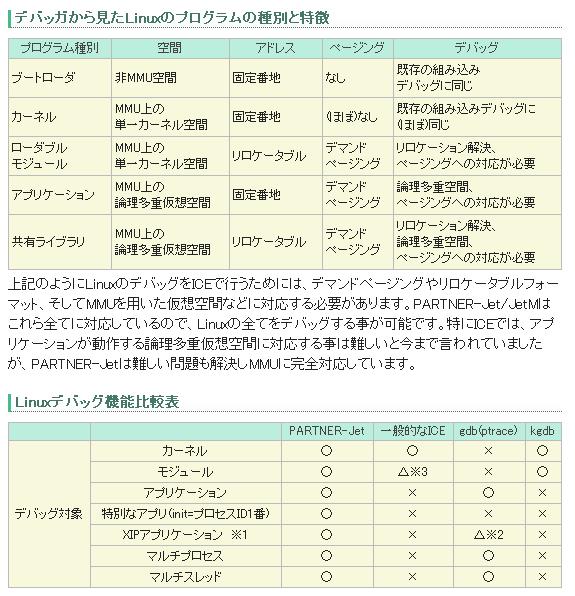
設定方法は,SCIMを起動して右から2番目の[コマンドメニューを表示]をクリックし,更に[SCIMを設定]をクリックします。すると[SCIM入力メソッド設定]が起動するので,左の[Anthy]タブを開きます。[キーバインド]タブの[キーバインドテーマ]をお好みのものにし,さらに[ローマ字入力]タブを開いて[ローマ字テーブル]も変更します。
munakata@muna-E420:~$ lsmod
Module                  Size  Used by
parport_pc             36959  0
ppdev                  17113  0
binfmt_misc            17565  1
    ↓            ↓   ↓
munakata@muna-E420:~$ sudo lshw -C network
[sudo] password for munakata:
  *-network
       description: Ethernet interface
       product: RTL8111/8168B PCI Express Gigabit Ethernet controller
       vendor: Realtek Semiconductor Co., Ltd.
       physical id: 0
       bus info: pci@0000:02:00.0
       logical name: eth0
       version: 06
       serial: f0:de:f1:65:e5:0a
       size: 1Gbit/s
       capacity: 1Gbit/s
       width: 64 bits
       clock: 33MHz
       capabilities: pm msi pciexpress msix vpd bus_master cap_list ethernet physical tp mii 10bt 10bt-fd 100bt 100bt-fd 1000bt 1000bt-fd autonegotiation
       configuration: autonegotiation=on broadcast=yes driver=r8169 driverversion=2.3LK-NAPI duplex=full ip=192.168.1.60 latency=0 link=yes multicast=yes port=MII speed=1Gbit/s
       resources: irq:40 ioport:5000(size=256) memory:d0404000-d0404fff memory:d0400000-d0403fff
  *-network DISABLED
       description: Wireless interface
       product: RTL8188CE 802.11b/g/n WiFi Adapter
       vendor: Realtek Semiconductor Co., Ltd.
       physical id: 0
       bus info: pci@0000:08:00.0
       logical name: wlan0
       version: 01
       serial: ec:55:f9:c4:3d:ae
       width: 64 bits
       clock: 33MHz
            ↓
munakata@muna-E420:~$ rfkill list
0: hci0: Bluetooth
	Soft blocked: no
	Hard blocked: no
1: tpacpi_bluetooth_sw: Bluetooth
	Soft blocked: no
	Hard blocked: no
2: phy0: Wireless LAN
	Soft blocked: yes
	Hard blocked: no
3: acer-wireless: Wireless LAN
	Soft blocked: yes
	Hard blocked: no
munakata@muna-E420:~$ sudo rmmod -f acer-wmi
munakata@muna-E420:~$ rfkill unblock all
/dev/sdc1 /mnt ext3 defaults 1 2
192.168.1.1:/exports/www /exports/www nfs rsize=8192,wsize=8192,hard,intr 0 0
| オプション | 意味 |
| async | ファイルシステムへの I/O が非同期で行われます。 |
| atime | アクセス毎に inode のアクセスタイムをアップデートします。 |
| auto | mount コマンドの -a オプションでマウントされるようにします。 |
| codepage | 文字コードの指定 |
| defaults | デフォルトのオプション(rw, suid, dev, exec, auto, nouser, async)を有効にします。 |
| dev | ファイルシステム上のデバイスを利用できるようにします。 |
| exec | バイナリの実行を許可します。 |
| gid | マウントするグロープIDを指定 |
| iocharset | マウントするシステムの文字コード |
| noatime | アクセス毎にinodeのアクセスタイムをアップデートしません。 |
| noauto | コマンドで明示的にmountコマンドを実行された場合にのみマウントされます。 |
| nodev | ファイルシステム上のデバイスを利用できないようにします。 |
| noexec | ファイルシステム上でのバイナリファイルの実行を無効にします。 |
| nosuid | SUID や SGID を無効にします。 |
| nouser | root以外マウントできないようにします。 |
| ro | リードオンリーでファイルシステムをマウントします。 |
| rw | 読み込み・書き込みができる状態でファイルシステムをマウントします。 |
| suid | SUID および SGID を有効にします。 |
| sync | ファイルシステムへのI/Oを同期で行います。 |
| user | 一般ユーザでもファイルシステムをマウントできるようにします。 |
| uid | マウントするユーザIDを指定 |
| 0 | dump不要 |
| 1 | dump必要 |
| 0 | チュック無し |
| 1 | / 専用でチェック有り |
| 2 | チェック有り |
find ./ -name "*.php"
munakata@muna-E420:~$ rfkill list
1: tpacpi_bluetooth_sw: Bluetooth
	Soft blocked: yes
	Hard blocked: no

munakata@muna-E420:~$ sudo rmmod -f acer-wmi

munakata@muna-E420:~$ rfkill unblock all
root@mythen:/home/server-admin# ls -la
ls: .gvfs にアクセスできません: 許可がありません
合計 300
drwxr-xr-x 36 server-admin server-admin  4096 2011-12-31 21:56 .
drwxr-xr-x  3 root         root          4096 2011-12-17 10:04 ..
-rw-------  1 server-admin server-admin  7636 2011-12-30 07:18 .ICEauthority
-rw-------  1 server-admin server-admin   103 2011-12-30 07:18 .Xauthority
drwx------  3 server-admin server-admin  4096 2011-12-11 21:44 .adobe
drwx------  3 server-admin server-admin  4096 2011-12-31 22:22 .anthy
(snip)
-rw-rw-r--  1 server-admin server-admin   369 2011-12-17 10:10 .gtk-bookmarks
d?????????  ? ?            ?                ?                ? .gvfs
drwxrwxr-x  4 server-admin server-admin  4096 2011-12-18 08:22 .icedtea
munakata@muna-E420:cat ../../.Xmodmap
! 全角半角キーもESCキーも両方 ESC にする
! keycode 9 = Zenkaku_Hankaku
! keycode 49 = Escape
keycode 9 = Escape
keycode 49 = Escape
munakata@muna-E420:xmodmap ~/.Xmodmap


![[heart]](image/face/heart.png)