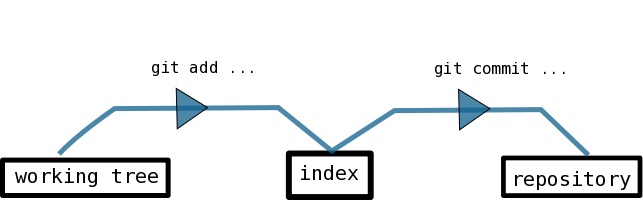
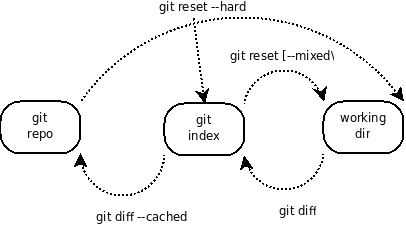
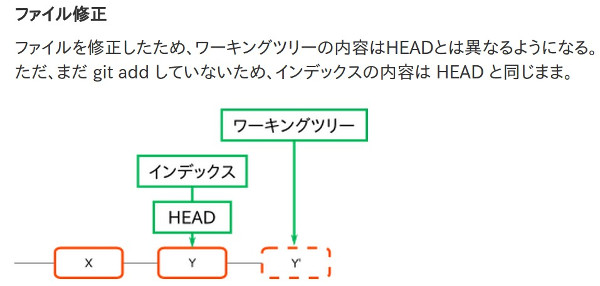
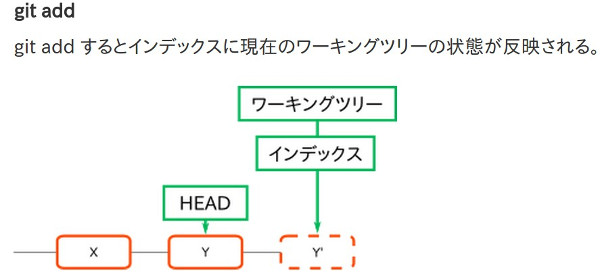
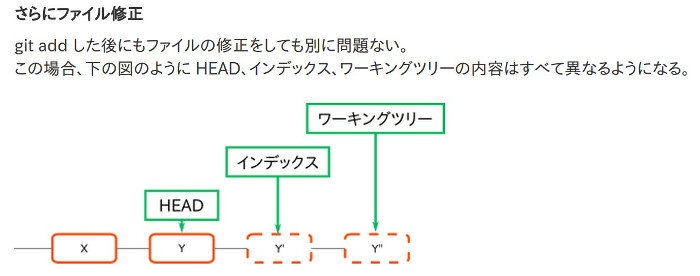
- 3段構成(repo - index - working_tree)
- index に git add で登録することを staging すると呼び
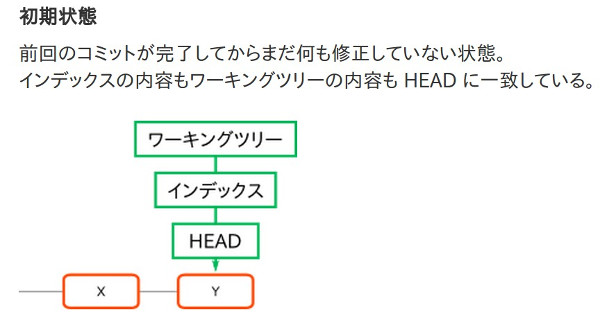
- working_tree の親になっている commit を HEAD と呼ぶ
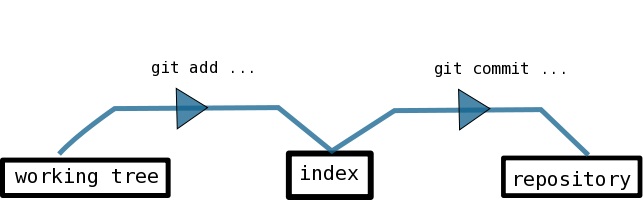
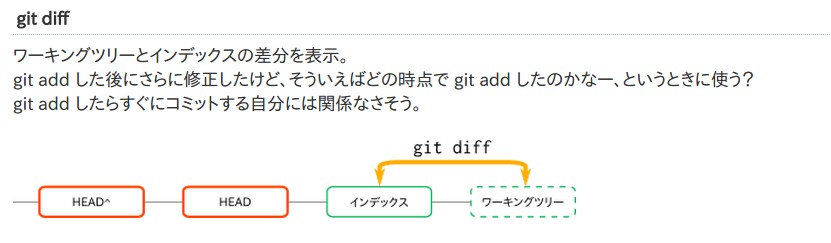
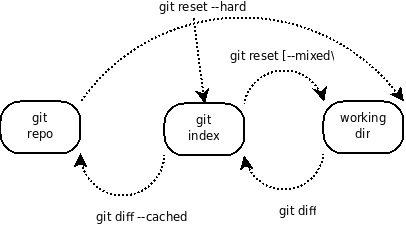
- git diff は通常は working_tree と index の差分
- シングルユーザー、 マルチユース
- ssh により多拠点リモートユース
- 複数のマシンで、別々の場所からから接続する
- gitweb を利用する
- 文書ファイル (tex など) の来歴管理を行なう
- サーバー設定情報の管理も行なう
- 基本的に ubuntu の標準に従う (ファイルの置き場所など)
- server account
- user = git
- pass = gituser
- home = /mnt/raid_vol/home/git
- shell = /usr/bin/git-shell (git 操作専用、通常ログインはできない)
- リモートリポジトリ = ssh://munakata@mythen.hmuna.com:8823/mnt/raid_vol/home/git/repos 下
- 公開鍵がサーバーに登録されている場合 = git clone ssh://MYTHEN/mnt/raid_vol/home/git/repos/(repo_name)
ローカルリポジトリの作成†
- git init
- git add
- git commit -am "comments"
リモートリポジトリの作成†
ローカルの内容をリモートに反映†
- git remote add [local_repo 名 (origin)] ssh://munakata@mythen.hmuna.com:8823/mnt/raid_vol/home/git/repos/REPO_NAME
- git push [local_repo 名 (origin)] master
ローカルに git を導入†
- 共通環境の設定
munakata@muna-E420:~/beamer/keio2012$ git config --global user.email public_mail@hmuna.com
munakata@muna-E420:~/beamer/keio2012$ git config --global user.name "hisao munakata"
- git local repo の設定と、変更のローカルコミット
munakata@muna-E420:~/beamer/keio2012$ git init
Reinitialized existing Git repository in /home/munakata/beamer/keio2012/.git/

munakata@muna-E420:~/beamer/keio2012$ git add *
ローカルとリモートの repo の関係付け (一回だけ)†
munakata@muna-E420:~/beamer/keio2012$ git remote add origin ssh://munakata@mythen.hmuna.com:8823/mnt/raid_vol/home/git/repos/XXX
ローカルブランチ (=master) のトラッキング先を明示的に指定†
- 通常は git clone した時点で origin/master としてトラッキング先リポジトリーが設定されるが
- git pull した時にトラッキング先のブランチが指定されていない... と表示された場合には、以下で再設定できる
- コンソールで git clone したコードを vscode 上の git view 経由で操作した場合にこの問題が発生した
git branch --set-upstream-to=origin/master master
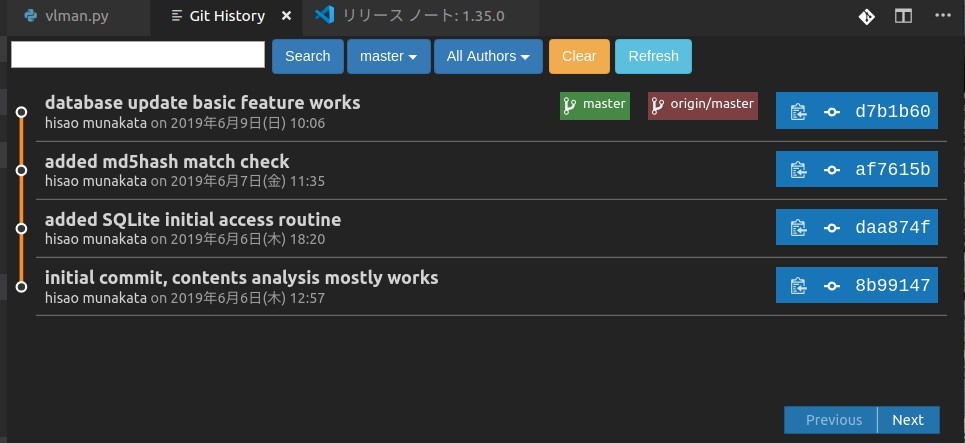
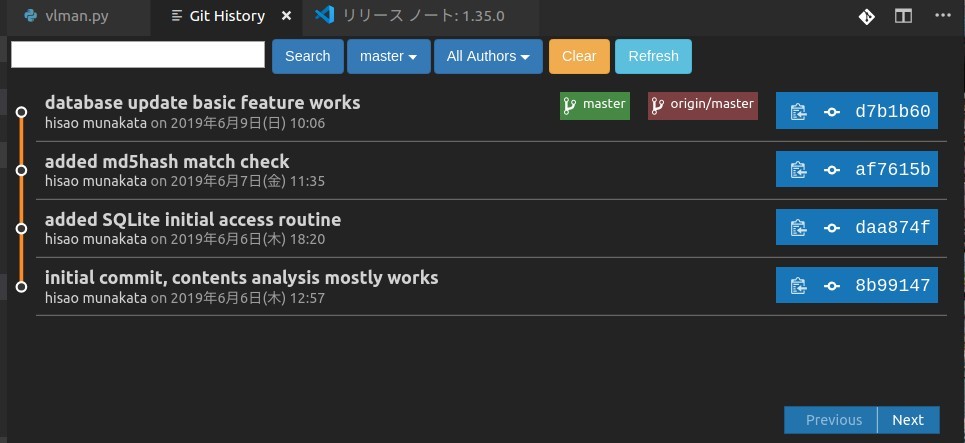
- 以下のように [master] と [origin/master] が並んでいる状態ならトラッキング情報が正しく設定されている
インデックス、 ワーキングツリー、 HEAD の関係の変化†
git add -p†
- -p を付けると変更箇所ごとに commit の対象にするか確認してくれる。
- 沢山の変更をした時に、論理的に関連のないものを別の commit にする(← 非常に重要)のを助ける
git commit†
- 一行目に変更の概略 → パッチを送る時のメールタイトルになる。
- 二行目は空行
- 三行目以降に詳細な説明を書く
git commit <path>†
- git commit に引数でファイル名を渡すと、明示的に指定されたファイルだけがcommit 対象になる
git rebase -i で過去数回分のコミットをまとめる†
- git rebase -i HEAD~~~~ (~ の数のコミットをまとめる)
- git rebase -i HEAD~4
pick 29e1651 evaluate model updated, still in struggle
pick 35d15a4 temporaly save (no major change)
pick 356c295 removed unused view (preffered flag)
pick b81062d removed build-in command (vman_entry.py)

# Rebase ca395bd..b81062d onto ca395bd (4 commands)
#
# Commands:
# p, pick = use commit
# r, reword = use commit, but edit the commit message
# e, edit = use commit, but stop for amending
# s, squash = use commit, but meld into previous commit
# f, fixup = like "squash", but discard this commit's log message
# x, exec = run command (the rest of the line) using shell
# d, drop = remove commit
#
pick を s (squash) に書き換えるとコミットが前のコミットにマージされる
git diff と git diff HEAD と git diff --cached の違い†
- git diff は working_tree と index の差 (git add 後に加えた差分が表示される)
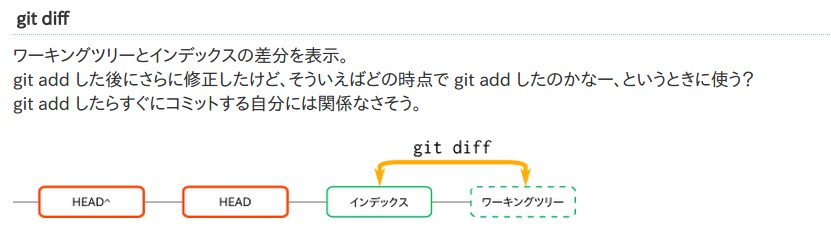
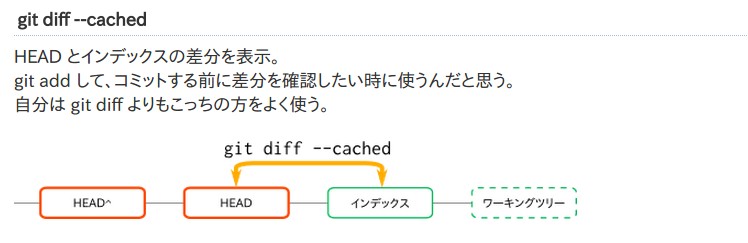
- git diff --cached は index と 最新の commit の差
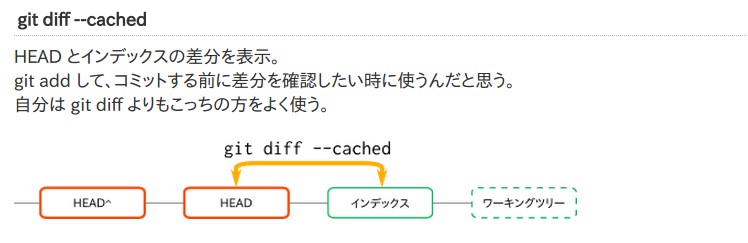
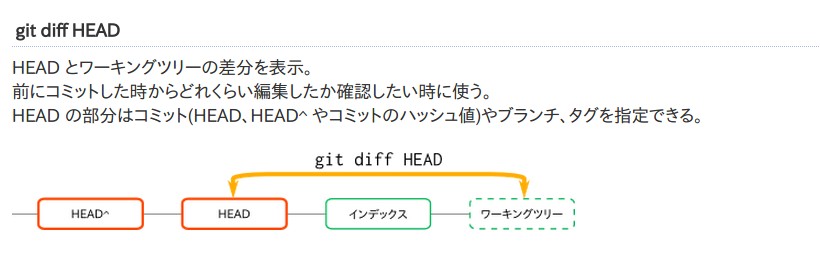
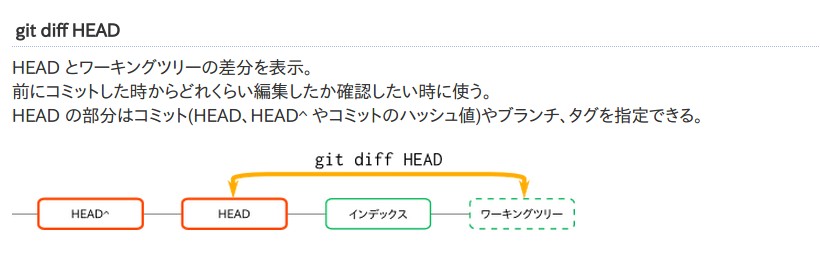
- git diff HEAD は working_tree と 最新の commit との差 (git add したが commit していないものが含まれる)
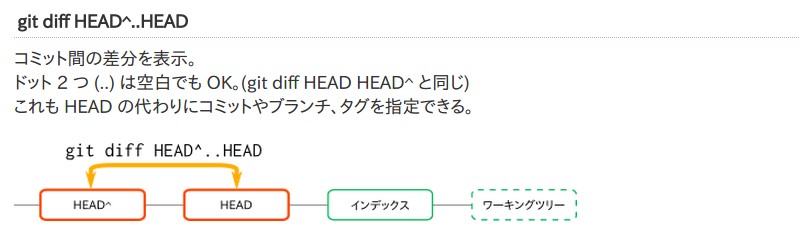
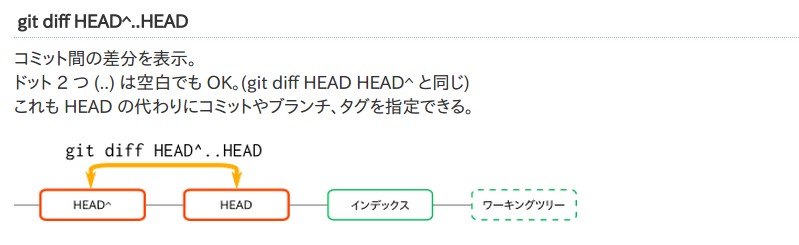
- git diff HEAD~..HEAD は複数のコミット間の差
git reset†
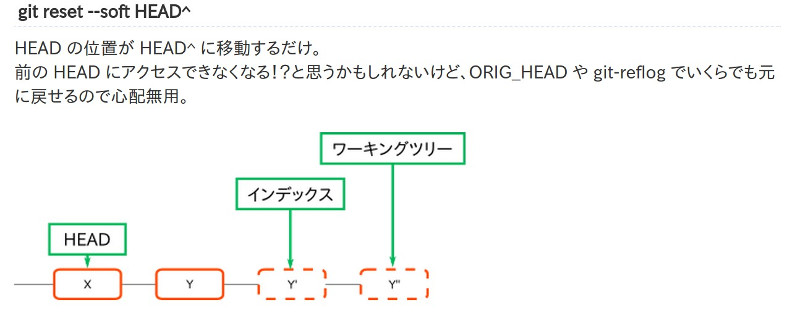
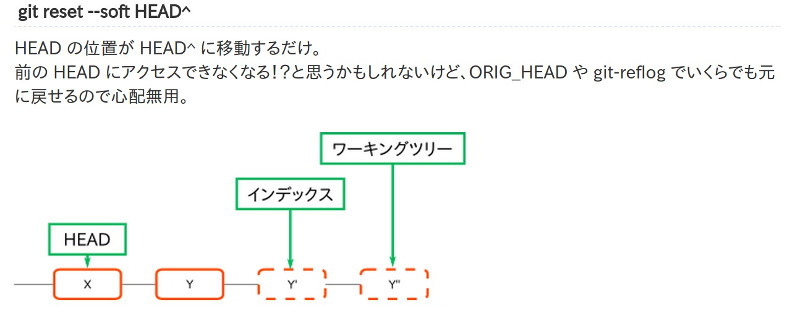
- HEAD の位置を変更するコマンド。
- オプション (影響度の小さい順に --soft、--mixed(オプションなしと同等)、--hard) によってインデックス、ワーキングツリーの内容も変更できる。
- soft = HEAD の位置のみを変更する。インデックス、ワーキングツリーには影響なし。
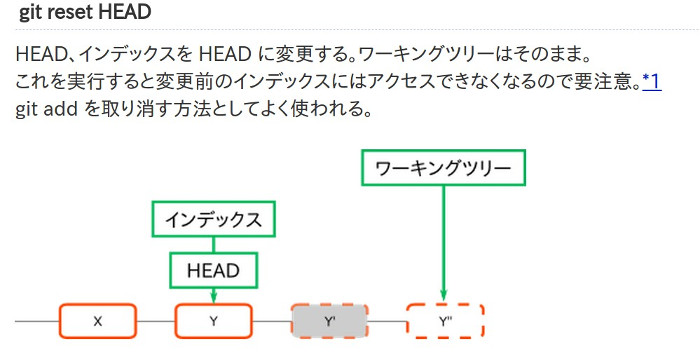
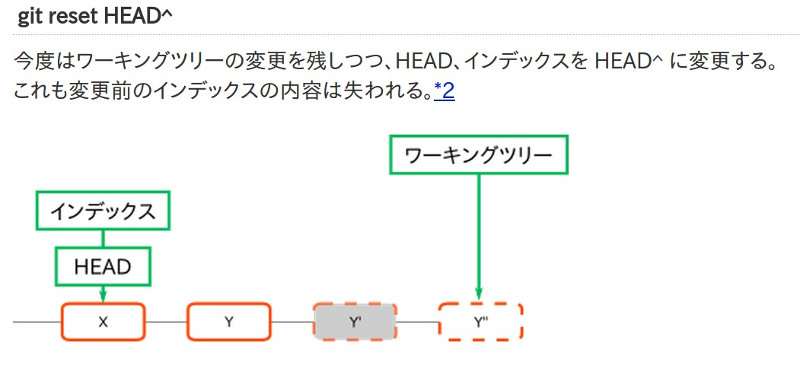
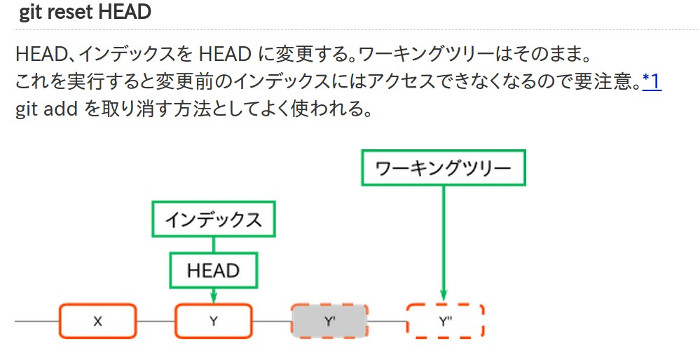
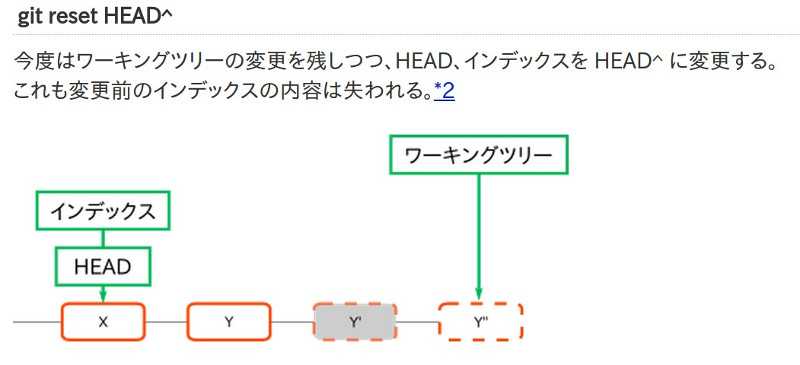
- mixed (またはオプションなし) = HEAD の位置とインデックスを変更する。ワーキングツリーには影響なし。
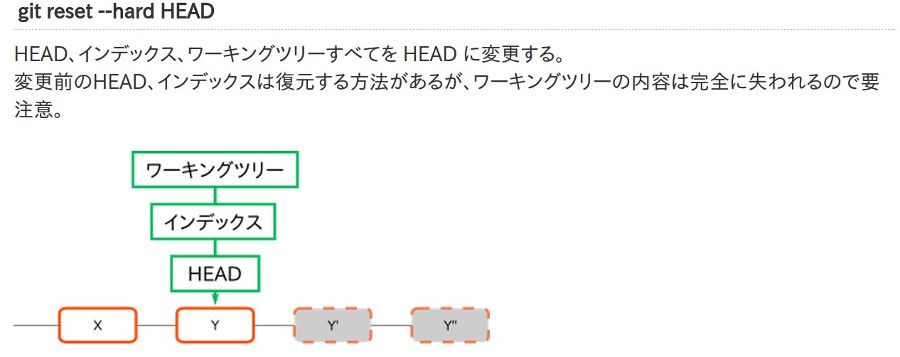
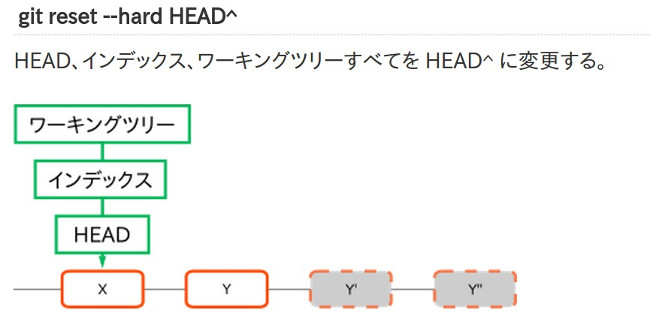
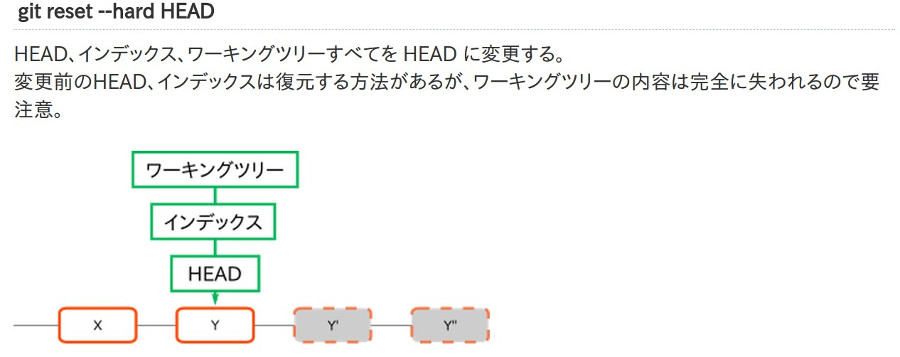
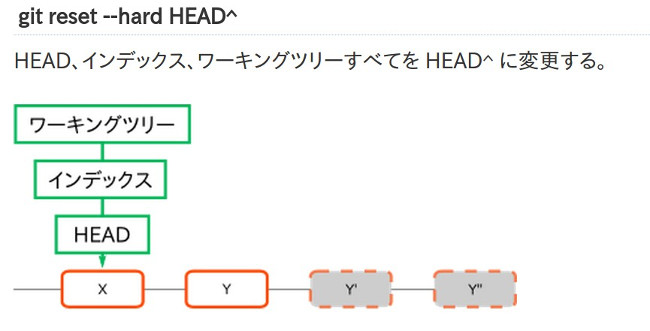
- hard = HEADの位置、インデックス、ワーキングツリーをすべて変更する。
- git reset --soft HEAD^
- git reset HEAD
- git reset HEAD^
- git reset --hard
- git reset --hard HEAD^
- git reset --hard HEAD(HEAD^ ではなく) は 最新の commit(=HEAD)以降のすべての working_tree の変更を取り消す
ローカルの master を、強制的にリモートの master に合わせる†
// 1) リモートの最新を取ってきておいて・・
$ git fetch origin master

// 2) ローカルのmasterを、リモート追跡のmasterに強制的に合わせる!
$ git reset --hard origin/master
git commit --amend : 直前のコミットのやり直し†
- 以下の操作と等価 (一行で完結する)
- git reset HEAD^
- ファイルの再編集
- git add (file)
- git commit -a -m "新しいコミットメッセージ"
- コミットメッセージの書き換えだけにも利用できる
git reset <path>†
- git reset にファイル名を指定すると、明示的に指定されたファイルだけが
git revert†
- git revert は 過去のコミットを取り消す
git fetch†
- git pull = git fetch + git merge
- fetch はローカルマシン上のオリジン情報(= origin/master) を更新する。が、ソースは変更しない
git log†
- git log --pretty=oneline : 一行で表示オプション 出力される内容
- git log --pretty=format: (option) で色々な表示にできる
git log --pretty=format:"%h - %an, %ar : %s"
ca82a6d - Scott Chacon, 11 months ago : changed the version number
085bb3b - Scott Chacon, 11 months ago : removed unnecessary test code
a11bef0 - Scott Chacon, 11 months ago : first commit
- format の書き方
| %H | コミットのハッシュ |
| %h | コミットのハッシュ (短縮版) |
| %T | ツリーのハッシュ |
| %t | ツリーのハッシュ (短縮版) |
| %P | 親のハッシュ |
| %p | 親のハッシュ (短縮版) |
| %an | Author の名前 |
| %ae | Author のメールアドレス |
| %ad | Author の日付 (--date= オプションに従った形式) |
| %ar | Author の相対日付 |
| %cn | Committer の名前 |
| %ce | Committer のメールアドレス |
| %cd | Committer の日付 |
| %cr | Committer の相対日付 |
| %s | 件名 |
git push ローカル上の変更をリモートに反映†
munakata@muna-E420:~/beamer/keio2012$ git push e420 master
munakata@mythen.hmuna.com's password:
Counting objects: 5, done.
Delta compression using up to 4 threads.
Compressing objects: 100% (3/3), done.
Writing objects: 100% (3/3), 337 bytes, done.
Total 3 (delta 2), reused 0 (delta 0)
To ssh://munakata@mythen.hmuna.com:8823/mnt/raid_vol/home/munakata/repos/keio2012
   462fe87..7a936a0  master -> master
既にあるブランチへの切り替え†
git ブランチを作成して、そのブランチに移動†
これは以下の2つをまとめて実行したことになる
- git branch ブランチ名
- git checkout ブランチ名
git ブランチをプッシュ†
- git push origin [branch 名]
git ブランチの削除†
git の管理対象から外す†
- .git と同じディレクトリーに .gitignore というファイルを作成し追跡させないファイルの 拡張子やディレクトリを列挙する。
- git はリカーシブに検索するのでファイル拡張子を指定する場合にディレクトリー名を指定する必要はない
- 注意:一度 git の追跡対象となったファイルは .gitignore に定義しても管理対象外にならない。 次項のキャッシュの削除が必要
git の管理対象から外す2(.gitignore に追加登録する場合には必須)†
- 特定のファイルを対象外にする場合
git rm --cached [ファイル名]
- 一括してキャッシュを削除する場合
git rm -r --cached .
git gc†
- レポジトリの最適化(未使用オブジェクトの削除、圧縮)
過去のリビジョンからファイルを復元 (abc123リビジョンにあるhoge.txtを持ってきたいとする)†
git checkout -f abc123 hoge.txt
- git tag -a <タグ名> -m "メッセージ"
- git push --tags
- git checkout -b 1.6 refs/tags/v1.6 (tag を指定してブランチにチェックアウト)
- git tag -d TAG_NAME (まずローカルのタグを削除)
- git push origin :refs/tags/TAG_NAME (リモートのタグを空のタグで上書きする形で削除)
git diff†
- git diff --word-diff=color
- 単語ベースのdiff
- 行の中の一部だけが変更されてるのをみたりするのに便利
- color を指定すると色の変化でdiffがわかって良い
- git diff --ignore-space-at-eol
- 末尾空白の変更を無視する
- なんかのついでに末尾スペース削りまくってるみたいな変更に対して便利
- git diff -b
- 空白の変更を無視する
- このへん多分インデントかわっただけだよね.. て心配なときに確認するのに便利
git send-email†
- apt-get install git-email
- git format-patch HEAD^ (file_name)
- git send-email (file_name)
- HTTP は基本的に読み込み専用のリポジトリーに使う。 以下の方法は ssh 接続では使えない
- git config --global credential.helper store
- cloneが終わると、$HOME/.git-credentialsというファイルが生成される。
- 中身はリポジトリホスト名とユーザ名・パスワードが平文で保存されている。
- git config --global credential.helper cache
- クライントで ssh-keygen を実行、パスフレーズは無しで生成する。
− サーバーの ~/.ssh に
cat (クライアントの公開鍵)>> ~/.ssh/authorized_keys
chmod 600 ~/.ssh/authorized_keys
- クライアントの ~/.ssh/config に
munakata@muna-E420:~/latex$ cat ~/.ssh/config
Host MYTHEN
	HostName		mythen.hmuna.com
	Port			8823
	IdentityFile	        ~/.ssh/muna_E420 (公開鍵)
	User			munakata
- クライアントのシェルに鍵を登録
$ ssh-agent bash
$ ssh-add ~/.ssh/(秘密鍵)
注:gitサーバーの .ssh のディレクトリーのパーミションが 700 でないと、git push 時に git ユーザーのパスワードを聞かれる(が、git アカウントには対話ログインを許可していないので正しいパスワードを入れても push できない。)
munakata@mythen:~/My_presentations/als2013JP$ git config -l
color.ui=auto
user.name=hisao munakata
user.email=public_mail@hmuna.com
core.quotepath=false
core.repositoryformatversion=0
core.filemode=true
core.bare=false
core.logallrefupdates=true
remote.origin.fetch=+refs/heads/*:refs/remotes/origin/*
remote.origin.url=ssh://munakata@mythen.hmuna.com:8823/mnt/raid_vol/home/munakata/repos/als2013JP
branch.master.remote=origin
branch.master.merge=refs/heads/master
remote.mythen.url=ssh://munakata@mythen.hmuna.com:8823/mnt/raid_vol/home/munakata/repos/als2013JP
remote.mythen.fetch=+refs/heads/*:refs/remotes/mythen/*
![[PukiWiki]](image/taikyoku.gif "[PukiWiki]")