![[PukiWiki]](image/taikyoku.gif "[PukiWiki]")
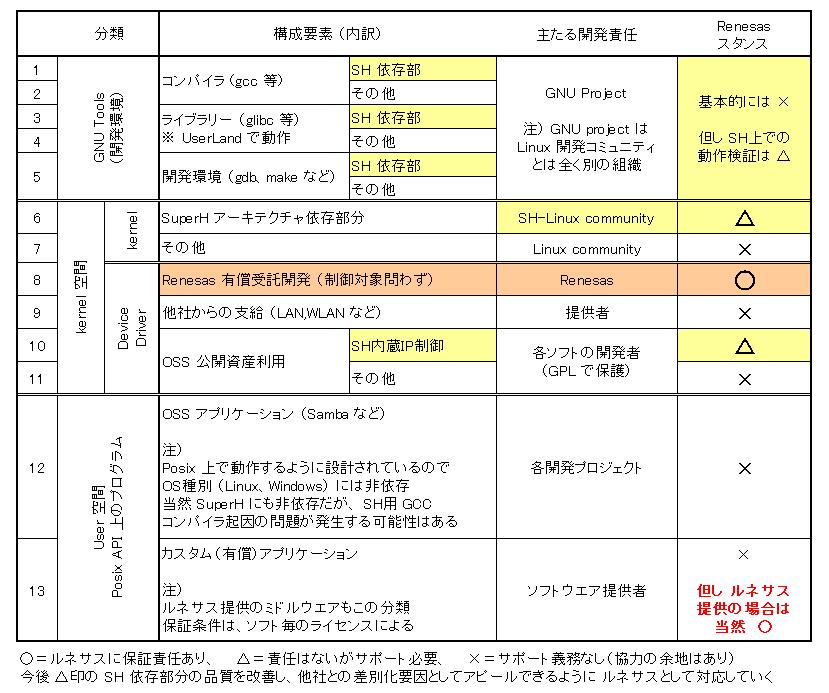
一般的には [Community] の成果を [Code maintainor] が認証したものを
[Distributor] が再配布して [Integrator] が顧客サポートする.... という基本構造があり
[ 各種標準化団体 ]は[Community]の活動の方向付けをしています。
お客さんは (例外的に master code から直接ネタをもってくることもあるでしょうが)
一般には [Distributor] からLinux のコードを導入し、[Integrator] の有償サポートを
期待しているのですが、このためには 一般には [Code maintainor] に必要なものがサポートされている必要があります。
例外的に [Distributor] が先行して特定の機能、CPUをサポートすることはありえますが、
最終的に [Master code]まで還流していかないと 亜流となり 以降の Linux には含まれないことになります。
 Linux システムソフトウエア構成要素と責任分担構造図†
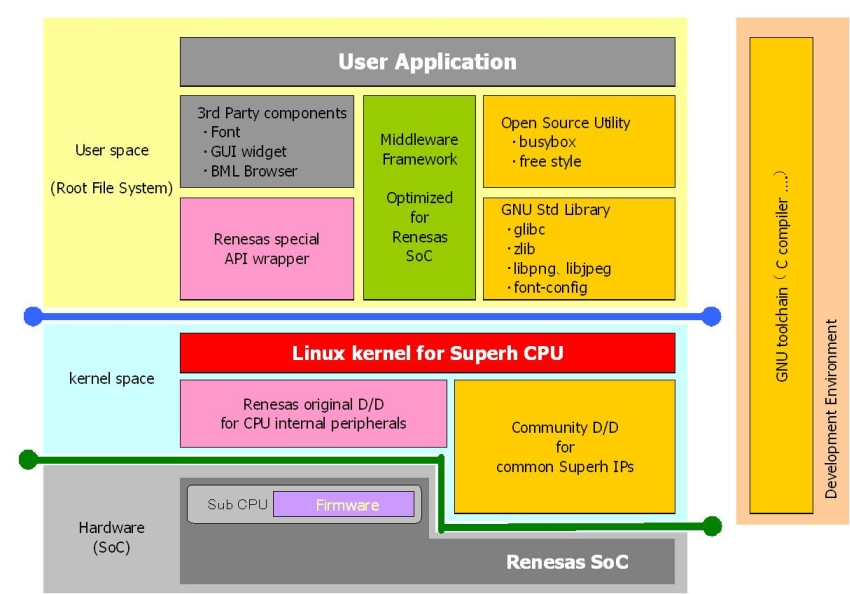
 Linux システムソフトウエア構成図†
 Linux プラットフォーム開発分担 [PDF]†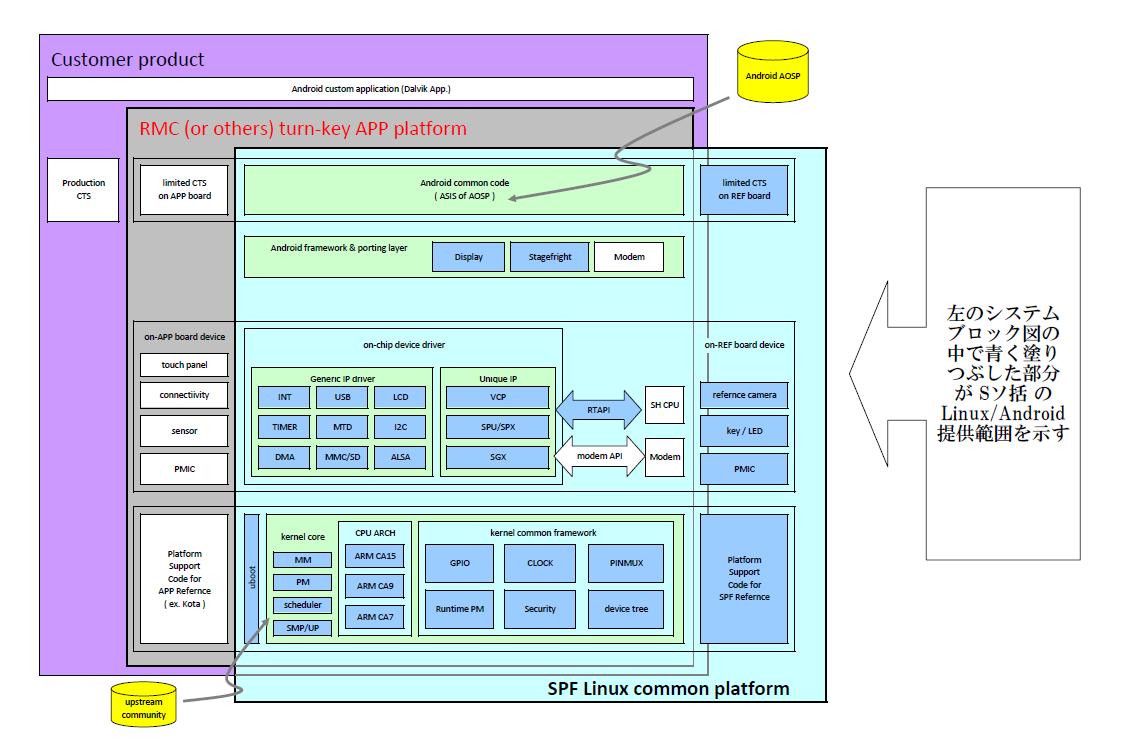
RTE では 3rd パーティである MPC Data を通して顧客向けの Linux サポートに対応している。
MPC data は Web上に SH Linux Support site を運用して、(主として)RTE が開発したプラットフォーム用の Linux コードを公開している。
The DirectFB example suites include benchmark 'df_dok'. We have ran this benchmark on the following platform:
| Platform | CPU | clock | I/F | SYSTEM RAM | Graphics Card | Kernel Version |
| A | Renesas SH-4 | 240MHz | CPU | 64MB | SMI SM501 | 2.4.19 |
| B | Renesas SH-4 | 240MHz | PCI | 64MB | Matrox Millenium | 2.4.19 |
| C | Intel Celeron | 450MHz | PCI | 128MB | Matrox Mystique | 2.4.20 |
| D | Intel Celeron | 450MHz | PCI | 128MB | Matrox Millenium | 2.4.20 |
| E | Intel Pentium4 | 2.4GHz | AGP | 1GB | Matrox G450 | 2.4.20 |
| Benchmarks | Platform | ||||
| A | B | C | D | E | |
| Anti-aliased Text [KChars/sec] | N/A | 20.40 | 24.83 | 23.96 | 750.00 |
| Anti-aliased Text (blend) [KChars/sec] | N/A | 6.12 | 16.52 | 16.66 | 752.85 |
| Fill Rectangles [MPixel/sec] | N/A | 63.63 | 116.37 | 53.25 | 849.22 |
| Fill Rectangles (blend) [MPixel/sec] | N/A | 1.20 | 3.18 | 3.26 | 225.84 |
| Fill Triangles [MPixel/sec] | N/A | 62.26 | 108.79 | 50.51 | 730.24 |
| Fill Triangles (blend) [MPixel/sec] | N/A | 1.17 | 3.13 | 3.17 | 218.24 |
| Draw Rectangles [KRects/sec] | N/A | 10.67 | 12.95 | 8.57 | 36.27 |
| Draw Rectangles (blend) [KRects/sec] | N/A | 0.43 | 0.83 | 0.84 | 17.09 |
| Draw Lines [KLines/sec] | N/A | 61.33 | 62.60 | 48.84 | 162.40 |
| Draw Lines (blend) [KLines/sec] | N/A | 1.94 | 3.69 | 3.70 | 80.04 |
| Blit [MPixel/sec] | N/A | 38.68 | 53.75 | 32.56 | 398.84 |
| Blit colorkeyed [MPixel/sec] | N/A | 39.19 | 58.69 | 32.54 | 421.97 |
| Blit with format conversion [MPixel/sec] | N/A | 3.59 | 18.11 | 17.79 | 193.26 |
| Blit from 32bit (alphachannel blend) [MPixel/sec] | N/A | 0.82 | 2.71 | 2.71 | 158.10 |
| Blit from 8bit palette [MPixel/sec] | N/A | 3.20 | 17.40 | 17.38 | 95.17 |
| Blit from 8bit palette (alphachannel blend) [MPixel/sec] | N/A | 0.81 | 2.67 | 2.71 | 5.53 |
| Stretch Blit [MPixel/sec] | N/A | 7.06 | 46.69 | 47.61 | 220.77 |
| Stretch Blit colorkeyed [MPixel/sec] | N/A | 4.20 | 46.17 | 46.30 | 221.64 |
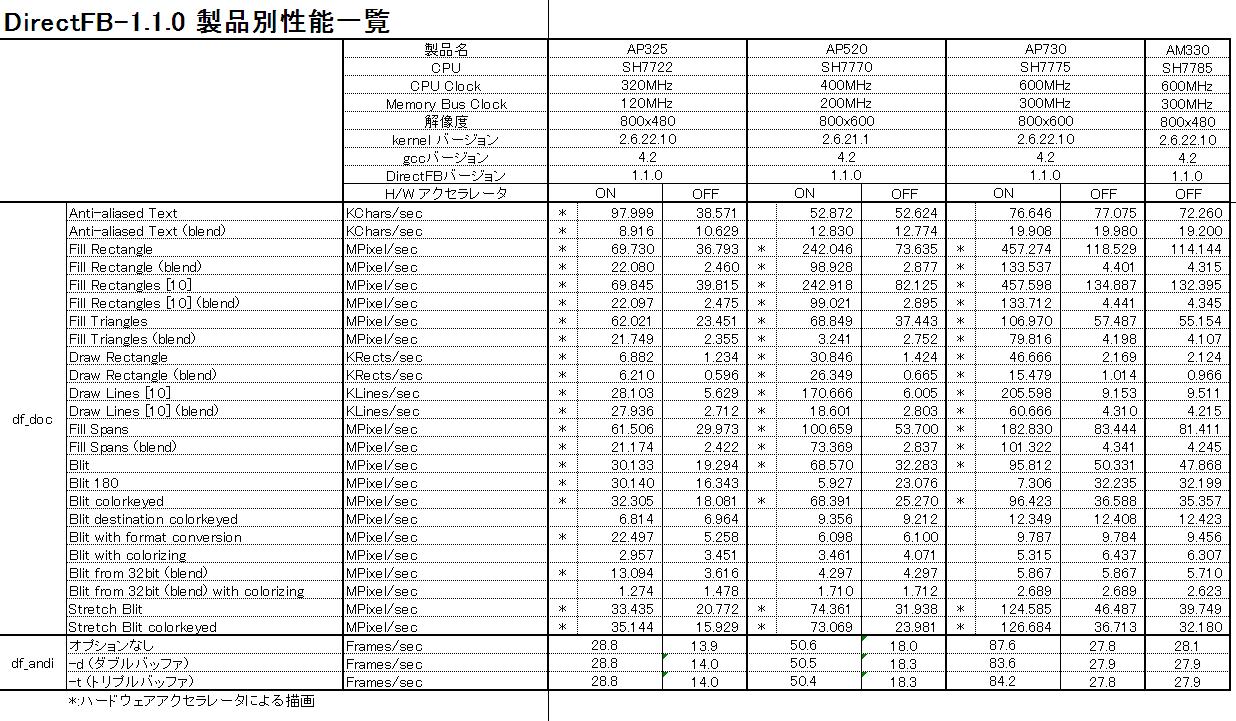 DirectFB性能比較20080118.xlsNew Version = Fedra3 ・・・・ 起動するzImage を名前で選択可能Old Version = Redhat
linear # You must appoint your CF mounting device name on following lines. # Default CF mounting device is /dev/hdc. boot = /dev/sda disk = /dev/sda bios = 0x80 # delay = 30 timeout=100 #vga = normal image = /boot/zImage-2.6.11.8 label = linux-2.6.11.8 root = /dev/hda1 read-only append="mem=64M console=ttySC0,115200" image = /boot/zImage-2.6.10 label = linux-2.6.10 root = /dev/hda1 read-only append="mem=64M console=ttySC0,115200" image = /boot/zImage-2.6.9 label = linux-2.6.9 root = /dev/hda1 read-only append="mem=64M console=ttySC0,115200"
      RTS7751R2D>b
        Disk_drive detected: ScanDisk SDCFB-128 HDX 2.15 012004K2904K5933
        Set Transfer Mode result: 50
        Initialize Device Parameters result: 50
        IDLE result: 50
        LILO boot:

           1 : linux-2.6.8.1
           2 : linux-2.6.7
           3 : linux-2.6.6

        Select boot image -> 1
        Loading linux-2.6.8.1 ..........................done.
合田さん 作成手順書(日本語)Kernel Network boot
Kernel configuration
[System type] - [Default bootloader kernel arguments (CMDLINE_BOOL)]
(CMDLINE):mem=64M console=ttySC0,115200 root=/dev/nfs
nfsroot=192.168.10.191:/tftpboot/rts7751r2d ip=192.168.10.200[Networking support] - [Network options] - [kernel level autoconfiguration (IP_PNP)]
[File systems] - [Network File Systems]
[root@power root]# service dhcpd restart
dhcpd を停止中:                                            [  OK  ]
dhcpd を起動中:                                            [  OK  ]
	host RTS7751R2D {
		hardware ethernet 00:00:87:6B:60:44;
		fixed-address 192.168.10.200;
		filename "/tftpboot/rts7751r2d/boot/zImage-2.6.8.1";
		option root-path "/tftpboot/rts7751r2d";
	}
上記の例では、MAC Address 00:00:87:6B:60:44 に対して、IP Address 192.168.10.200 を割り当て、boot するカーネルは、 /tftpboot/rts7751r2d/boot/zImage-2.6.8.1 を指定する。また、Root filesystem として、 /tftpboot/rts7751r2d を指定する。
(例) #mkidr arch/sh/initram
#tar zxvf rootfs.tgz -C arch/sh/initram
 #cd arch/sh/initram
 #ln -s bin/busybox init
CONFIG_INITRAMFS_SOURCE="arch/sh/initram"
CONFIG_INITRAMFS_ROOT_UID=0
CONFIG_INITRAMFS_ROOT_GID=0
CONFIG_CMDLINE="mem=128M console=ttySC0,115200 root=/dev/ram0
date コマンドを使ってシステム時刻を変更する方法 (フォーマットに注意)
# date 041211402004
Mon Apr 12 11:40:00 UTC 2004
hwclock コマンドでRTC の時刻をシステム時刻にあわせる
# hwclock
Tue Apr 12 09:19:04 2016  -0.028194 seconds

# hwclock --systohc

# hwclock
Mon Apr 12 11:41:45 2004  -0.069402 seconds
再起動するとシステム時間がRTCから正しく読み込まれる
# halt

Reboot してから

# date
Mon Apr 12 11:49:38 UTC 2004
| 場所・名前 | 目的 | ダウンロード |
| /etc/sysconfig/network-scripts/ifcfg-eth0 | eth0の設定ファイル | '&ref(ifcfg-eth0)' |
| /etc/sysconfig/network-scripts/ifcfg-eth1 | eth1の設定ファイル | |
| /etc/sysconfig/network | networkの設定ファイル | |
| /etc/dhcpd.conf | DHCPサーバの設定ファイル | |
| /etc/rc.d/init.d/S20network | ネットワーク起動のスクリプトファイル | '&ref(S20network)' |
| /etc/rc.d/init.d/S40dhcpd | DHCPサーバ起動のスクリプトファイル | '&ref(S40dhcpd)' |
eth1側に接続したパソコンがIPアドレスを取得することができます。
上記の機能を有効にするためにカーネルのコンフィグレーションで以下の項目を指定してください。
 [Networking option]
 [Socket Filtering]
   [IP:Kernel level autoconfiguration]
    [IP:DHCP support]
DEVICE=eth0
BOOTPROTO=static
BROADCAST=192.168.10.255
IPADDR=192.168.10.200
NETMASK=24
NETWORK=192.168.10.0
GATEWAY=192.168.10.5
ONBOOT=yes
 bios = 0x80
#
# Network configuration file
#
#
# NETWORKING    : yes, no(yes is require)
# HOSTNAME      : localhost
# NISDOMAIN     : NIS domain name. "nisdomain" (none: "NISDOMAIN=")
# GATEWAYDEV    : eth0, eth1, ... (none:"GATEWAYDEV=")
# GATEWAY       : router address. (none:"GATEWAY=" )
#

NETWORKING=yes
FORWARD_IPV4=yes
HOSTNAME=sh7751rvoip
#NISDOMAIN=
#GATEWAYDEV=eth0
GATEWAY=192.168.10.5
server-identifier    192.168.10.200;

shared-network DHCP-NET {
    subnet 192.168.10.0 netmask 255.255.255.0 {
        range 192.168.10.197 192.168.10.199;
        default-lease-time -1;
    }
}
Kernel-2.6.x における、MMU のコンフィグレーションでSH-2 以外 (SH-3 or SH-4) の時、指定可能です。
SH-3 or SH-4 指定時、デフォルトでは、"y" になります。ヘルプとして下記の記述があります。
>    Early SH processors (such as the SH7604) lack an MMU. In order to~
>    boot on these systems, this option must not be set.
>
>    On other systems (such as the SH-3 and 4) where an MMU exists,~
>    turning this off will boot the kernel on these machines with the~
>    MMU implicitly switched off.
従って、SH-3, SH-4 の時に、MMU の有効/無効が指定出来ますが、MMU を無効にした時の動作は検証していません。
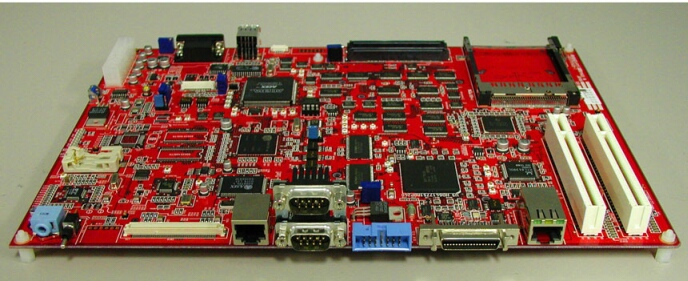
RTS7751R2D_HW.docRTS7751R2D-e.pdfBSP_list_detail_RTS7751R2D_BE.pdfR2D_hw_manual_00_jl.pdfR2D_hw_manual_00_e.pdfrej10j1322_r0p751rlc0011rl.pdfR0P751RLC0011RL-MAIN_SCH.pdfR0P751RLC0011RL-FROM_SCH.pdf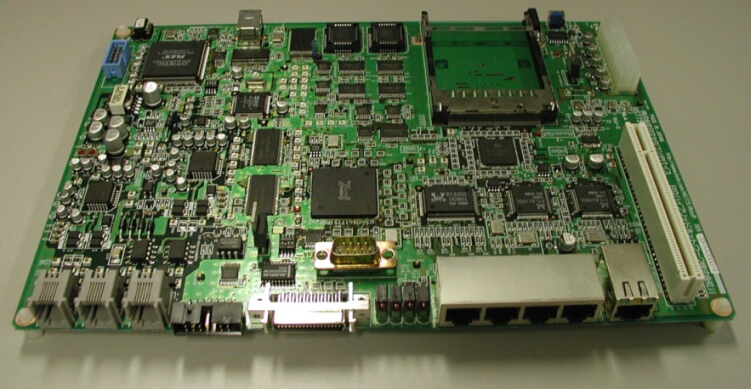
| eth0 | 192.168.10.200 |
| eth1 | 192.168.20.200 |
| S64 Firewall のセキュリティポリシー |
| ルータからインターネットへの接続はすべて許可 |
| LANからルータへの接続を許可 |
| インターネットからの接続要求のうち、コネクションが確立済みのTCPで短命ポート宛(1024以上)を許可 |
| LANからの接続要求をIPマスカレード |
| DNSが利用するudpを許可 |
| これ以外の接続はすべて拒否 |
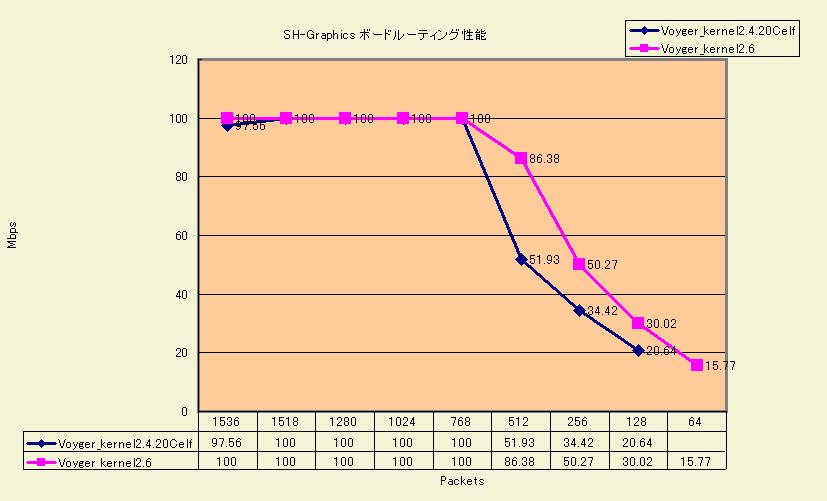
Gigabit LAN での限界ベンチマークデータ ⇒ gigabit_benchmark.xls
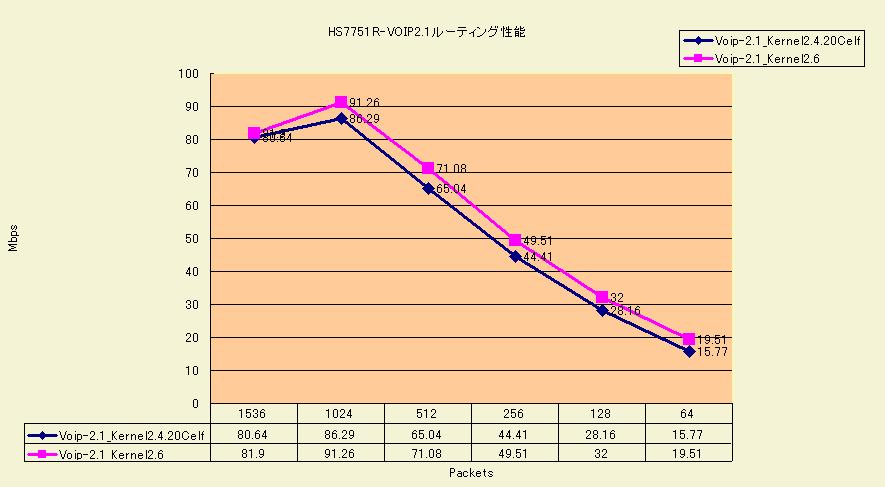
Intel IXP-425 との性能比較データ ⇒ SH7751RvsIXP425.xls
IPアドレス : 192.168.0.1
ユーザ名  : admin
パスワード : なし
「ping 192.168.0.xxx」(xxxは、調べた値)
(正引きレコードの設定)
「ping cyber_disk」
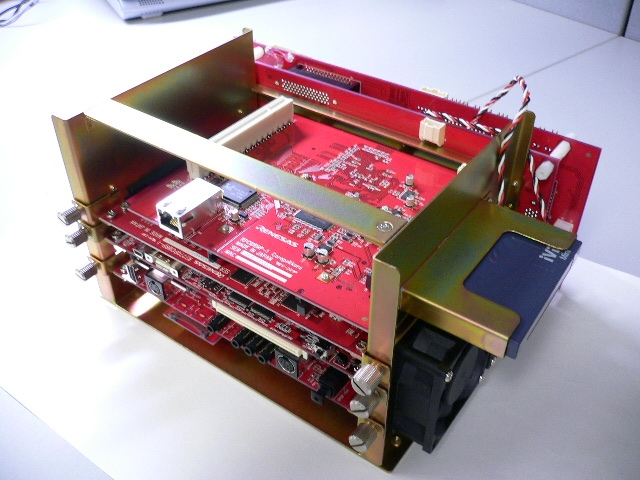
カーネル評価状況 7780 2005-6-3 時点ソフト視点 デバッグ問題点 7780 2005-6-3 時点Highlander コンセプト紹介プレゼン資料Kernel support 2.6.8-1 2005-8-14 時点BSP 2005-8-14 時点Hardware Manual (英文) 2005-10SetUp Manual (英文) 2005-10Hardware Connectivity (英文) 2005-10Highlander 7780 起動ログ(2.6.13+CABI)(シ研) Streaming 7780 ベンチマーク(シ研) Streaming 7751R ベンチマーク[比較用]2.6.14-4/GCC3.4.5 ベースパッケージリスト
http://www.movie-list.com/forum/archive/index.php/f-16.html
 # gzip -d libx264-shvpu.ffpreset.gz
 # cp libx264-shvpu.ffpreset /usr/share/ffmpeg/
$ ffmpeg -i _input_file_ -vcodec libx264 -vpre shvpu \
          (options) _output_file.mp4
このとき、(options)にビットレートやサイズを変更できます。ビットレート: -b 500000 (500 kbpsの場合、デフォルトは200kbps)サイズ: -s 640x480 (640x480の場合、デフォルトはinputと同じ)$ mplayer _output_file.mp4
$ mediainfo _output_file.mp4


![[heart]](image/face/heart.png)