![[PukiWiki]](image/taikyoku.gif "[PukiWiki]")
[local] munakata:~/source/python/vlman$ pip3 install django
[local] munakata:~/source/python/vlman$ python3 -m django --version
2.2.2
[local] munakata:~/source/python/vlman$ django-admin startproject vlmanui
[local] munakata:~/source/python/vlman/vlmanui$ django-admin startapp file_viewer
[local] munakata:~/source/python/vlman/vlmanui$ python3 manage.py createsuperuser
Username (leave blank to use 'munakata'):
Email address: magu775@gmail.com
Password:
Password (again):
Superuser created successfully.
LANGUAGE_CODE = 'ja'
TIME_ZONE = 'Asia/Tokyo'
[local] munakata:~/source/python/vlman$ tree
.
├── video_top
│   ├── sample_A.mp4
├── vlman.py
├── vlmandb.sqbpro
├── vlmandb.sqlite3
├── file_viewer  <--------- application definition
│   ├── __init__.py
│   ├── admin.py
│   ├── apps.py
│   ├── migrations
│   │   └── __init__.py
│   ├── models.py  <----------- database access definition
│   ├── tests.py
│   └── views.py <--------- look & feel definition
└── vlmanui <------------ total system settings
    ├── manage.py
    └── vlmanui
        ├── __init__.py
        ├── settings.py  <---------- application directory
        ├── urls.py  <------------ URL entry point definition
└── wsgi.py[local] munakata:~/source/python/vlman/vlmanui$ python3 manage.py runserver 8000
path('abc/', include('(プロジェクト名).urls', name = 'reverse serch name')
rpath(r'^abc*$', include('application name.urls'), name='reverse name')
[local] munakata:~/source/python/vlman/vlmanui$ python3 manage.py makemigrations
Migrations for 'fview':
  fview/migrations/0001_initial.py
    - Create model Filedir

[local] munakata:~/source/python/vlman/vlmanui$ python3 manage.py migrate
Operations to perform:
  Apply all migrations: admin, auth, contenttypes, fview, sessions
Running migrations:
  Applying contenttypes.0001_initial... OK
  Applying auth.0001_initial... OK
  Applying admin.0001_initial... OK
  Applying admin.0002_logentry_remove_auto_add... OK
  Applying admin.0003_logentry_add_action_flag_choices... OK
  Applying contenttypes.0002_remove_content_type_name... OK
  Applying auth.0002_alter_permission_name_max_length... OK
  Applying auth.0003_alter_user_email_max_length... OK
  Applying auth.0004_alter_user_username_opts... OK
  Applying auth.0005_alter_user_last_login_null... OK
  Applying auth.0006_require_contenttypes_0002... OK
  Applying auth.0007_alter_validators_add_error_messages... OK
  Applying auth.0008_alter_user_username_max_length... OK
  Applying auth.0009_alter_user_last_name_max_length... OK
  Applying auth.0010_alter_group_name_max_length... OK
  Applying auth.0011_update_proxy_permissions... OK
  Applying fview.0001_initial... OK
  Applying sessions.0001_initial... OK
(vman) munakata@muna-E450:~/code/python/vman/vmanhmi$ python manage.py shell
Python 3.6.8 (default, Jan 14 2019, 11:02:34)
[GCC 8.0.1 20180414 (experimental) [trunk revision 259383]] on linux
Type "help", "copyright", "credits" or "license" for more information.
(InteractiveConsole)
>>> from django.core.cache import cache
>>> cache.clear()
sqlite> select * from django_migrations;   <------- 該当アプリの変更履歴が記録されている
sqlite> delete from django_migrations where app='fview (=アプリ名)';
sqlite>.exit
(vman) munakata@muna-E450:~/code/python/vman/vmanhmi$ python manage.py makemigrations
(vman) munakata@muna-E450:~/code/python/vman/vmanhmi$ python manage.py migrate
(vman) munakata@muna-E450:~/code/python/vman/vmanhmi$ python manage.py makemigrations fview
(vman) munakata@muna-E450:~/code/python/vman/vmanhmi$ python manage.py migrate --fake fview zero
(vman) munakata@muna-E450:~/code/python/vman/vmanhmi$ python manage.py migrate fview
"python.linting.pylintArgs": [
     "--load-plugins=pylint_django"
],munakata@muna-E450:~/code/python/vman/vmanhmi$ python manage.py shell Python 3.6.8 (default, Jan 14 2019, 11:02:34) [GCC 8.0.1 20180414 (experimental) [trunk revision 259383]] on linux Type "help", "copyright", "credits" or "license" for more information. (InteractiveConsole) >>> from django.core.cache import cache >>> cache.clear()
munakata@muna-E450:~/code/python/vman/vmanhmi$ tree
(project root)
├── fview (application root)
│   (snip)
│   ├── static  <------ 各アプリの下に専用の css/js を配置する
│   │   └── fview
│   │       ├── css
│   │       │   ├── bootstrap.min.css
│   │       │   └── bootstrap.min.css.map
│   │       └── js
│   │           ├── bootstrap.bundle.min.js
│   │           ├── bootstrap.bundle.min.js.map
│   │           ├── jquery-3.4.1.min.js
│   │           └── jquery-3.4.1.min.map
pip3 install django-bootstrap4
munakata@muna-E450:~/code/python/vman/vmanhmi$ pip install django-bootstrap4
Collecting django-bootstrap4
  Downloading https://files.pythonhosted.org/packages/02/5a/485d61f6dafa4e4d001a7880b04f40f04fe485a54b2756b0536ed2052342/django-bootstrap4- 0.0.8.tar.gz
Building wheels for collected packages: django-bootstrap4
  Running setup.py bdist_wheel for django-bootstrap4 ... done
  Stored in directory: /home/munakata/.cache/pip/wheels/f6/58/7f/fcdbcc8c631cc8f775cb8b9349ded99aff7a3f5b28e0f40ef3
Successfully built django-bootstrap4
Installing collected packages: django-bootstrap4
Successfully installed django-bootstrap4-0.0.8
<script src="https://kit.fontawesome.com/f70a45d16f.js"></script>
munakata@muna-E450:~/code/python/vman/vmanhmi$ pip install pipenv
munakata@muna-E450:~/code/python/vman/vmanhmi$ pipenv install django-fontawesome-5
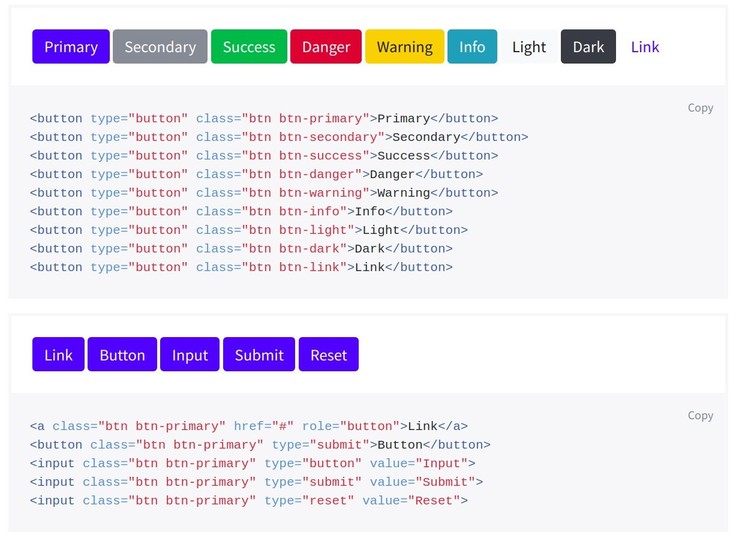
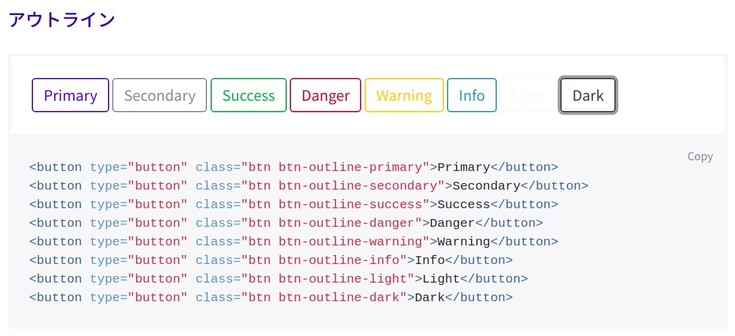
<a href="{% url 'fview:list_view' %}" class="btn btn-primary btn-sm my-3">ファイル一覧に戻る</a><a href={% url 'app:table' table.id %}>{{ table.name }}</a> <a scope="row" href="{% url 'fview:detail_view' fid=vfile.file_ID %}" class="btn btn-outline-primary btn-sm">{{ vfile.file_ID }}</a><form action="" method="POST">
{% csrf_token %}
<button type="submit" class="btn btn-outline-success btn-sm">お気に入りに登録</button>
</form>munakata@muna-E450:~/code/python/vmanhmi/fview/templates/fview$ pip install pillow Collecting pillow Using cached https://files.pythonhosted.org/packages/d2/c2/f84b1e57416755e967236468dcfb0fad7fd911f707185efc4ba8834a1a94/Pillow-6.0.0-cp36-cp36m-manylinux1_x86_64.whl Installing collected packages: pillow Successfully installed pillow-6.0.0
# media file for "pillow"
MEDIA_ROOT = os.path.join(BASE_DIR, 'media')
MEDIA_URL = '/media/'
# To support media directory path finding
from . import settings
from django.contrib.staticfiles.urls import static
from django.contrib.staticfiles.urls import staticfiles_urlpatterns

urlpatterns += staticfiles_urlpatterns()
urlpatterns += static(settings.MEDIA_URL, document_root=settings.MEDIA_ROOT)
class Document(models.Model):
    description = models.CharField(max_length=255, blank=True)
    photo = models.ImageField(upload_to='documents/', default='defo')
    uploaded_at = models.DateTimeField(auto_now_add=True)
ImageField 型を宣言することが重要な意味を持つ

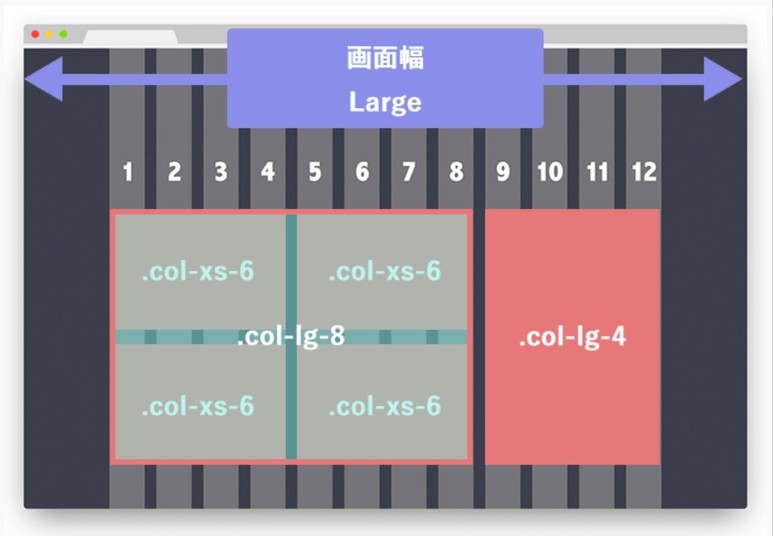
<div class="container">
    <div class="row">
        <div class="col-lg-8">
            <div class="row">
                <div class="col-xs-6"></div>
                <div class="col-xs-6"></div>
                <div class="col-xs-6"></div>
                <div class="col-xs-6"></div>
            </div>
        </div>
        <div class="col-lg-4"></div>
    </div>
</div>
(vman) munakata@muna-E450:~/code/python/vman$ pip3 install channels channels_redis asgi_redis
munakata@mvc:~$ sudo apt install redis
munakata@mvc:~$ redis-server -v
Redis server v=4.0.9 sha=00000000:0 malloc=jemalloc-3.6.0 bits=64 build=9435c3c2879311f3

munakata@mvc:~$ ss -nlt
State           Recv-Q           Send-Q                      Local Address:Port                        Peer Address:Port
LISTEN          0                128                               0.0.0.0:111                              0.0.0.0:*
(snip)
LISTEN          0                128                             127.0.0.1:6379                             0.0.0.0:*              <------ Radis はデフォルトで 127.0.0.1 だけを受け付ける設定
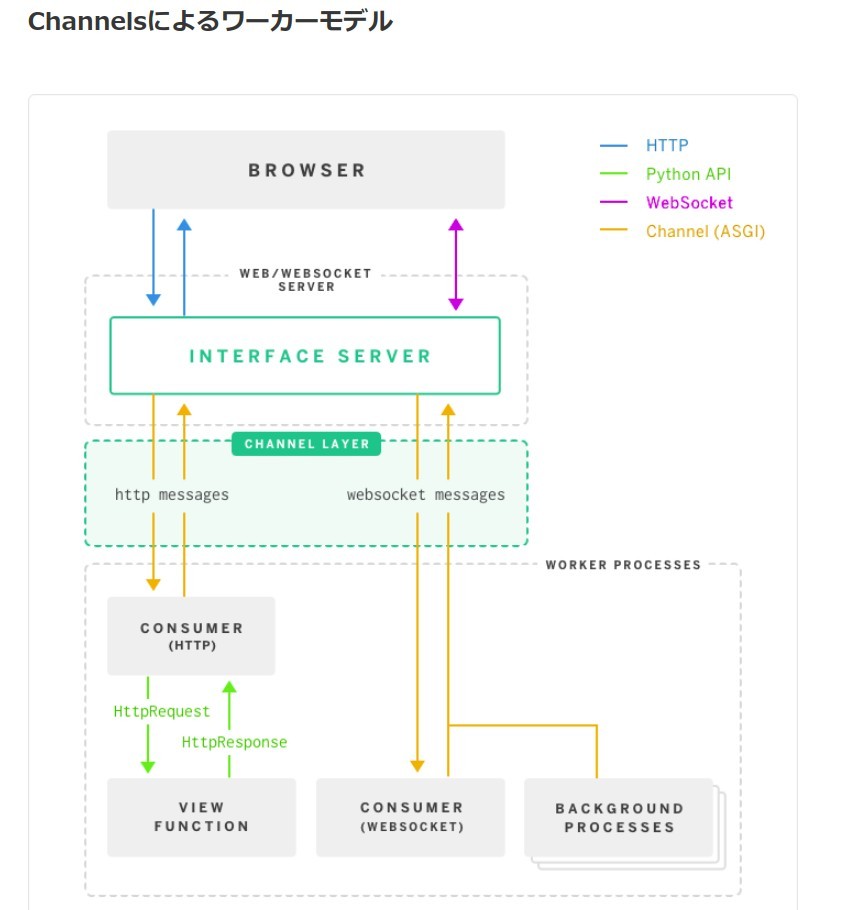
from channels.routing import ProtocolTypeRouter

application = ProtocolTypeRouter({
    # (http->django views is added by default)
})INSTALLED_APPS = [
'channels',
'django.contrib.admin',
'django.contrib.auth',
'django.contrib.contenttypes',
'django.contrib.sessions',
'django.contrib.messages',
'django.contrib.staticfiles',
'fview',
'bootstrap4',
'fontawesome_5',
]Delay server
If you used the delay server before to put things on hold for a few seconds, you can now instead use an AsyncConsumer and asyncio.sleep:
class PingConsumer(AsyncConsumer):
async def websocket_receive(self, message):
await asyncio.sleep(1)
await self.send({
"type": "websocket.send",
"text": "pong",
})# websocket (channels) のために ASGIの起点を指定 ASGI_APPLICATION = 'vmanhmi.routing.application'
System check identified no issues (0 silenced).
July 20, 2019 - 15:43:38
Django version 2.2.2, using settings 'vmanhmi.settings'
Starting ASGI/Channels version 2.2.0 development server at http://127.0.0.1:8000/
Quit the server with CONTROL-C.
Listen failure: Couldn't listen on 127.0.0.1:8000: [Errno 98] Address already in use.
munakata@muna-E450:~/code/python/vman/vmanhmi$ lsof -i:8000
COMMAND  PID     USER   FD   TYPE DEVICE SIZE/OFF NODE NAME
chrome  3143 munakata   57u  IPv4  57585      0t0  TCP localhost:56236->localhost:8000 (ESTABLISHED)
python3 4055 munakata   26u  IPv4  57446      0t0  TCP localhost:8000 (LISTEN)
python3 4055 munakata   29u  IPv4  57621      0t0  TCP localhost:8000->localhost:56242 (CLOSE_WAIT)
python3 4055 munakata   30u  IPv4  55067      0t0  TCP localhost:8000->localhost:56236 (ESTABLISHED)
python3 4055 munakata   31u  IPv4  58463      0t0  TCP localhost:8000->localhost:56246 (CLOSE_WAIT)
python3 4055 munakata   32u  IPv4  57175      0t0  TCP localhost:8000->localhost:56244 (CLOSE_WAIT)

munakata@muna-E450:~/code/python/vman/vmanhmi$ sudo kill 3143 4055

munakata@muna-E450:~/code/python/vman/vmanhmi$ lsof -i:8000
COMMAND  PID     USER   FD   TYPE DEVICE SIZE/OFF NODE NAME
python3 4055 munakata   26u  IPv4  57446      0t0  TCP localhost:8000 (LISTEN)
python3 4055 munakata   29u  IPv4  57621      0t0  TCP localhost:8000->localhost:56242 (CLOSE_WAIT)
python3 4055 munakata   30u  IPv4  55067      0t0  TCP localhost:8000->localhost:56236 (CLOSE_WAIT)
python3 4055 munakata   31u  IPv4  58463      0t0  TCP localhost:8000->localhost:56246 (CLOSE_WAIT)
python3 4055 munakata   32u  IPv4  57175      0t0  TCP localhost:8000->localhost:56244 (CLOSE_WAIT)
munakata@muna-E450:~/code/python/vman/vmanhmi$ kill -s QUIT  4055
munakata@muna-E450:~/code/python/vman/vmanhmi$ lsof -i:8000
通常はcheck_allやcheck_output(およびrun)などを使えばよいのですが、子プロセスの終了をまたずに何か処理をしたいとかそういうことをしたい場合にはPopenを使います。
# -- test.py --
from time import sleep

print('child start!')
sleep(1)
print('child end!')
# -- main.py --
import subprocess

print('parent start!')
ps = subprocess.Popen(['python','test.py'])
print('parent end!')
$ py main.py
parent start!
parent end!
child start!
child end!
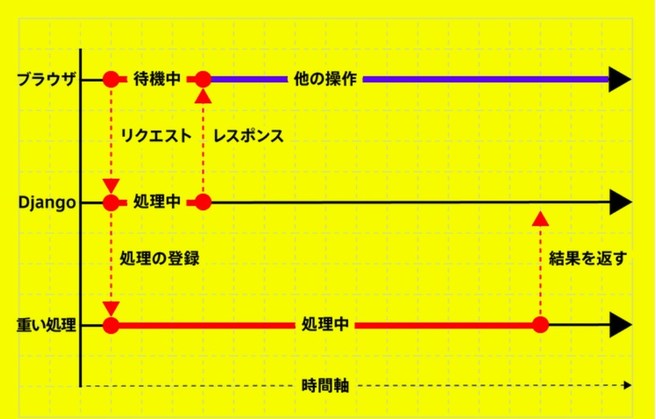
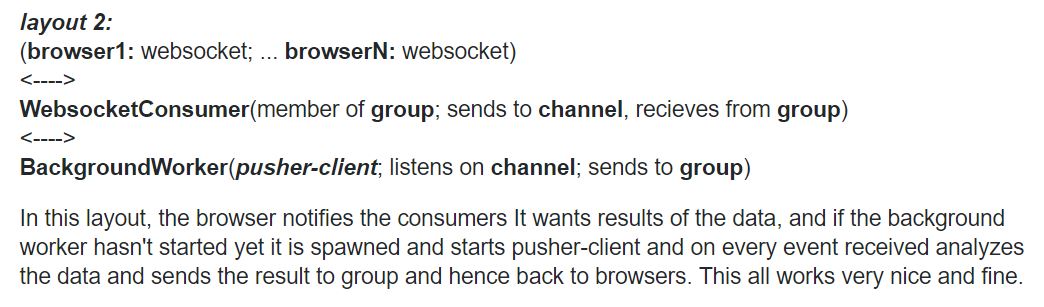
import os

if os.fork()==0:
    long_process()
else:
return HttpResponse()import subprocess
p = subprocess.Popen([sys.executable, '/path/to/script.py'],
stdout=subprocess.PIPE,
stderr=subprocess.STDOUT)
(where the script is likely to be a manage.py command)import threading
t = threading.Thread(target=long_process,
args=args,
kwargs=kwargs)
t.setDaemon(True)
t.start()
return HttpResponse()
from multiprocessing import Process

p = Process(target=_bulk_action,args=(action,objs))
p.start()
return HttpResponse()


 The Fool - real-time progress updates with django channels.pdf