最終型†
起動スクリプト†
インスタンス情報†
- mx2 (mail2.hmuna.com)
| インスタンス名 | i-0de57e328b2a18377 (mail2.hmuna.com) |
| パブリック IPv4 アドレス | 54.168.145.135 |
| プライベート IPv4 アドレス | 172.31.22.38 |
| パブリック IPv4 DNS | ec2-54-168-145-135.ap-northeast-1.compute.amazonaws.com |
| プライベート IPv4 DNS | ip-172-31-22-38.ap-northeast-1.compute.internal |
| インスタンスタイプ | t2.medium |
| Elastic IP アドレス | 54.168.145.135 (パブリック IP) |
| VPC ID | vpc-ddcb93b9 |
| サブネット ID | subnet-a7d324ee |
| AMI ID | ami-02b658ac34935766f |
| AMI name | ubuntu/images/hvm-ssd/ubuntu-bionic-18.04-amd64-server-20200908 |
| 終了保護 | 有効 |
| AMI location | 099720109477/ubuntu/images/hvm-ssd/ubuntu-bionic-18.04-amd64-server-20200908 |
| キーペア名 | magu-tokyo-messenger |
| vCPU | 2 |
| RAM | 4GB |
- mx3 (mail3.hmuna.com)
| インスタンス名 | i-02abb90c515dd92c1 (mail3.hmuna.com) |
| パブリック IPv4 アドレス | 13.114.88.171 |
| プライベート IPv4 アドレス | 172.31.4.225 |
| パブリック IPv4 DNS | ec2-13-114-88-171.ap-northeast-1.compute.amazonaws.com |
| プライベート IPv4 DNS | ip-172-31-4-225.ap-northeast-1.compute.internal |
| インスタンスタイプ | t2.micro |
| Elastic IP アドレス | 13.114.88.171 (パブリック IP) |
| VPC ID | vpc-ddcb93b9 |
| サブネット ID | subnet-00072c58 |
| AMI ID | ami-02b658ac34935766f |
| AMI name | ubuntu/images/hvm-ssd/ubuntu-bionic-18.04-amd64-server-20200908 |
| 終了保護 | 有効 |
| AMI location | 099720109477/ubuntu/images/hvm-ssd/ubuntu-bionic-18.04-amd64-server-20200908 |
| キーペア名 | magu-tokyo-messenger |
| vCPU | 1 |
| RAM | 1GB |
方針、戦略(と、途中での紆余曲折)†
- そもそも AWS のリザーブドインスタンス(3年契約)の有効期限なので更新を計画
- なので Ubuntu 16.04(現状)→ 18.04 への更新、EBS サイズ(現状 128G) の縮小などは今回は実施しない当初方針
- EC2 の仕様を比較すると、3年前の t2.small は現在の t2.micro と性能的に同じだった
- 新規に3年前払いで t2.micro インスタンスを購入し、既存サーバーの置き換え作業を開始
- ところが リザーブドインスタンスというのはインスタンスの使用権であってインスタンス自体とは別 である事が判明
- 実行中の インスタンスと同じリザーブドインスタンスがある場合 費用がそちらに振り返られる仕組み
- なのでリザーブドインスタンスを購入しても、起動可能なインスタンスのリストには出てこない
- リザーブドインスタンスには有効期限があり該当インスタンスを実行していなくても権利は時間と共に減っていく仕組み
- なのでリザーブドインスタンスと同じタイプ(グレード)のインスタンスを実行しないと全くの無駄になる
- 未使用のリザーブドインスタンスを売ることができるが、米国内銀行に口座を持っていないと返金を受け取れない
- 今回先走って追加購入(次項)したインスタンスには既存サーバーを移行する事は出来ないと判明(トライした経緯は下記)
- 現状環境の継続利用には、t2.small リザーブドインスタンスを別に購入する必要がある ・・・・ が、流石にそれは馬鹿だろう
- t2.micro 上に Ubuntu18.04 メールサーバー環境を構築 → 試行開始で問題発覚 (t2.micro の RAM容量 1GB ではサーバー動かない)
- 結局作成したインスタンスを t2.small Ubuntu18.04 環境に移行 → 動くようになったと思われたが 実は 2GB でも不安定で落ちる事がある事が判明
- 最終的に t2.medium (RAM 4GB) 環境に再度移行して動作安定。
結局 t2.micro, t2.small のインスタンス3年前払いは(現時点では)無駄になった
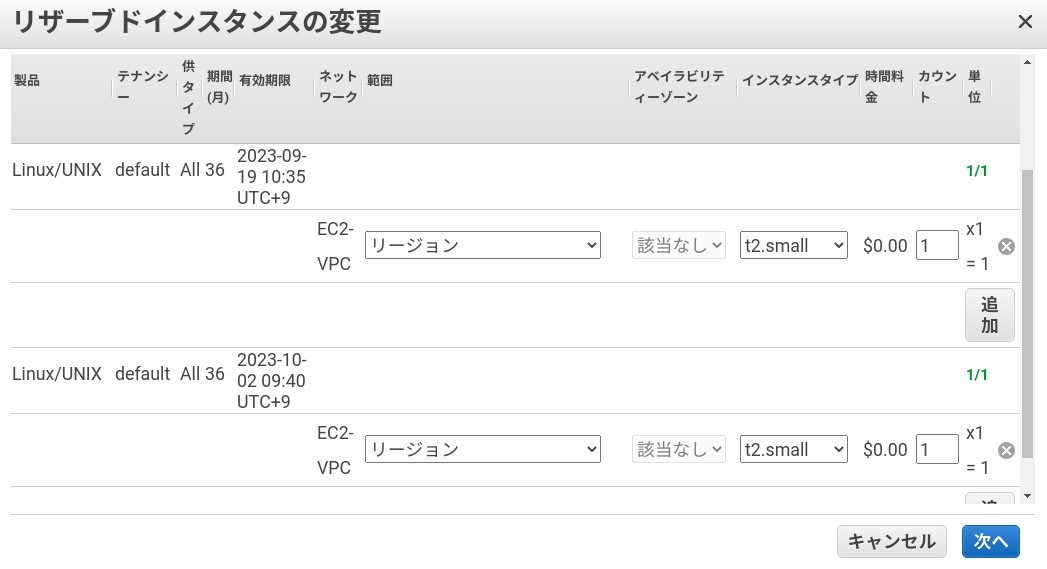
- t2.small RI x2 => t2.medium RI に変更できる 事が判明。 これで t2.small 購入分は無駄にならず活用できることになりそう
- 無駄になったインスタンス利用権の活用は別途検討するが.... -> mail3.hmuna.com (2ndery MX) として稼働させた
新戦略†
- まず、急ぐ必要はない(リザーブドインスタンスが切れても、インスタンスは止まらない)が
- t2.micro のリザーブドインスタンスの購入(済)
- t2.micrro インスタンス(本番サーバー置き換え用)を作成
- メールサーバー環境の構築(仮 IP、仮 証明書)
- 旧サーバーインスタンスを停止
- データ移行用インスタンスを起動
- EBS新旧を移行用サーバーにマウントしメールサーバーのデータをオフライン移行
- ELASTIC IP 付け替え、証明書移行 to 新サーバーインスタンス
- 新サーバー稼働、テスト
- 移行用サーバーインスタンスの停止
- 経過観察後、問題なければ旧サーバーインスタンスの停止
AWS 側の設定†
リザーブドインスタンスのダウングレード購入†
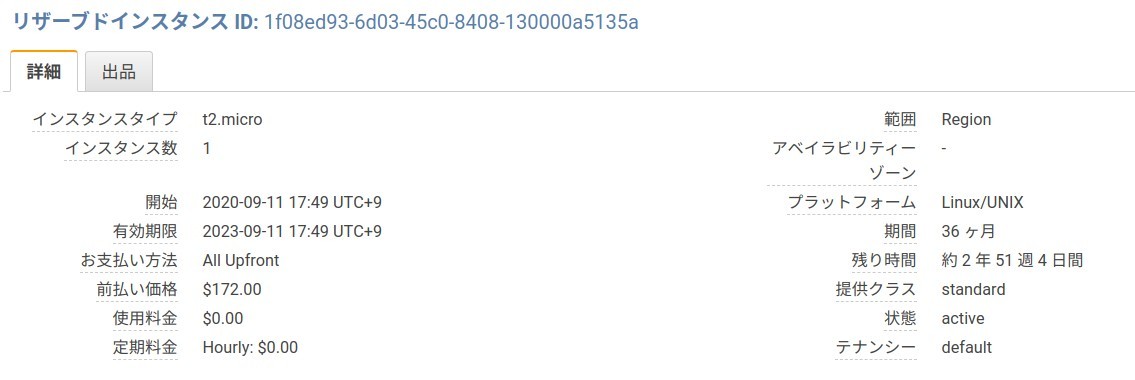
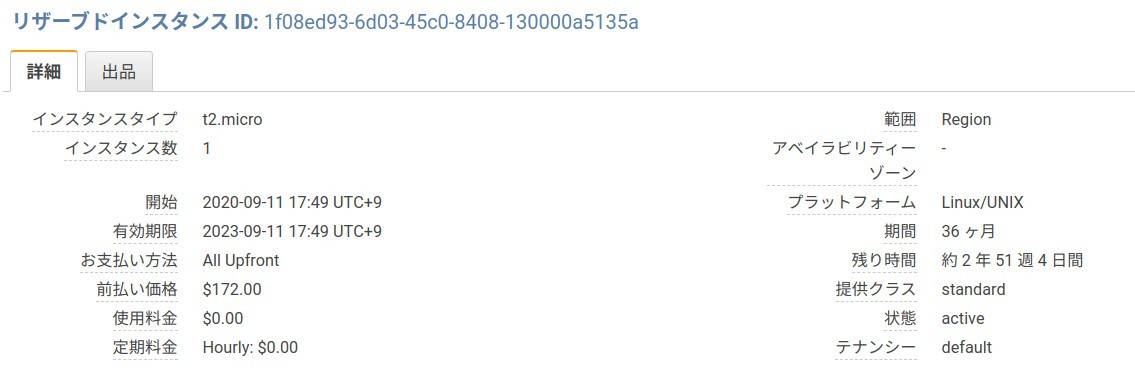
リザーブドインスタンス ID = 1f08ed93-6d03-45c0-8408-130000a5135a
- t2.micro (前回は t2.small だったが、性能的には同等なので実質値下げ)
- t2.micro (@2020) = 1コア vCPU (最大 3.3 GHz)、1 GiB メモリ RAM、ストレージは EBS のみ
- t2.small (@2017) = 1コア vCPU (最大 3.3 GHz)、2 GiB メモリ RAM、128GB ストレージ
- 36ヶ月、全額前払い、スタンダード(コンバーティブルでない) で購入
- $172 (前回は $395 だった)
t2.micro インスタンスの新規作成†
t2.medium インスタンスの設定方針(最終的な形)†
- キーペアは既存のものを流用
- セキュリティグループも既存の設定を流用
- ボリュームも t2.micro 設定時に作った 30GB EBS イメージを流用(ここは 128GB → 30GB で月額利用料削減に寄与)
- Elastic IP も t2.micro 設定時に新設したグローバル IP (= mail2.hmuna.com) を再利用
- メールサーバー証明書は Let's Encrypt(無償)に切り替えたので、従来利用してきた有償版証明書は不要になった
購入した t2.small を無駄にせず、差分を購入して t2.medium にアップグレード可能だった†
2 つ以上の リザーブドインスタンス を単一の リザーブドインスタンス にマージすることもできます。
たとえば、それぞれに 1 つのインスタンスがある 4 つの t2.small リザーブドインスタンス がある場合、
これらをマージして 1 つの t2.large リザーブドインスタンス を作成できます。
が、しかし t2.small RI を追加で購入したが購入日付が違うためマージできず†
> EC2 t2.small リザーブドインスタンスを購入後、要件的に t2.medium が必要となり t2.small を
> 追加購入して マージしようとしたが、購入日が異なるためにマージ出来ない状況になっています。
> 後から購入したリザーブドインスタンスの有効期限を短くして、最初に購入したものと合わせる事は
> 可能でしょうか

リザーブドインスタンスにつきましては長期間のご利用を前提として安価料金のメリットを提供させて
いただいておりますため、契約期間は短縮いただけません。お問い合わせくださいましたところ大変心苦しく
存じますが、どうぞご理解くださいますようお願い申し上げます。

なお、プラットフォームがLinux/UNIXのリザーブドインスタンスは、柔軟性により、オンデマンドインス
タンスのサイズとリザーブドインスタンスのサイズが異なっておりましても、リザーブドインスタンスが
オンデマンドインスタンスに適用される場合がございますこと補足申し上げます。
詳細につきましては下記ページをご覧くださいますようお願い申し上げます。
- リージョンごとの、またはサイズが柔軟な Amazon EC2 リザーブドインスタンスはどのように働きますか?
- サイズが柔軟な Amazon EC2 リザーブドインスタンスの計算方法を教えてください。
- AWSのコスト最適化/リザーブドインスタンス
オンデマンドインスタンスに スマートに RI 購入済クレジットを適用してくれる(無駄ではなかった)†
ご担当者様

平素よりお世話になっております。AWSカスタマーサービスの喜屋武と申します。
この度はご丁寧にご返信いただき、誠にありがとうございます。

頂いたご質問内容に関しまして、下記の通りご回答差し上げます。
(すでにご認識いただいている内容と重複する部分もあるかと存じますが、ご容赦頂ければ幸いです)

【サイズが柔軟なRIに関しまして】
RIの「柔軟性」というのは、RIが持っている性質のことです。
(別途、設定する必要がなくRIを購入した時点で自動的に付与される性質とご認識くださいませ)

RIは上記「柔軟性」により、正規化係数(フットプリント)に基づいて稼働しているインスタンスに「自動適用」されます。
あくまでもコスト最適化の観点に基づいて、稼働しているインスタンスの状況に併せて「自動適用」されるため、
「適用したいインスタンスを任意に選択することはできない」という点にご留意いただければと存じます。

■RIの柔軟性の具体例
※下記説明の前提として、t2.nanoの正規化係数は「0.25」。t2.smallの正規化係数は「1」。t2.mediumの正規化係数は「2」となります。
例1)t2.smallのRIを2つ保持しているが、実際にはt2.mediumインスタンス1台のみ稼働している場合。
正規化係数「2」がt2.medium1台(「2」)の稼働に対して適用されます。

例2)t2.smallのRIを2つ保持しており、実際にはt2.smallを1台、t2.nanoインスタンス4台のみ稼働している場合。
正規化係数「2」がt2.small1台(「1」)、t2.nanoインスタンス4台(「0.25*4=1」)の稼働に対して適用されます。

▼(ご参考)RIの正規化係数について
https://docs.aws.amazon.com/ja_jp/AWSEC2/latest/UserGuide/ri-modifying.html
「インスタンスサイズのフットプリント」の項目にサイズごとの正規化係数の記載がございます。

【質問に対するご回答】
> t2.small RI が2つあれば オンデマンドの t2.medium のコストに自動的に割り当てられる.... という理解で正しいでしょうか
上記説明をもとにすると、お客様から頂いた上記質問に対する回答としましては、
「 t2.small RI が2つあり、かつ稼働しているオンデマンドインスタンスが t2.medium1台のみであれば、
t2.mediumのコストに自動的に割り当てられる」 ということになります。しかしながら、他にt2.smallなど
別のインスタンスが稼働している場合には、t2.smallの稼働コスト分に割り当てられてしまう可能性がございますこと、
ご承知おきくださいませ。

※前述の通り、必ずしも「t2.medium のコストに割り当てられる」とは断言できませんが、「コスト最適化」の
観点に基づいて割り当てられますため、お客様が損を被ることはございませんので、ご安心くださいませ。
サーバー設定†
メールサーバー環境(virtual mailbox 対応)の構築†
- Postfix: sends and receives mail via the SMTP protocol.
- Dovecot: a POP/IMAP server. It also handles user authentication.
- Postgrey: greylists incoming mail ← これは使わない(遅延が問題になる)
- amavisd-new: a manager for organizing various antivirus and spam checking content filters.
- Clam AntiVirus: a virus detection suite.
- SpamAssassin: for sniffing out spam in emails.
- Postfix Admin: a web front end for administering mail users and domains.
- Roundcube: a webmail interface for users.
- mysql
- root pass = mysql_admin
- mail pass = mail_password
- pass = h77mailpass
- config.local.php の編集でハマった。ファイルの場所は /var/www/html に予めある。/var/www/html/postfixadmin に作ってはダメ。
- 管理者
- DomainKeys Identified Mail (DKIM) 設定
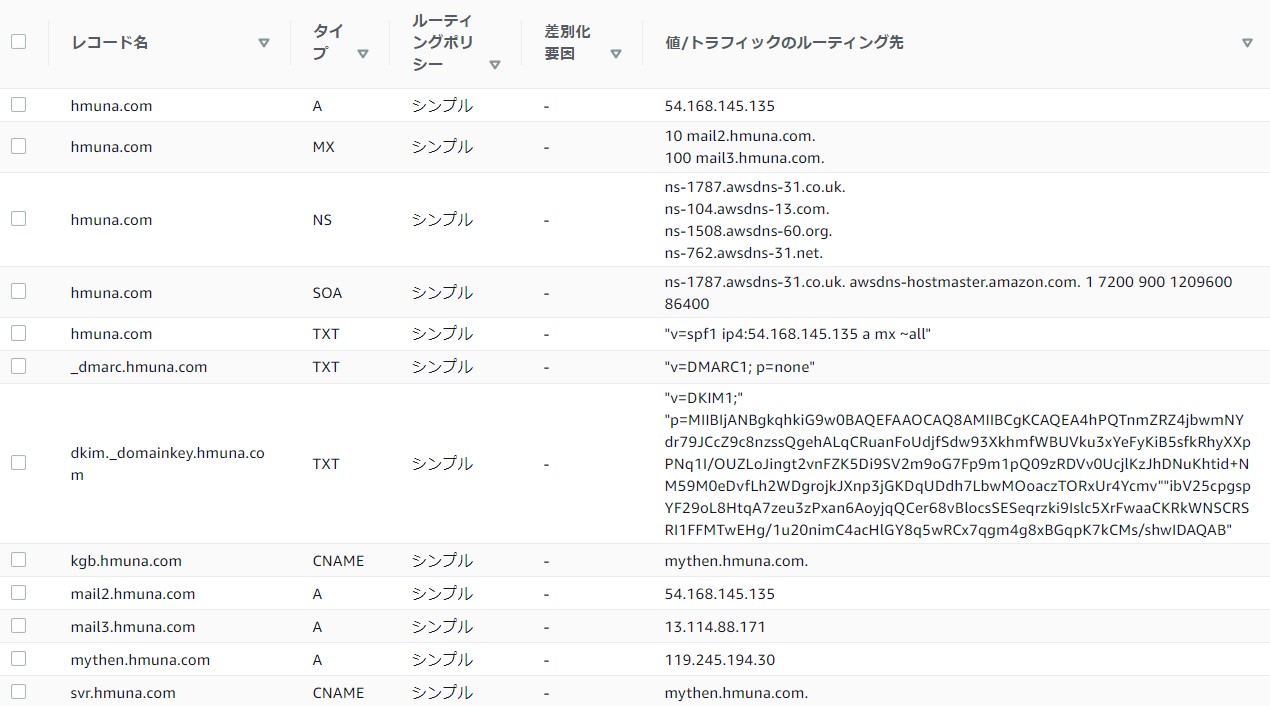
- 後で DNS に登録する dkim.txt レコード (改行なし、但し登録時の文字数制限があり、途中で "" で分割している、途中にスペースは入れない)
- localに(= 仮設の mail2.hmuna.com サーバー内で)メール転送を行ったところ clamAV に接続出来ないというエラー
Sep 18 07:55:42 ip-172-31-22-209 amavis[1625]: (01625-01) (!)connect to /var/run/clamav/clamd.ctl failed, attempt #1: Can't connect to a UNIX socket /var/run/clamav/clamd.ctl: No such file or directory
Sep 18 07:55:42 ip-172-31-22-209 amavis[1625]: (01625-01) (!)ClamAV-clamd: All attempts (1) failed connecting to /var/run/clamav/clamd.ctl, retrying (2)
Sep 18 07:55:48 ip-172-31-22-209 amavis[1625]: (01625-01) (!)connect to /var/run/clamav/clamd.ctl failed, attempt #1: Can't connect to a UNIX socket /var/run/clamav/clamd.ctl: No such file or directory
Sep 18 07:55:48 ip-172-31-22-209 amavis[1625]: (01625-01) (!)ClamAV-clamd av-scanner FAILED: run_av error: Too many retries to talk to /var/run/clamav/clamd.ctl (All attempts (1) failed connecting to /var/run/clamav/clamd.ctl) at (eval 113) line 659.\n
Sep 18 07:55:48 ip-172-31-22-209 amavis[1625]: (01625-01) (!)WARN: all primary virus scanners failed, considering backups
Sep 18 07:56:13 ip-172-31-22-209 amavis[1625]: (01625-01) (!)ClamAV-clamscan av-scanner FAILED: /usr/bin/clamscan KILLED, signal 9 (0009) at (eval 113) line 950.
Sep 18 07:56:13 ip-172-31-22-209 amavis[1625]: (01625-01) (!!)AV: ALL VIRUS SCANNERS FAILED
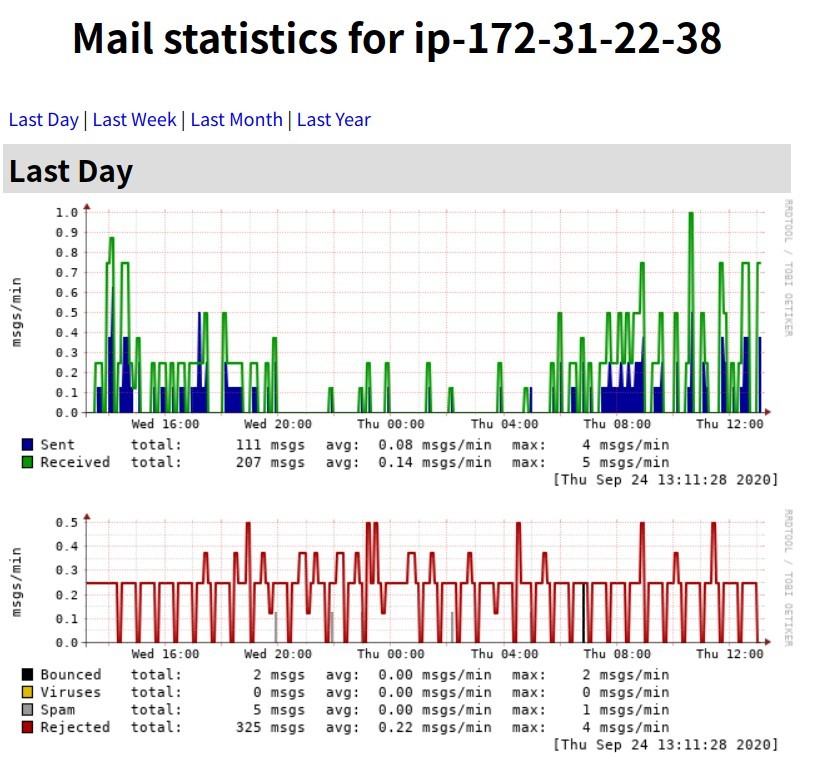
clamav がメモリーを喰い潰す問題(は、程度の差こそあれ t2.small でも発生)†
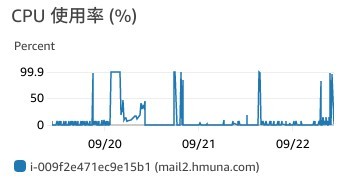
- 一日に一回程度 メモリー枯渇でシステムが死にそうになっている事が判明 → 重大欠点なので対策要
- [さらに残念!!] t2.small 2G メモリーでも状況によってメモリーが枯渇するケースがある事が判明
- t2.medium 上で正常稼働した状態でのメモリー使用状況

- clamavdaemon は RAM 上の SPAM データベースをロードするが、このサイズが 850MB 程度になっている。
- 他の処理との関連で oom が発生し、SWAP Out などで CPU load 100% 状況が頻発している
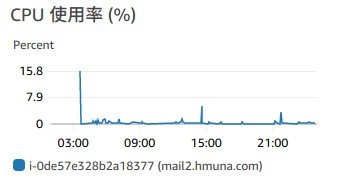
- とりあえず、リザーブドインスタンスは購入せずに t2.mediam (4G RAM) に移行して実行させる → サクサク動作する

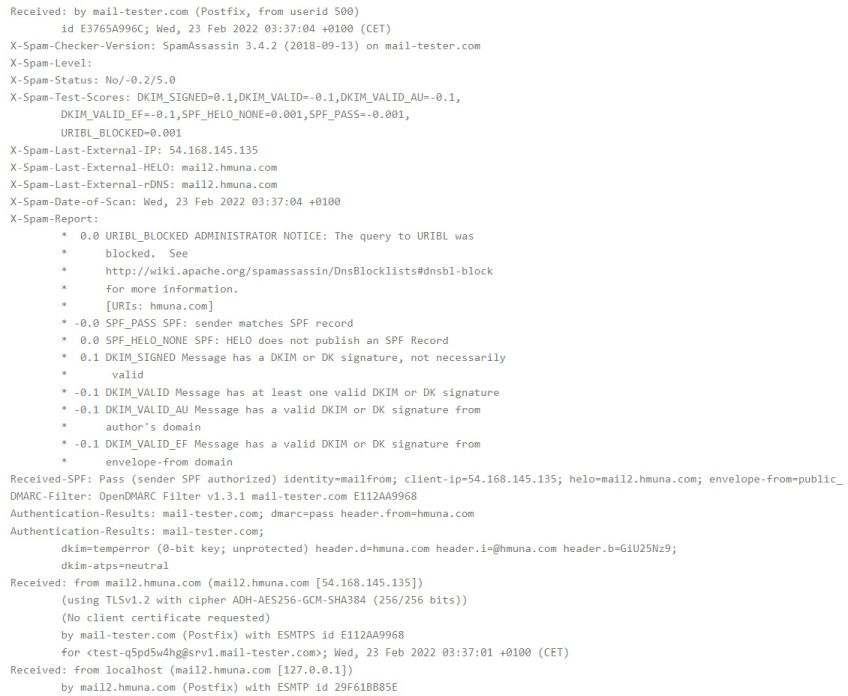
Received: by mail-tester.com (Postfix, from userid 500)
	id C671FA84CE; Wed, 23 Sep 2020 06:05:15 +0200 (CEST)
Authentication-Results: mail-tester.com;
	dkim=temperror (0-bit key; unprotected) header.d=hmuna.com header.i=@hmuna.com header.b=PkL3aRQl;
	dkim-atps=neutral
X-Spam-Checker-Version: SpamAssassin 3.4.2 (2018-09-13) on mail-tester.com
X-Spam-Level:
X-Spam-Status: No/-0.2/5.0
X-Spam-Test-Scores: DKIM_SIGNED=0.1,DKIM_VALID=-0.1,DKIM_VALID_AU=-0.1,
	DKIM_VALID_EF=-0.1,SPF_PASS=-0.001,URIBL_BLOCKED=0.001
X-Spam-Last-External-IP: 54.168.145.135
X-Spam-Last-External-HELO: mail2.hmuna.com
X-Spam-Last-External-rDNS: mail2.hmuna.com
X-Spam-Date-of-Scan: Wed, 23 Sep 2020 06:05:15 +0200
X-Spam-Report:
	* -0.0 SPF_PASS SPF: sender matches SPF record
	* -0.1 DKIM_VALID_EF Message has a valid DKIM or DK signature from
	*      envelope-from domain
	* -0.1 DKIM_VALID_AU Message has a valid DKIM or DK signature from
	*      author's domain
	*  0.1 DKIM_SIGNED Message has a DKIM or DK signature, not necessarily
	*       valid
	* -0.1 DKIM_VALID Message has at least one valid DKIM or DK signature
	*  0.0 URIBL_BLOCKED ADMINISTRATOR NOTICE: The query to URIBL was
	*      blocked.  See
	*      http://wiki.apache.org/spamassassin/DnsBlocklists#dnsbl-block
	*      for more information.
	*      [URIs: hmuna.com]
Received-SPF: Pass (sender SPF authorized) identity=mailfrom; client-ip=54.168.145.135; helo=mail2.hmuna.com; envelope- from=public_mail@hmuna.com; receiver=test-iac1xgrmt@srv1.mail-tester.com
DMARC-Filter: OpenDMARC Filter v1.3.1 mail-tester.com 750C2A84CE
Authentication-Results: mail-tester.com; dmarc=pass header.from=hmuna.com
Authentication-Results: mail-tester.com;
	dkim=temperror (0-bit key; unprotected) header.d=hmuna.com header.i=@hmuna.com header.b=PkL3aRQl;
	dkim-atps=neutral
Received: from mail2.hmuna.com (mail2.hmuna.com [54.168.145.135])
	(using TLSv1.2 with cipher ADH-AES256-GCM-SHA384 (256/256 bits))
	(No client certificate requested)
	by mail-tester.com (Postfix) with ESMTPS id 750C2A84CE
	for <test-iac1xgrmt@srv1.mail-tester.com>; Wed, 23 Sep 2020 06:05:11 +0200 (CEST)
Received: from localhost (mail2.hmuna.com [127.0.0.1])
	by mail2.hmuna.com (Postfix) with ESMTP id 86FD3BDD71
	for <test-iac1xgrmt@srv1.mail-tester.com>; Wed, 23 Sep 2020 13:05:08 +0900 (JST)
X-Virus-Scanned: Debian amavisd-new at mail2.hmuna.com
Received: from mail2.hmuna.com ([127.0.0.1])
	by localhost (ip-172-31-22-38.ap-northeast-1.compute.internal [127.0.0.1]) (amavisd-new, port 10024)
	with ESMTP id wq3NdD-vsXbN for <test-iac1xgrmt@srv1.mail-tester.com>;
	Wed, 23 Sep 2020 13:05:05 +0900 (JST)
MIME-Version: 1.0
DKIM-Signature: v=1; a=rsa-sha256; c=simple/simple; d=hmuna.com; s=dkim;
	t=1600833905; bh=T3JVNWIKqLNE9srGASR8eT8PH5+lK4r3tOAkV8JFS1Q=;
	h=Date:From:To:Subject:From;
	b=PkL3aRQlA5kX1PJ3FWbN2Pd94Sd4B1eBvyvFY44qHUHwgDJB1vWEiO4mKYINqQ42H
	 aIahl7OhJ9RG2WLDesyqdWmX1cZ3OnwX9GCjz5ShJYRYTYLkO9Bhaz2jkGRyra9azA
	 T2hNxpgB+Egfosinbx+77PzFTmAxx1+L2hQXTnqKKC/Zntqc00i9gBaW62w9Sju67Q
	 6qHazZjJZe3fX06UDYl6qarJzG9cwyXFqJh6X1jOyeR3Cvulq25N0TxYN/g/bC2R+l
	 5hRmR7lELwkiQIFoQaPvqyHNYs1A0b7fR2JjZBQ33Ohrve+38z8LzwKjRSCkEGlp6z
	 uUGacjdOvWy0A==
Content-Type: text/plain; charset=US-ASCII;
 format=flowed
Content-Transfer-Encoding: 7bit
Date: Wed, 23 Sep 2020 13:05:05 +0900
From: public_mail@hmuna.com
To: test-iac1xgrmt@srv1.mail-tester.com
Subject: test mail
Message-ID: <b1cd71427944275c2fddffe817bb3aee@hmuna.com>
X-Sender: public_mail@hmuna.com
- インストール
[AWS (sudo)]:/home/ubuntu# apt install rrdtool mailgraph
- /etc/apache2/site-available/mailgrah の設定
[AWS (sudo)]:/home/ubuntu# cat /etc/apache2/sites-available/mailgraph.conf
Alias /mailgraph /usr/share/mailgraph
<Directory /usr/share/mailgraph>
    Options +FollowSymLinks +ExecCGI
    AddHandler cgi-script .cgi
    #Require local
    #Require ip 54.168.145.135/24

    AuthUserFile /etc/mailgraph/mailgraph-htpasswd
    AuthName "Mailgraph"
    AuthType Basic
    Require valid-user
</Directory>
- アクセスユーザー制限 (/etc/mailgraph/mailgraph-htpasswd)
[AWS (sudo)]:/home/ubuntu# htpasswd -c /etc/mailgraph/mailgraph-htpasswd admin
- user = admin
- pass = frex7785
- 起動
[AWS (sudo)]:/home/ubuntu# a2enmod cgid
[AWS (sudo)]:/home/ubuntu# a2ensite mailgraph
[AWS (sudo)]:/home/ubuntu# systemctl restart apache2 mailgraph
メール振り分け処理 (procmail → dovecot-sieve に実装を変更)†
dovecot sieve インストール†
- dovecot sieve
- sieve は汎用メールのフィルタリング用言語で dovecot が対応している
- dovecot-managesieved
virtual mailbox への対応†
- From Devecot virtual-plugin manual
Sieve filters with virtual mailboxes¶
Using the sieve plugin with virtual mailboxes will cause dovecot to output a fatal exception error in it’s logs and crash. This is because
sieve can’t tell the difference between a virtual location and a maildir/mbox location due to the way it detects actions in the mailboxes.

If you use virtual mailboxes that are configured in sieve, make sure that they point to the namespace which has a maildir/mbox location and
a unique prefix. If you don’t, sieve will crash trying to copy a message to a virtual mailbox.
- /etc/dovecot/conf.d/90-sieve.conf (上記の対応のため)
managesieve†
- /etc/dovecot/conf.d/20-managesieve.conf
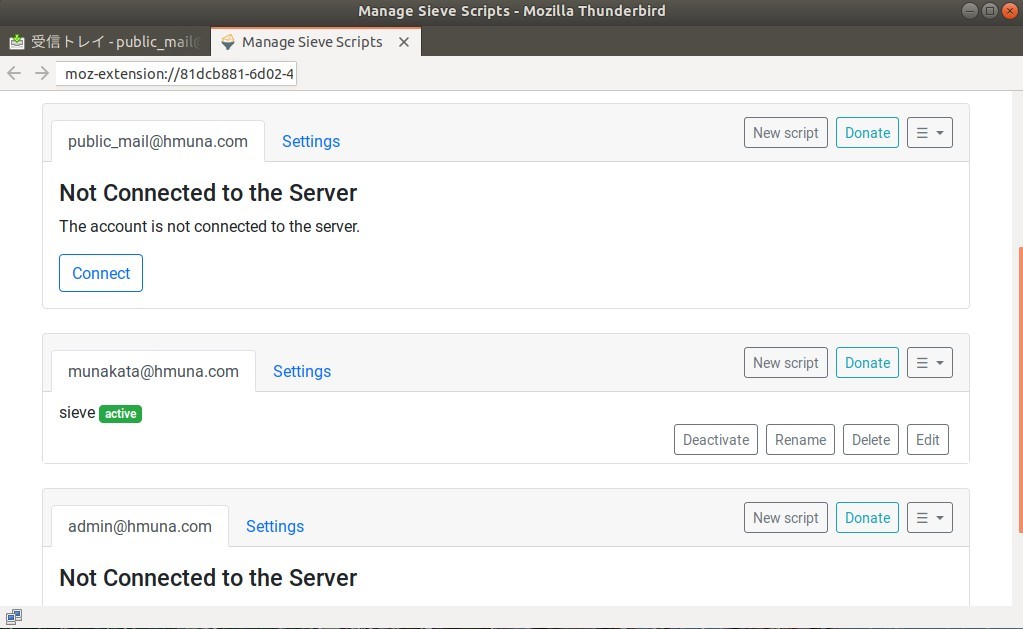
- Thanderbird クライアントに plug-in をインストールし、[メッセージフィルター] - [sieve message filter(s)] を起動
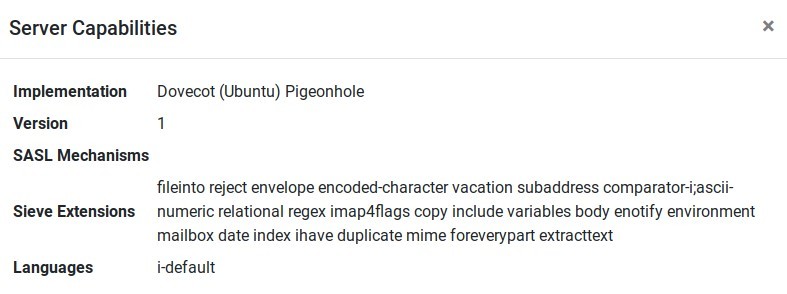
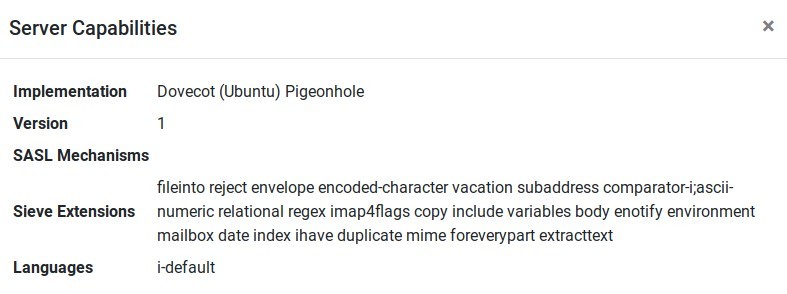
- サーバーがサポートするフィルター機能を確認
sieve programing†
- (動いたので)使い方
- 各ユーザーのバーチャルメールディレクトリ (/var/vmail/hmuna.com/(アカウント名)/) 下に sieve ディレクトリーを作成
- (重要)sieve ディレクトリー以下のオーナーを vmail.mail に変更する
- Thanderbird に plug-in をインストールし メニューから sieve フィルターを Activate する
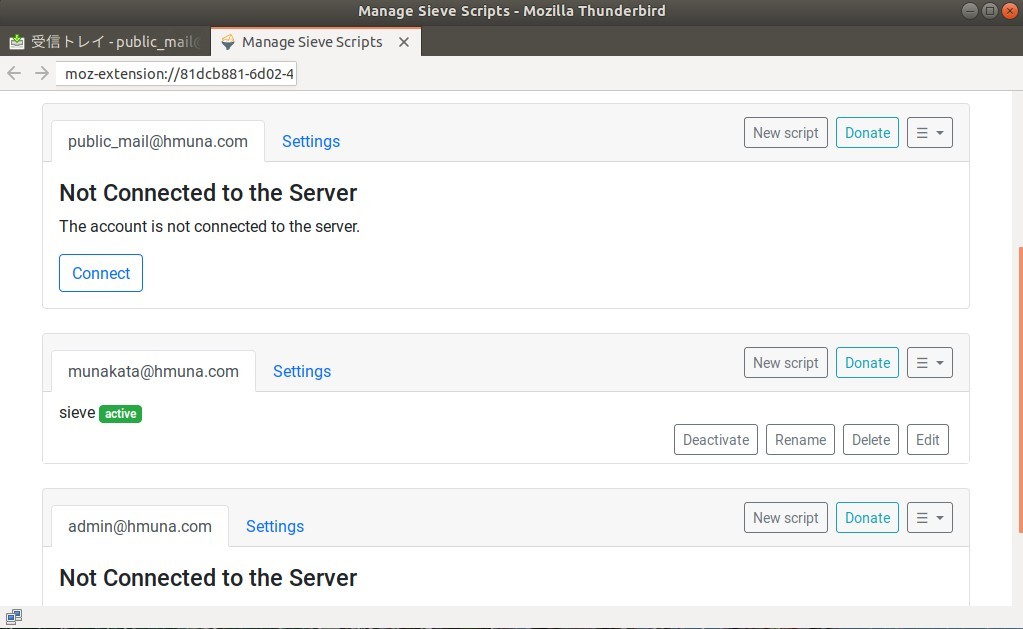
- Thanderbird 等のメールクライアント上 sieve のプログラミングができるようになっている
- 保存したスクリプトはサーバーの /var/vmail/hmuna.com/public_mail ディレクトリ内の sieve というファイル
- Action ボタンを押すと /var/vmail/hmuna.com/public_mail/.dovecot.sieve にシンボリックリンクが張られる
sieve example†
 sieve_orig <-- 実際の設定(下記は抜粋)
require ["copy","fileinto","regex","body"];

####################################################################
# Strong Black List : Hard Force delete
####################################################################
if header :contains "from" "news-keymans@mail.recruit.co.jp*" { discard; stop; }
if header :contains "from" "@umaimizu.jp|@netrition.com" { discard; stop; }
if header :contains "from" "@netrition.com" { discard; stop; }
if header :contains "from" "e-frontier.info" { discard; stop; }

if allof ( header :contains "to" "magu@angel.email.ne.jp", header :contains "from" "@em.mynavi.jp" ) { discard; stop; }
if allof ( header :contains "to" "magu@angel.email.ne.jp", header :contains "from" "@tmn.mynavi.jp" ) { discard; stop; }
if allof ( header :contains "to" "magu@angel.email.ne.jp", header :contains "from" "v-mail@dmm.co.jp" ) { discard; stop; }


####################################################################
# For security, copy all incoming messages to backup folder first
####################################################################
fileinto :copy "INBOX._backup";


####################################################################
# White List : Force copy to INBOX
####################################################################
if header :contains "from" "nbonline@nikkeibp.co.jp" { keep; }
if header :contains "from" "wis_news@blwisdom.com" { keep; }
if header :contains "from" "mail-info@diamond.co.jp" { keep; }
if header :contains "from" "@linuxfoundation.org" { keep; }


####################################################################
# Black List : Force delete (but, still in _backup folder)
####################################################################
if header :contains "from" "@netrition.com" { discard; stop; }
if header :contains "from" "@joshin.co.jp" { discard; stop; }
if header :contains "from" "@toshibadirect.jp" { discard; stop; }
if header :contains "from" "english@mag2.com" { discard; stop; }
if header :contains "from" "@sfjazz.org" { discard; stop; }


####################################################################
# direct move to pre-defined folfer (ML etc)
####################################################################
if header :contains "from" "umemura@shop.rakuten.co.jp" { fileinto "INBOX.Message_saved.Shopping.Umemura"; }
if header :contains "from" "rakuten.co.jp" { fileinto "INBOX.Message_saved.Shopping.Rakuten"; }
if header :contains "from" "@amazon.co.jp" { fileinto "INBOX.Message_saved.Shopping.Amazon"; }
if header :contains "from" "@justsystem.co.jp" { fileinto "INBOX.Message_saved.Shopping.JustSystem"; }


####################################################################
# Message with SPAM flag force move to spam@hmuna.com
####################################################################
if header :contains "X-Spam-Status" "Yes" { fileinto "INBOX._spam"; }


####################################################################
# SPAM manual list : Force move to SPAM folder
####################################################################
if header :contains "from" "@specialmovie.com" { fileinto "INBOX._spam"; }
if header :contains "from" "@specialmovie.com" { fileinto "INBOX._spam"; }
if header :contains "from" "@spnews.com" { fileinto "INBOX._spam"; }
if header :contains "from" "@stationcasinos.com" { fileinto "INBOX._spam"; }

if header :contains "to" "licram.com" { fileinto "INBOX._spam"; }
if header :contains "to" "hanmail.net" { fileinto "INBOX._spam"; }
if header :contains "to" "public_mafia@yahoo.com" { fileinto "INBOX._spam"; }
sieve debug†
- /etc/dovecot/conf.d/90-sieve.conf のトレースオプションを有効にする
- 一回毎の sieve フィルター処理結果が記録される
- ファイル数が膨大になるのでデバッグ時以外は無効に戻す
## TRACE DEBUGGING↲
# Trace debugging provides detailed insight in the operations performed by↲
# the Sieve script. These settings apply to both the LDA Sieve plugin and the↲
# IMAPSIEVE plugin.-↲
#↲
# WARNING: On a busy server, this functionality can quickly fill up the trace↲
# directory with a lot of trace files. Enable this only temporarily and as↲
# selective as possible.↲
 --↲
# The directory where trace files are written. Trace debugging is disabled if↲
# this setting is not configured or if the directory does not exist. If the-↲
# path is relative or it starts with "~/" it is interpreted relative to the↲
# current user's home directory.↲
sieve_trace_dir = /var/vmail/%d/%n/↲
 --
# The verbosity level of the trace messages. Trace debugging is disabled if↲
# this setting is not configured. Possible values are:↲
#↲
#   "actions"        - Only print executed action commands, like keep,↲
#                      fileinto, reject and redirect.↲
#   "commands"       - Print any executed command, excluding test commands.↲
#   "tests"          - Print all executed commands and performed tests.↲
#   "matching"       - Print all executed commands, performed tests and the↲
#                      values matched in those tests.↲
sieve_trace_level = actions↲
参考 URL†
2ndery MX (mail3.hmuna.com) の立ち上げ†
- 今回使わなくなった t2.micro を活用する意味で(本来は必須ではない)2ndery MX サーバーを立ち上げることにする
- メモリー悔いの clamav などフィルター系の処理は動かさない
- その他の設定は primary MX に合わせる
mailserver 設定†
- server = mail3.hmuna.com (13.114.88.171)
- インストール除外としたパッケージ
- postgrey
- amavis
- clamav
- clamav-daemon
- main.cf の中で 127.0.0.1:10023 に送ってチェックする設定を無効にする
- MX1 を止めた状態でメールが MX2 に転送され保存されているログ(MX1 への転送は deffered になっている)
Sep 29 00:51:09 mail3 postfix/smtps/smtpd[17902]: Anonymous TLS connection established from unknown[212.70.149.68]: TLSv1.2 with cipher ECDHE-RSA-AES256-GCM-SHA384 (256/256 bits)
Sep 29 00:51:14 mail3 postfix/smtpd[17891]: connect from mail-il1-f179.google.com[209.85.166.179]
Sep 29 00:51:15 mail3 postfix/smtpd[17891]: Anonymous TLS connection established from mail-il1-f179.google.com[209.85.166.179]: TLSv1.3 with cipher TLS_AES_128_GCM_SHA256 (128/128 bits)
Sep 29 00:51:15 mail3 policyd-spf[17896]: prepend Received-SPF: Pass (mailfrom) identity=mailfrom; client-ip=209.85.166.179; helo=mail-il1-f179.google.com; envelope-from=magu775@gmail.com; receiver=<UNKNOWN>
Sep 29 00:51:15 mail3 postfix/smtpd[17891]: 97164454DC: client=mail-il1-f179.google.com[209.85.166.179]
Sep 29 00:51:15 mail3 postfix/cleanup[17897]: 97164454DC: message-id=<CAK8HeGNGVr7Wd+XgY=4p6Y8=s5KZv7K_6uyHovhc3irSTpU=MA@mail.gmail.com>
Sep 29 00:51:15 mail3 postfix/qmgr[17887]: 97164454DC: from=<magu775@gmail.com>, size=19800, nrcpt=1 (queue active)
Sep 29 00:51:15 mail3 postfix/smtp[17898]: connect to mail2.hmuna.com[54.168.145.135]:25: Connection refused
Sep 29 00:51:15 mail3 postfix/smtp[17898]: 97164454DC: to=<public_mail@hmuna.com>, relay=none, delay=0.63, delays=0.61/0.01/0/0, dsn=4.4.1, status=deferred (connect to mail2.hmuna.com[54.168.145.135]:25: Connection refused)
Sep 29 00:51:16 mail3 postfix/smtpd[17891]: disconnect from mail-il1-f179.google.com[209.85.166.179] ehlo=2 starttls=1 mail=1 rcpt=1 data=1 quit=1 commands=7
DB レプリケーションの設定†
202202:後日更新 (SPF レコード非推奨化に伴う DNS レコードの変更)†
- 20220220 に三鷹メインPC(Legion Ti500) への windows11 再インストールを実施
- Kaspersky が hmuna.com は怪しいドメインであると警告を発するようになった
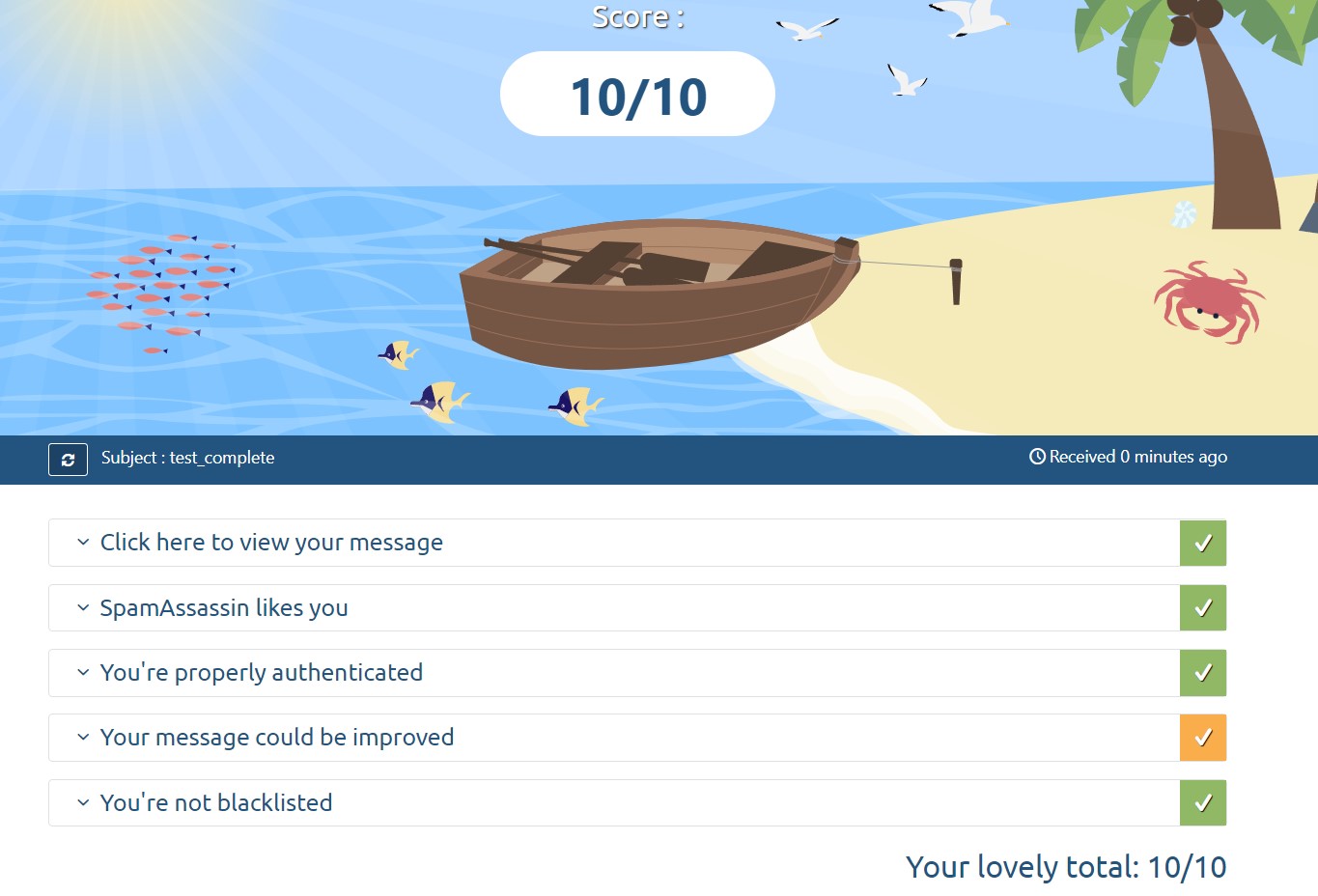
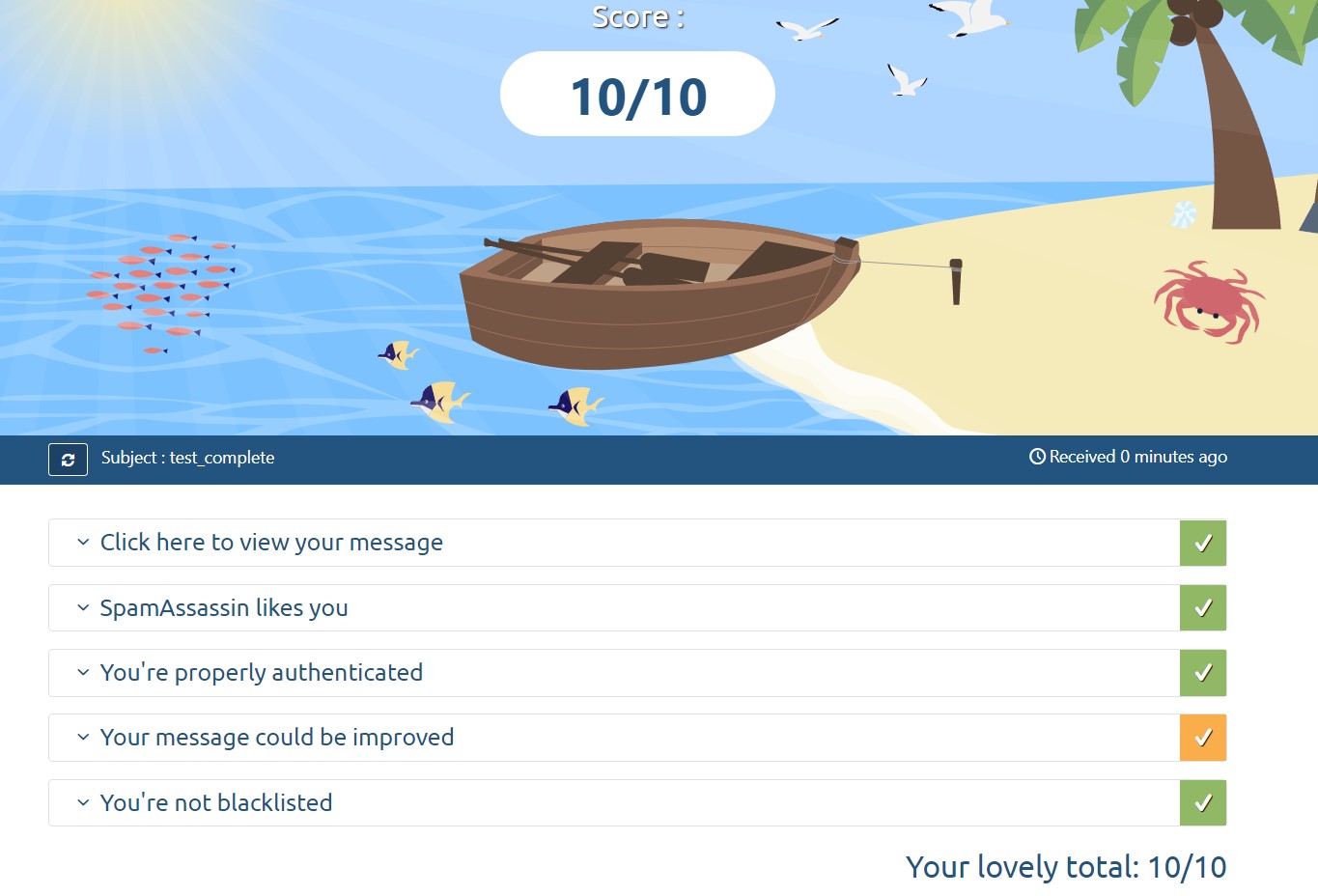
- メールテスター で確認したところスコアは 5.7/10 となった
- SPF レコードチェッカー でテストを行ったが SPF レコードが無効 となった
- SPF/DKIM は AWS Route53 のドメイン情報として登録していた
- SPF 型の定義、同じ内容を TXT としても定義するのが当時の方法だった
- その後 SPF 型の定義が RFC7208 で非推奨(実質使用禁止)になっていた ことがわかった
- Route53 のレコードから SPF 型の宣言を削除し DNS レコードを更新した。
- 上記変更後に メールテスター で確認したところ 10/10 に復帰した。
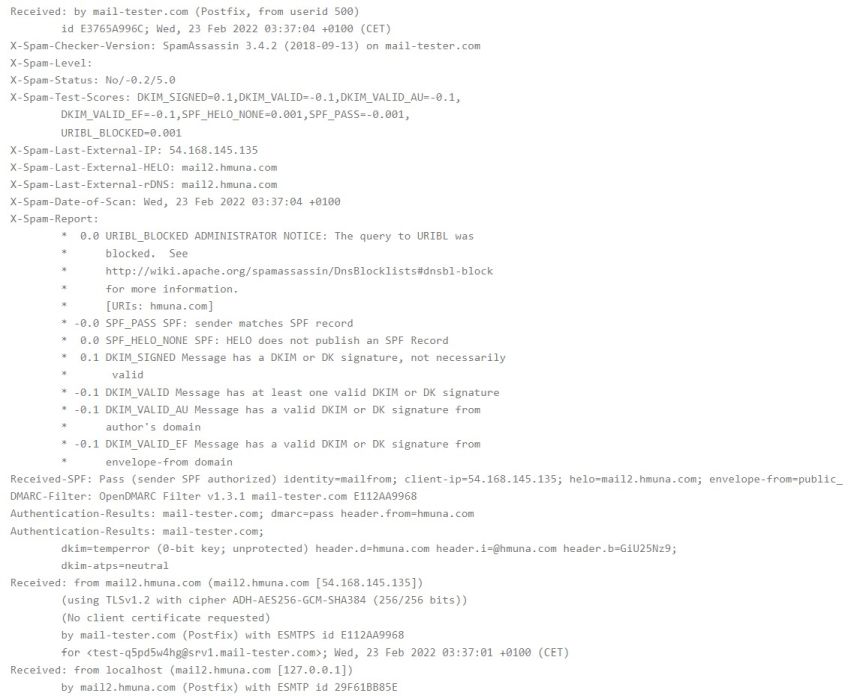
- 結局 DKIM レコードについては変更していない(SPF レコードが無効だった事の副作用と考えられる)
![[PukiWiki]](image/taikyoku.gif "[PukiWiki]")