Let's encrypt から証明書失効の連絡メールが来た、本来は certbot で自動更新される筈なのに†
Hello,

Your certificate (or certificates) for the names listed below will expire in 19 days (on 2024-05-05). Please make sure to renew your certificate before then, or
visitors to your web site will encounter errors.

We recommend renewing certificates automatically when they have a third of their total lifetime left. For Let's Encrypt's current 90-day certificates, that
means renewing 30 days before expiration. See https://letsencrypt.org/docs/integration-guide/ for details.

kgb2.hmuna.com

For details about when we send these emails, please visit: https://letsencrypt.org/docs/expiration-emails/ In particular, note that this reminder email is still
sent if you've obtained a slightly different certificate by adding or removing names. If you've replaced this certificate with a newer one that covers more or
fewer names than the list above, you may be able to ignore this message.

For any questions or support, please visit: https://community.letsencrypt.org/ Unfortunately, we can't provide support by email.

To learn more about the latest technical and organizational updates from Let's Encrypt, sign up for our newsletter: https://letsencrypt.org/opt-in/

Regards,
The Let's Encrypt Team
certbot をマニュアルで再実行するとエラーになった†
- ちなみに certbot のサイトには Ubutu20 (focal) までしか選択がないが、22 (jammy) でも問題は無いようだ
[KGB2] munakata:~$ sudo certbot --apache
Saving debug log to /var/log/letsencrypt/letsencrypt.log

Which names would you like to activate HTTPS for?
We recommend selecting either all domains, or all domains in a VirtualHost/server block.
- - - - - - - - - - - - - - - - - - - - - - - - - - - - - - - - - - - - - - - -
1: kgb2.hmuna.com
2: tvr.hmuna.com
- - - - - - - - - - - - - - - - - - - - - - - - - - - - - - - - - - - - - - - -
Select the appropriate numbers separated by commas and/or spaces, or leave input
blank to select all options shown (Enter 'c' to cancel):   <------ ブランクにして両方を選択

- - - - - - - - - - - - - - - - - - - - - - - - - - - - - - - - - - - - - - - -
An RSA certificate named kgb2.hmuna.com already exists. Do you want to update
its key type to ECDSA?
- - - - - - - - - - - - - - - - - - - - - - - - - - - - - - - - - - - - - - - -
(U)pdate key type/(K)eep existing key type: U   <----- U を選択して更新を選択

- - - - - - - - - - - - - - - - - - - - - - - - - - - - - - - - - - - - - - - -
You have an existing certificate that contains a portion of the domains you
requested (ref: /etc/letsencrypt/renewal/kgb2.hmuna.com.conf)

It contains these names: kgb2.hmuna.com

You requested these names for the new certificate: kgb2.hmuna.com,tvr.hmuna.com.

Do you want to expand and replace this existing certificate with the new certificate?
- - - - - - - - - - - - - - - - - - - - - - - - - - - - - - - - - - - - - - - -
(E)xpand/(C)ancel: E
Renewing an existing certificate for kgb2.hmuna.com and tvr.hmuna.com

Certbot failed to authenticate some domains (authenticator: apache). The Certificate Authority reported these problems:
  Domain: kgb2.hmuna.com
  Type:   connection
  Detail: 124.155.55.64: Fetching http://kgb2.hmuna.com/.well-known/acme-challenge/qIYj_9JB1a1UuSKprTsS39A442uAuwWyuS5_zT-vuLY: Timeout during connect (likely firewall problem)

  Domain: tvr.hmuna.com
  Type:   connection
  Detail: 124.155.55.64: Fetching http://tvr.hmuna.com/.well-known/acme-challenge/LB_6Wc2pPPJR_F6c_wNSeOLTdZtm9Ol40JUCKttAnf0: Timeout during connect (likely firewall problem)

Hint: The Certificate Authority failed to verify the temporary Apache configuration changes made by Certbot. Ensure that the listed domains point to this Apache server and that it is accessible from the internet.

Some challenges have failed.
Ask for help or search for solutions at https://community.letsencrypt.org. See the logfile /var/log/letsencrypt/letsencrypt.log or re-run Certbot with -v for
more details.
/var/log/letsencrypt/letsencrypt.log で certbot のエラーを確認†
Certbot failed to authenticate some domains (authenticator: apache). The Certificate Authority reported these problems:
  Domain: kgb2.hmuna.com
  Type:   connection
  Detail: 124.155.55.64: Fetching http://kgb2.hmuna.com/.well-known/acme-challenge/qIYj_9JB1a1UuSKprTsS39A442uAuwWyuS5_zT-vuLY: Timeout during connect (likely firewall problem)

  Domain: tvr.hmuna.com
  Type:   connection
  Detail: 124.155.55.64: Fetching http://tvr.hmuna.com/.well-known/acme-challenge/LB_6Wc2pPPJR_F6c_wNSeOLTdZtm9Ol40JUCKttAnf0: Timeout during connect (likely firewall problem)

Hint: The Certificate Authority failed to verify the temporary Apache configuration changes made by Certbot. Ensure that the listed domains point to this Apache server and that it is accessible from the internet.
- Hint にあるように certbot がサーバーの 80番ポートへのアクセスに失敗しているのが原因のようだ。
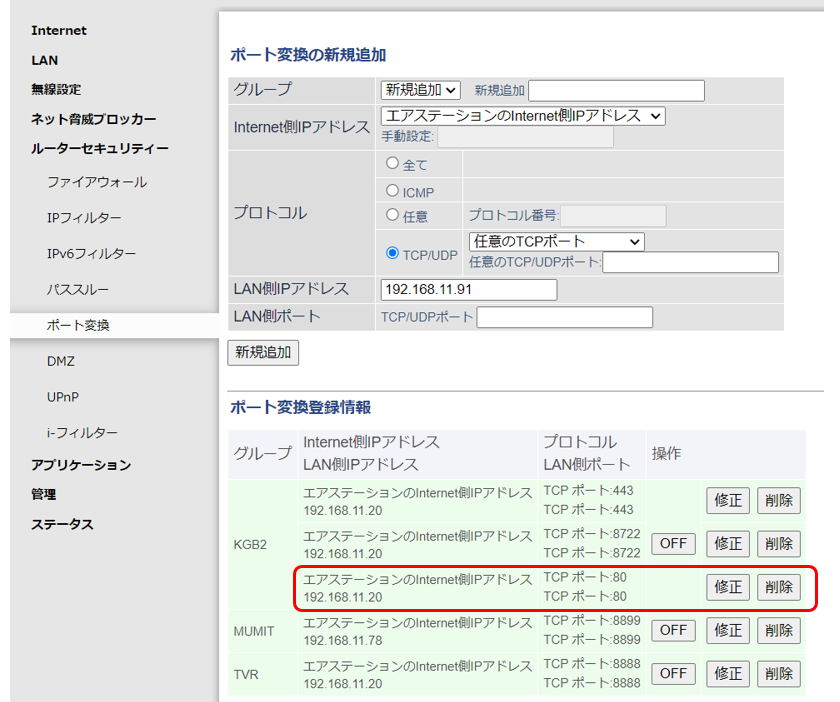
- 三鷹のルーターを交換したときに https(993) ポートしかサーバーにリダイレクト設定をしていなくて、http(80) がつながっていなかったのが原因と思われる
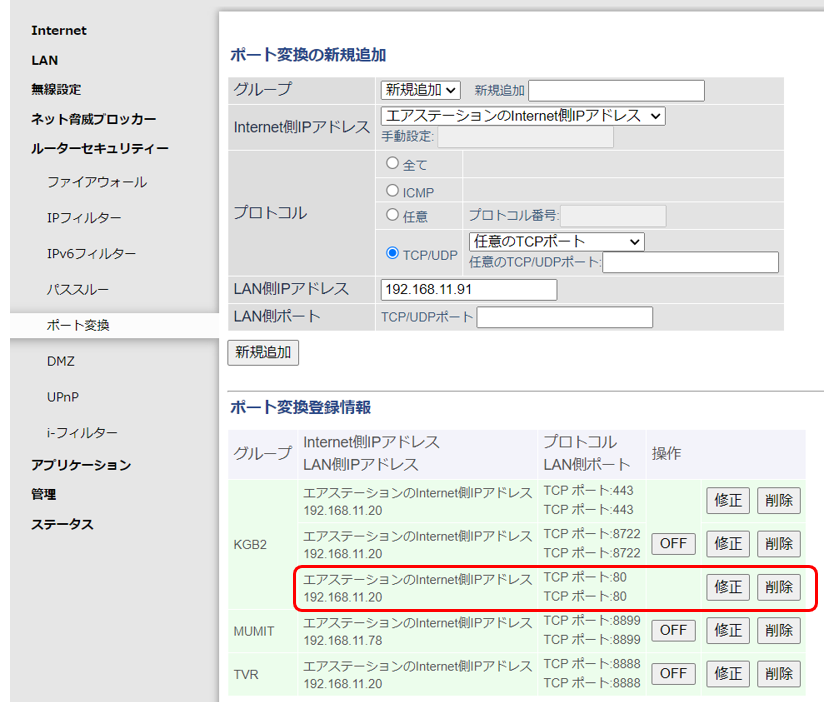
Buffalo ルーターの 80番ポート転送を追加†
- ルーターセキュリティ → ポート変換
80番ポートのリダイレクト設定後 ⇒ 証明書の更新成功†
[KGB2] munakata:~$ sudo certbot --apache
Saving debug log to /var/log/letsencrypt/letsencrypt.log

Which names would you like to activate HTTPS for?
We recommend selecting either all domains, or all domains in a VirtualHost/server block.
- - - - - - - - - - - - - - - - - - - - - - - - - - - - - - - - - - - - - - - -
1: kgb2.hmuna.com
2: tvr.hmuna.com
- - - - - - - - - - - - - - - - - - - - - - - - - - - - - - - - - - - - - - - -
Select the appropriate numbers separated by commas and/or spaces, or leave input
blank to select all options shown (Enter 'c' to cancel):  <---- Blank for both

- - - - - - - - - - - - - - - - - - - - - - - - - - - - - - - - - - - - - - - -
An RSA certificate named kgb2.hmuna.com already exists. Do you want to update
its key type to ECDSA?
- - - - - - - - - - - - - - - - - - - - - - - - - - - - - - - - - - - - - - - -
(U)pdate key type/(K)eep existing key type: U  <----

- - - - - - - - - - - - - - - - - - - - - - - - - - - - - - - - - - - - - - - -
You have an existing certificate that contains a portion of the domains you
requested (ref: /etc/letsencrypt/renewal/kgb2.hmuna.com.conf)

It contains these names: kgb2.hmuna.com

You requested these names for the new certificate: kgb2.hmuna.com,tvr.hmuna.com.

Do you want to expand and replace this existing certificate with the new certificate?
- - - - - - - - - - - - - - - - - - - - - - - - - - - - - - - - - - - - - - - -
(E)xpand/(C)ancel: E  <------
Renewing an existing certificate for kgb2.hmuna.com and tvr.hmuna.com

Successfully received certificate.
Certificate is saved at: /etc/letsencrypt/live/kgb2.hmuna.com/fullchain.pem
Key is saved at:         /etc/letsencrypt/live/kgb2.hmuna.com/privkey.pem
This certificate expires on 2024-07-28.
These files will be updated when the certificate renews.
Certbot has set up a scheduled task to automatically renew this certificate in the background.

Deploying certificate
Successfully deployed certificate for kgb2.hmuna.com to /etc/apache2/sites-enabled/kgb2.hmuna.com.conf
Successfully deployed certificate for tvr.hmuna.com to /etc/apache2/sites-enabled/tvr.hmuna.com.conf
Added an HTTP->HTTPS rewrite in addition to other RewriteRules; you may wish to check for overall consistency.
Your existing certificate has been successfully renewed, and the new certificate has been installed.

- - - - - - - - - - - - - - - - - - - - - - - - - - - - - - - - - - - - - - - -
If you like Certbot, please consider supporting our work by:
 * Donating to ISRG / Let's Encrypt:   https://letsencrypt.org/donate
 * Donating to EFF:                    https://eff.org/donate-le
- - - - - - - - - - - - - - - - - - - - - - - - - - - - - - - - - - - - - - - -
![[PukiWiki]](image/taikyoku.gif "[PukiWiki]")


 Let's Encrypt certificate expiration notice for domain "kgb2.hmuna.com"