![[PukiWiki]](image/taikyoku.gif "[PukiWiki]")
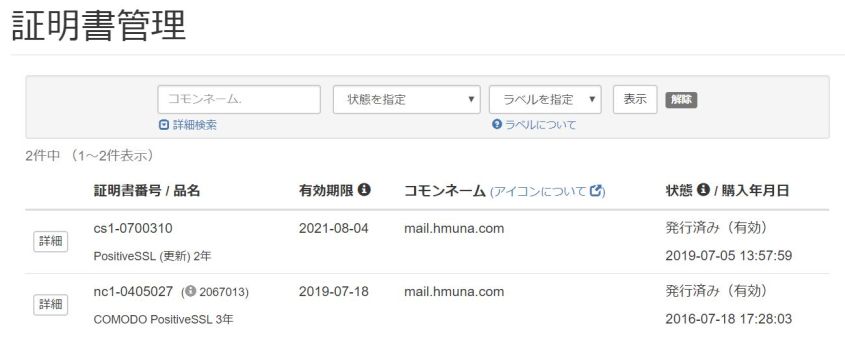
AWS 上で運用しているメールサーバーの証明書の更新を行った。
 cs1-0700310.txt
------------------------------------------------------
証明書情報
------------------------------------------------------
証明書番号:cs1-0700310

コモンネーム:mail.hmuna.com

CSR:
-----BEGIN CERTIFICATE REQUEST-----
MIICsTCCAZkCAQAwbDELMAkGA1UEBhMCSlAxETAPBgNVBAgMCEthbmFnYXdhMREw
DwYDVQQHDAhZb2tvaGFtYTERMA8GA1UECgwISVQgQWRtaW4xCzAJBgNVBAsMAklU
MRcwFQYDVQQDDA5tYWlsLmhtdW5hLmNvbTCCASIwDQYJKoZIhvcNAQEBBQADggEP
ADCCAQoCggEBAMlZTubDpZGOW8qk0rTFe1x0ixahykS3jnJ++cFZMvykEP8MD81j
C5DwJHAqRQ5b4uB04HiBALofde7I78iHDPql2lovkTqNhTIvcjBb7yBLJt9n0k0/
pdY2OCohSZUH1VoaYmcPXRuZpY++0Uow9mOUsi2z6sqIznZ0bEYC+Omcy56T9iKI
wg0vSsxi5AJDhAmaWLd98T75jB2f9T/MCoSZLkUzKgh+sS172E2myQNxNP58U5HF
5fINekljd6RchDK9WGWJqmJpKBB4RQfvlXwr+numgBlnamgP2DgTCivpPfX03zfw
AyyxnL7CB5yZsjH+paCffTcKOGpaZbXwik0CAwEAAaAAMA0GCSqGSIb3DQEBCwUA
A4IBAQBxrutKGVKPSYbsZk66jmdIq4VlkF8oeK9Iqsmt441aw1pNNSWaWVfyruN4
oaf8qbPNFoEbBn4QicbJixO2/P39MuVmrNHPw4o4JOfSIixxuqoNw5zQW+d+YHoV
0K6hYZVvsioO8a30FaN8AWEs48PXjfpdVe7XoTCtW/yePq9wXNTALXRpr6AyqaoN
NontS/a7NlMcfu1FNzMprTi45AXVexlskWLY8lRylgE/rvYSfciKPM9fViSk2hJL
RchQ+4rdUT83pGxOEZjr8ZXY049eCuZ437HInKP3uuhwVK2VkKgaPtWjfNAMaxlL
VQ1KgYVehRsAsp8VD8DEn2G9owcN
-----END CERTIFICATE REQUEST-----


------------------------------------------------------
ドメイン使用権確認
------------------------------------------------------

確認方法:email
※email:メール認証、http:ファイル認証、cname:DNS認証

承認メールアドレス:admin@hmuna.com
※認証方式がファイル認証の場合、この項目は表示されません。
その他
証明書送付先:public_mail@hmuna.com
証明書発行会社の名前が から "SSLストア" に変更になったようだ。
 mail_hmuna_com.zip
[AWS] ubuntu:~/work$ openssl x509 -in mail_hmuna_com.crt -noout -dates
notBefore=Jul  5 00:00:00 2019 GMT
notAfter=Aug  4 23:59:59 2021 GMT
[AWS] ubuntu:~/work$ openssl x509 -in mail_hmuna_com.crt -noout -subject
subject= /OU=Domain Control Validated/CN=mail.hmuna.com
[AWS] ubuntu:~/work$ openssl x509 -in /etc/ssl/certs/mail_hmuna_com.crt -noout -dates
notBefore=Jul 21 00:00:00 2016 GMT
notAfter=Sep 27 23:59:59 2019 GMT
発行は 2016/7/21 だが、何故か失効は 2019/9/27(3年と2ヶ月強)になっている。
magu-tokyo-messenger.pemssl-bundle.crt
[AWS] ubuntu:~/work$ cat mail_hmuna_com.crt USERTrustRSAAddTrustCA.crt SectigoRSADomainValidationSecureServerCA.crt AddTrustExternalCARoot.crt > ssl-bundle.crt
# PEM encoded X.509 SSL/TLS certificate and private key. They're opened before$
# dropping root privileges, so keep the key file unreadable by anyone but$
# root. Included doc/mkcert.sh can be used to easily generate self-signed$
# certificate, just make sure to update the domains in dovecot-openssl.cnf$
#ssl_cert = </etc/dovecot/dovecot.pem$
#ssl_key = </etc/dovecot/private/dovecot.pema$
ssl_cert = </etc/ssl/certs/mail_hmuna_com.crt$
ssl_key  = </etc/ssl/private/mail_hmuna.key$

# If key file is password protected, give the password here. Alternatively$
# give it when starting dovecot with -p parameter. Since this file is often$
# world-readable, you may want to place this setting instead to a different$
# root owned 0600 file by using ssl_key_password = <path.$
#ssl_key_password =$

# PEM encoded trusted certificate authority. Set this only if you intend to use$
# ssl_verify_client_cert=yes. The file should contain the CA certificate(s)$
# followed by the matching CRL(s). (e.g. ssl_ca = </etc/ssl/certs/ca.pem)$
#ssl_ca =-$
ssl_ca  = </etc/apache2/ssl.crt/mail_hmuna_com.ca-bundle$


