事前情報†
リソース†
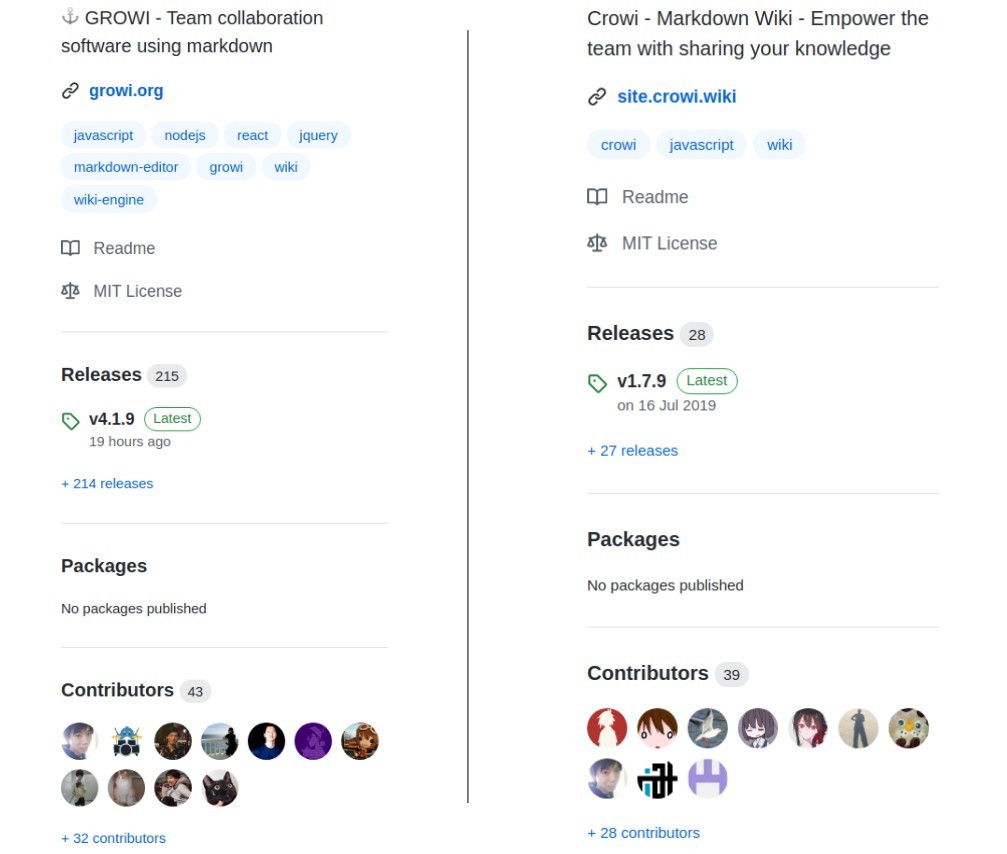
- GROWI は markup ベースのページ作成ツール(OSS)
- WESEEK, Inc. が社内ツールとして開発メンテしているもの
- Crowi のフォーク
- pukiwiki の後継情報アグリゲーションサイトとして検討
- 2020年時点でもコードメンテ、リリースの実態があり本家 (crowi、右) よりアクティブ
- なので、今回お試しで GROWI の方をインストールしてみる事にした
インストール†
- docker イメージ、heiroku イメージも用意されているが Ubuntu にインストール
- 公式ドキュメントでは Ubuntu 16.04 向けのインストール手順が公開も 18.04 はスコープ外
- Ubuntu18.04にGrowiをインストール を参考に 18.04 環境に移植
- 特に nodejs のバージョン(既にメンテが止まっている v8.4 に依存している)指定がポイント
必要パッケージ†
- node.js 8.x (DO NOT USE 9.x)
- npm 5.x
- yarn
- MongoDB 3.x
- Redis 3.x (Optional)
- Elasticsearch 5.x (Optional)
- Japanese (kuromoji) Analysis plugin
- ICU Analysis Plugin
node/npm†
curl で v8.4 の repo を指定(ワーニング表示後にインストールされた)†
[KGB] munakata:~$ curl -sL https://deb.nodesource.com/setup_8.x | sudo -E bash -

================================================================================
================================================================================

                              DEPRECATION WARNING

  Node.js 8.x LTS Carbon is no longer actively supported!

  You will not receive security or critical stability updates for this version.

  You should migrate to a supported version of Node.js as soon as possible.
  Use the installation script that corresponds to the version of Node.js you
  wish to install. e.g.

   * https://deb.nodesource.com/setup_10.x — Node.js 10 LTS "Dubnium"
   * https://deb.nodesource.com/setup_12.x — Node.js 12 LTS "Erbium" (recommended)
   * https://deb.nodesource.com/setup_14.x — Node.js 14 LTS "Fermium"

  Please see https://github.com/nodejs/Release for details about which
  version may be appropriate for you.

  The NodeSource Node.js distributions repository contains
  information both about supported versions of Node.js and supported Linux
  distributions. To learn more about usage, see the repository:
    https://github.com/nodesource/distributions

================================================================================
================================================================================

Continuing in 20 seconds ...


## Installing the NodeSource Node.js 8.x LTS Carbon repo...


## Populating apt-get cache...

+ apt-get update
取得:1 file:/var/opt/amdgpu-pro-local ./ InRelease
無視:1 file:/var/opt/amdgpu-pro-local ./ InRelease
取得:2 file:/var/opt/amdgpu-pro-local ./ Release [816 B]
取得:2 file:/var/opt/amdgpu-pro-local ./ Release [816 B]
取得:3 file:/var/opt/amdgpu-pro-local ./ Release.gpg
無視:3 file:/var/opt/amdgpu-pro-local ./ Release.gpg
エラー:4 http://archive.ubuntu.com/ubuntu bionic InRelease
  'archive.ubuntu.com' を解決できませんでした
ヒット:5 http://jp.archive.ubuntu.com/ubuntu bionic InRelease
取得:6 http://jp.archive.ubuntu.com/ubuntu bionic-updates InRelease [88.7 kB]
ヒット:7 https://dl.yarnpkg.com/debian stable InRelease
無視:8 https://repo.mongodb.org/apt/ubuntu bionic/mongodb-org/4.0 InRelease
取得:9 http://jp.archive.ubuntu.com/ubuntu bionic-backports InRelease [74.6 kB]
ヒット:10 https://repo.mongodb.org/apt/ubuntu bionic/mongodb-org/4.0 Release
ヒット:11 http://dl.google.com/linux/chrome/deb stable InRelease
取得:13 http://security.ubuntu.com/ubuntu bionic-security InRelease [88.7 kB]
ヒット:14 http://archive.canonical.com/ubuntu xenial InRelease
無視:15 https://artifacts.elastic.co/packages/5.x/apt stable InRelease
ヒット:16 https://artifacts.elastic.co/packages/5.x/apt stable Release
252 kB を 1秒 で取得しました (176 kB/s)
パッケージリストを読み込んでいます... 完了
W: http://archive.ubuntu.com/ubuntu/dists/bionic/InRelease の取得に失敗しました  'archive.ubuntu.com' を解決できませんでした
W: いくつかのインデックスファイルのダウンロードに失敗しました。これらは無視されるか、古いものが代わりに使われます。

## Confirming "bionic" is supported...

+ curl -sLf -o /dev/null 'https://deb.nodesource.com/node_8.x/dists/bionic/Release'

## Adding the NodeSource signing key to your keyring...

+ curl -s https://deb.nodesource.com/gpgkey/nodesource.gpg.key | apt-key add -
OK

## Creating apt sources list file for the NodeSource Node.js 8.x LTS Carbon repo...

+ echo 'deb https://deb.nodesource.com/node_8.x bionic main' > /etc/apt/sources.list.d/nodesource.list
+ echo 'deb-src https://deb.nodesource.com/node_8.x bionic main' >> /etc/apt/sources.list.d/nodesource.list

## Running `apt-get update` for you...

+ apt-get update
取得:1 file:/var/opt/amdgpu-pro-local ./ InRelease
無視:1 file:/var/opt/amdgpu-pro-local ./ InRelease
取得:2 file:/var/opt/amdgpu-pro-local ./ Release [816 B]
エラー:3 http://archive.ubuntu.com/ubuntu bionic InRelease
  'archive.ubuntu.com' を解決できませんでした
取得:2 file:/var/opt/amdgpu-pro-local ./ Release [816 B]
取得:4 file:/var/opt/amdgpu-pro-local ./ Release.gpg
無視:4 file:/var/opt/amdgpu-pro-local ./ Release.gpg
ヒット:5 http://jp.archive.ubuntu.com/ubuntu bionic InRelease
取得:6 http://jp.archive.ubuntu.com/ubuntu bionic-updates InRelease [88.7 kB]
ヒット:7 http://dl.google.com/linux/chrome/deb stable InRelease
取得:8 http://jp.archive.ubuntu.com/ubuntu bionic-backports InRelease [74.6 kB]
ヒット:9 https://dl.yarnpkg.com/debian stable InRelease
無視:10 https://repo.mongodb.org/apt/ubuntu bionic/mongodb-org/4.0 InRelease
ヒット:11 https://repo.mongodb.org/apt/ubuntu bionic/mongodb-org/4.0 Release
ヒット:12 http://archive.canonical.com/ubuntu xenial InRelease
取得:13 http://security.ubuntu.com/ubuntu bionic-security InRelease [88.7 kB]
取得:15 https://deb.nodesource.com/node_8.x bionic InRelease [4,595 B]
無視:16 https://artifacts.elastic.co/packages/5.x/apt stable InRelease
ヒット:17 https://artifacts.elastic.co/packages/5.x/apt stable Release
取得:19 https://deb.nodesource.com/node_8.x bionic/main i386 Packages [766 B]
取得:20 https://deb.nodesource.com/node_8.x bionic/main amd64 Packages [767 B]
258 kB を 2秒 で取得しました (136 kB/s)
パッケージリストを読み込んでいます... 完了
W: http://archive.ubuntu.com/ubuntu/dists/bionic/InRelease の取得に失敗しました  'archive.ubuntu.com' を解決できませんでした
W: いくつかのインデックスファイルのダウンロードに失敗しました。これらは無視されるか、古いものが代わりに使われます。

## Run `sudo apt-get install -y nodejs` to install Node.js 8.x LTS Carbon and npm
## You may also need development tools to build native addons:
     sudo apt-get install gcc g++ make
## To install the Yarn package manager, run:
     curl -sL https://dl.yarnpkg.com/debian/pubkey.gpg | sudo apt-key add -
     echo "deb https://dl.yarnpkg.com/debian/ stable main" | sudo tee /etc/apt/sources.list.d/yarn.list
     sudo apt-get update && sudo apt-get install yarn
nodejs のインストール (同時に npm も入った)†
[KGB] munakata:~$ sudo apt install -y nodejs
パッケージリストを読み込んでいます... 完了
依存関係ツリーを作成しています
状態情報を読み取っています... 完了
以下のパッケージが自動でインストールされましたが、もう必要とされていません:
  libboost-program-options1.65.1 libgoogle-perftools4 libpcrecpp0v5 libtcmalloc-minimal4 libyaml-cpp0.5v5 linux-headers-4.15.0-118
  linux-headers-4.15.0-118-generic linux-image-4.15.0-118-generic linux-modules-4.15.0-118-generic linux-modules-extra-4.15.0-118-generic
これを削除するには 'sudo apt autoremove' を利用してください。
以下のパッケージが新たにインストールされます:
  nodejs
アップグレード: 0 個、新規インストール: 1 個、削除: 0 個、保留: 0 個。
14.1 MB のアーカイブを取得する必要があります。
この操作後に追加で 70.5 MB のディスク容量が消費されます。
取得:1 https://deb.nodesource.com/node_8.x bionic/main amd64 nodejs amd64 8.17.0-1nodesource1 [14.1 MB]
14.1 MB を 4秒 で取得しました (3,391 kB/s)
以前に未選択のパッケージ nodejs を選択しています。
(データベースを読み込んでいます ... 現在 284730 個のファイルとディレクトリがインストールされています。)
.../nodejs_8.17.0-1nodesource1_amd64.deb を展開する準備をしています ...
nodejs (8.17.0-1nodesource1) を展開しています...
nodejs (8.17.0-1nodesource1) を設定しています ...
man-db (2.8.3-2ubuntu0.1) のトリガを処理しています ...

[KGB] munakata:~$ node -v
v8.17.0
[KGB] munakata:~$ npm -v
6.13.4
yarn のリポジトリ設定、インストール†
[KGB] munakata:~$ curl -sS https://dl.yarnpkg.com/debian/pubkey.gpg | sudo apt-key add -
OK

[KGB] munakata:~$ echo "deb https://dl.yarnpkg.com/debian/ stable main" | sudo tee /etc/apt/sources.list.d/yarn.list
deb https://dl.yarnpkg.com/debian/ stable main

[KGB] munakata:~$ sudo apt-get update && sudo apt-get install yarn
yarn はすでに最新バージョン (1.22.5-1) です。<--------- 一度上記手順でインストールしていたので

[KGB] munakata:~$ yarn -v
1.22.5
mongodb のインストール†
インストール†
[KGB] munakata:~$ sudo apt install -y mongodb mongodb-server mongo-tools
  (問題なく進んだので経過は省略)
起動とステータス確認†
[KGB] munakata:~$ sudo systemctl start mongodb
[KGB] munakata:~$ sudo systemctl status mongodb
● mongodb.service - An object/document-oriented database
   Loaded: loaded (/lib/systemd/system/mongodb.service; enabled; vendor preset: enabled)
   Active: active (running) since Tue 2020-10-20 11:08:54 JST; 1min 59s ago
     Docs: man:mongod(1)
 Main PID: 346 (mongod)
    Tasks: 23 (limit: 4915)
   CGroup: /system.slice/mongodb.service
           └─346 /usr/bin/mongod --unixSocketPrefix=/run/mongodb --config /etc/mongodb.conf

10月 20 11:08:54 mvc systemd[1]: Started An object/document-oriented database.
自動起動の有効化†
[KGB] munakata:~$ sudo systemctl enable mongodb
Synchronizing state of mongodb.service with SysV service script with /lib/systemd/systemd-sysv-install.
Executing: /lib/systemd/systemd-sysv-install enable mongodb
バージョン確認(exit で抜ける)†
[KGB] munakata:~$ mongo
MongoDB shell version v3.6.3
connecting to: mongodb://127.0.0.1:27017
MongoDB server version: 3.6.3
Welcome to the MongoDB shell.
For interactive help, type "help".
For more comprehensive documentation, see
	http://docs.mongodb.org/
Questions? Try the support group
	http://groups.google.com/group/mongodb-user
Server has startup warnings:
2020-10-20T11:08:54.284+0900 I STORAGE  [initandlisten]
2020-10-20T11:08:54.284+0900 I STORAGE  [initandlisten] ** WARNING: Using the XFS filesystem is strongly recommended with the WiredTiger
storage engine
2020-10-20T11:08:54.284+0900 I STORAGE  [initandlisten] **          See http://dochub.mongodb.org/core/prodnotes-filesystem
2020-10-20T11:08:55.309+0900 I CONTROL  [initandlisten]
2020-10-20T11:08:55.309+0900 I CONTROL  [initandlisten] ** WARNING: Access control is not enabled for the database.
2020-10-20T11:08:55.309+0900 I CONTROL  [initandlisten] **          Read and write access to data and configuration is unrestricted.
2020-10-20T11:08:55.309+0900 I CONTROL  [initandlisten]
> exit
bye
java のインストール†
apt で openjdk をインストール†
[KGB] munakata:~$ sudo apt install -y default-jre openjdk-11-jre-headless openjdk-8-jre-headless
  (問題なく進んだので経過は省略)
[KGB] munakata:~$ java --version
openjdk 11.0.8 2020-07-14
OpenJDK Runtime Environment (build 11.0.8+10-post-Ubuntu-0ubuntu118.04.1)
OpenJDK 64-Bit Server VM (build 11.0.8+10-post-Ubuntu-0ubuntu118.04.1, mixed mode, sharing)
インストール先を確認し JAVA_HOMEに java8 を設定†
[KGB] munakata:~$ update-alternatives --list java
/usr/lib/jvm/java-11-openjdk-amd64/bin/java
/usr/lib/jvm/java-8-openjdk-amd64/jre/bin/java
[KGB] munakata:~$ sudo vi /etc/profile.d/java.sh
[KGB] munakata:~$ cat /etc/profile.d/java.sh
JAVA_HOME=/usr/lib/jvm/java-8-openjdk-amd64

(一度ログアウト)

[KGB] munakata:~$ echo $JAVA_HOME
/usr/lib/jvm/java-8-openjdk-amd64
Elasticsearchのリポジトリ設定、インストール†
elasticsearch を apt でインストール†
[KGB] munakata:~$ sudo apt update
[KGB] munakata:~$ sudo apt install -y elasticsearch
plug-in インストール†
[KGB] munakata:~$ sudo /usr/share/elasticsearch/bin/elasticsearch-plugin install analysis-kuromoji
-> Downloading analysis-kuromoji from elastic
[=================================================] 100%
-> Installed analysis-kuromoji

[KGB] munakata:~$ sudo /usr/share/elasticsearch/bin/elasticsearch-plugin install analysis-icu
-> Downloading analysis-icu from elastic
[=================================================] 100%
-> Installed analysis-icu
起動とステータス確認†
[KGB] munakata:~$ sudo systemctl start elasticsearch

[KGB] munakata:~$ sudo systemctl status elasticsearch
● elasticsearch.service - Elasticsearch
   Loaded: loaded (/usr/lib/systemd/system/elasticsearch.service; enabled; vendor preset: enabled)
   Active: active (running) since Thu 2020-10-08 19:14:01 JST; 1 weeks 4 days ago
     Docs: http://www.elastic.co
 Main PID: 8414 (java)
    Tasks: 55 (limit: 4915)
   CGroup: /system.slice/elasticsearch.service
           └─8414 /usr/bin/java -Xms2g -Xmx2g -XX:+UseConcMarkSweepGC -XX:CMSInitiatingOccupancyFraction=75 -XX:+UseCMSInitiatingOccupancyOnl

10月 08 19:14:01 mvc systemd[1]: Starting Elasticsearch...
10月 08 19:14:01 mvc systemd[1]: Started Elasticsearch.
- メモリーは 2GB 割り当てられている(十分以上に大きい)
自動起動の有効化†
[KGB] munakata:~$ sudo systemctl enable elasticsearch
Synchronizing state of elasticsearch.service with SysV service script with /lib/systemd/systemd-sysv-install.
Executing: /lib/systemd/systemd-sysv-install enable elasticsearch
動作確認†
[KGB] munakata:~$ curl localhost:9200
{
  "name" : "qTywGV3",
  "cluster_name" : "elasticsearch",
  "cluster_uuid" : "QIjtkuqkQTmgaNh0XrRuNQ",
  "version" : {
    "number" : "5.6.16",
    "build_hash" : "3a740d1",
    "build_date" : "2019-03-13T15:33:36.565Z",
    "build_snapshot" : false,
    "lucene_version" : "6.6.1"
  },
  "tagline" : "You Know, for Search"
}
Redis†
![[PukiWiki]](image/taikyoku.gif "[PukiWiki]")