simBrief†
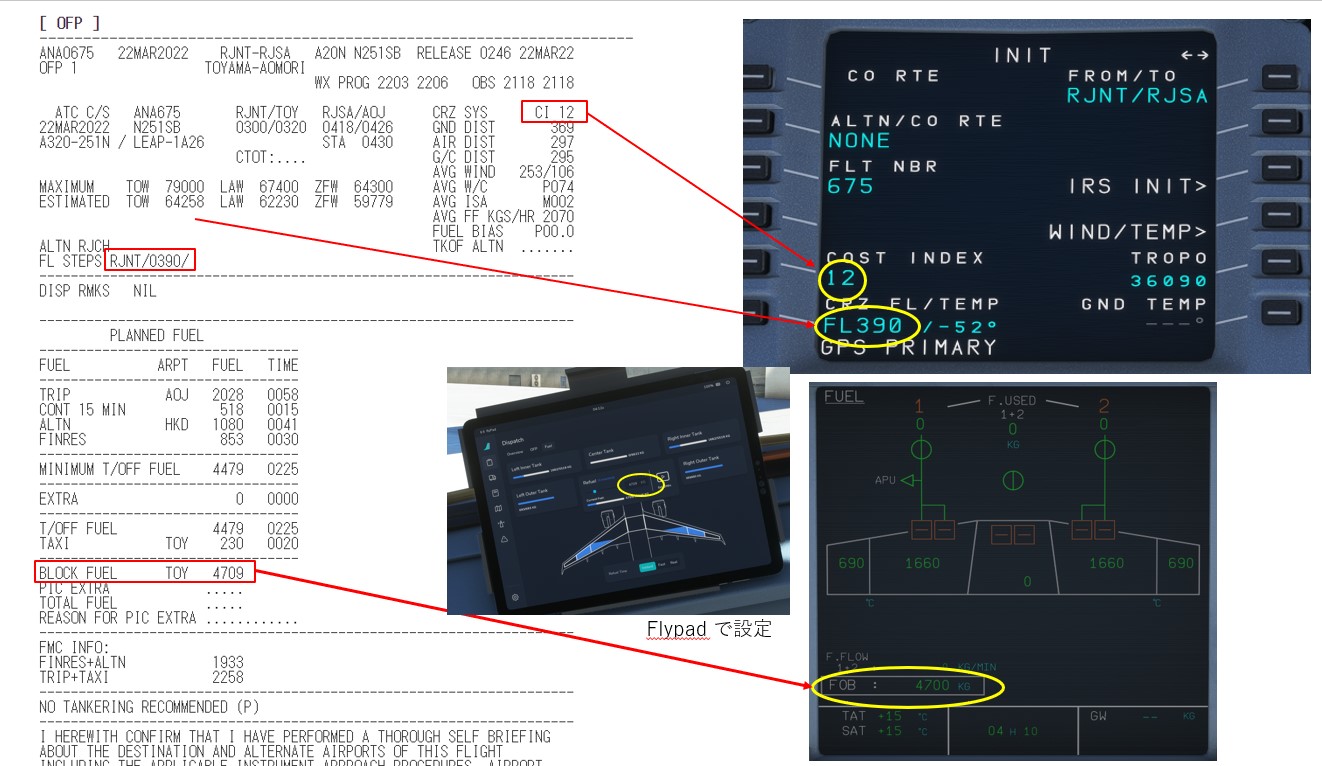
- フライトプランの作成( PLAN → Brief の二段階、MSFS2020 のワークディレクトリに自動コピー)
- nagigraph の最新データの利用
- simBrief で作成した FP の読み込み:World Map のサブメニューで読み込み可能
- MCDU への FP の導入
理解したこと†
- アクティブポーズ:画面上のメニュー左のアイコン
- キーボードで AutoTrust の設定速度を変更する(着陸直前にスピードを抑えたい)
- [SHIFT] + [CTRL] + [INS] で速度アップ
- [SHIFT] + [CTRL] + [DEL] で速度ダウン
管制関係†
- SID (= Standard Instrument Departure) 標準計器出発方式
- New sky 14 Cleared to Tokyo international airport via Mifune one departure then flight planed route maintain 9000 squawk 5547
- ソラシドエアー14便。東京国際空港(羽田)までのフライトを承認します。Mifune one departureを行い、その後はフライトプランにファイルしたルート通りに飛行してください。9000ftを維持して、飛行機のコードは5547にセットしてください。
- STAR (= Standard instrument arrival) 標準計器到着方式
- Airdo 15 Descend via STAR to 4000,Cleared for ILS Z Runway 34R approach. Maintain210kt
- エアードゥー15便。STARの高度制限に従って降下してください。滑走路34R
コントローラ関連†
- ブレーキ = [NUM DEL]
- 駐機ブレーキ = Shift + [NUM DEL]
- We begin by looking down at the bottom pedestal.
- Place the Parking Brake handle in the ON position
- Ensure the Speed Brakes have been disarmed/retracted
- Flaps are retracted
- Weather Radar is switched off
- Engine Masters 1 and 2 are in the OFF position
- Engine Mode selector is set to NORM
- Thrust Levers are idle
- Gear Lever is down
- Wiper selectors are in the OFF position
- MCDU 設定順序= D.I.F.S.I.P
- D ATA
- I NIT A
- F LIGHT PLAN <---- from SimBrief
- S ECONDARY FLIGHT PLAN
- R AD NAV
- I NIT B
- P ERF
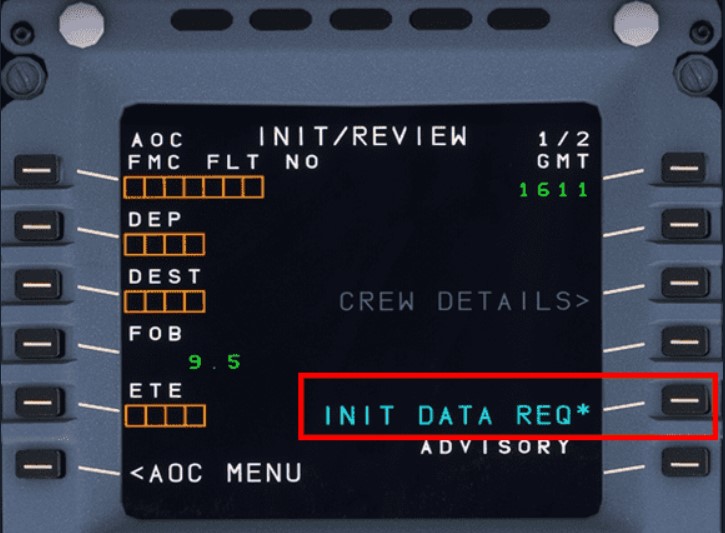
- Prepare the MCDU to input the flight plan
- Return to MCDU MENU
- Click on ATSU
- Click on AOC MENU
- Click on INIT/PRESS
- Click on INIT DATA REQ
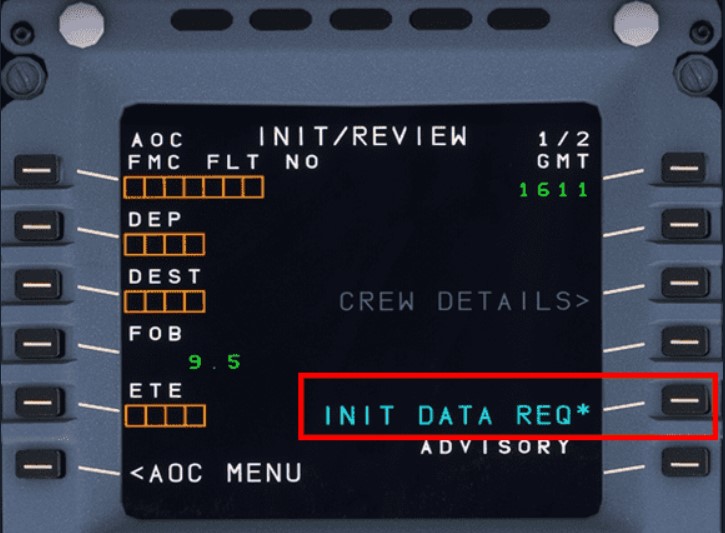
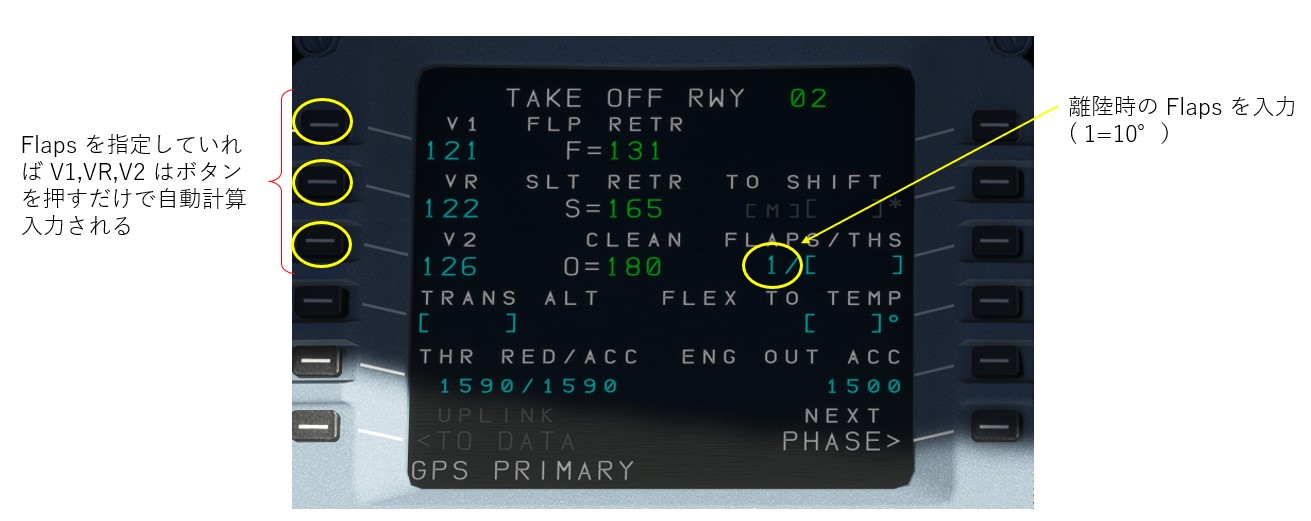
- Line-up & Take-off procedure
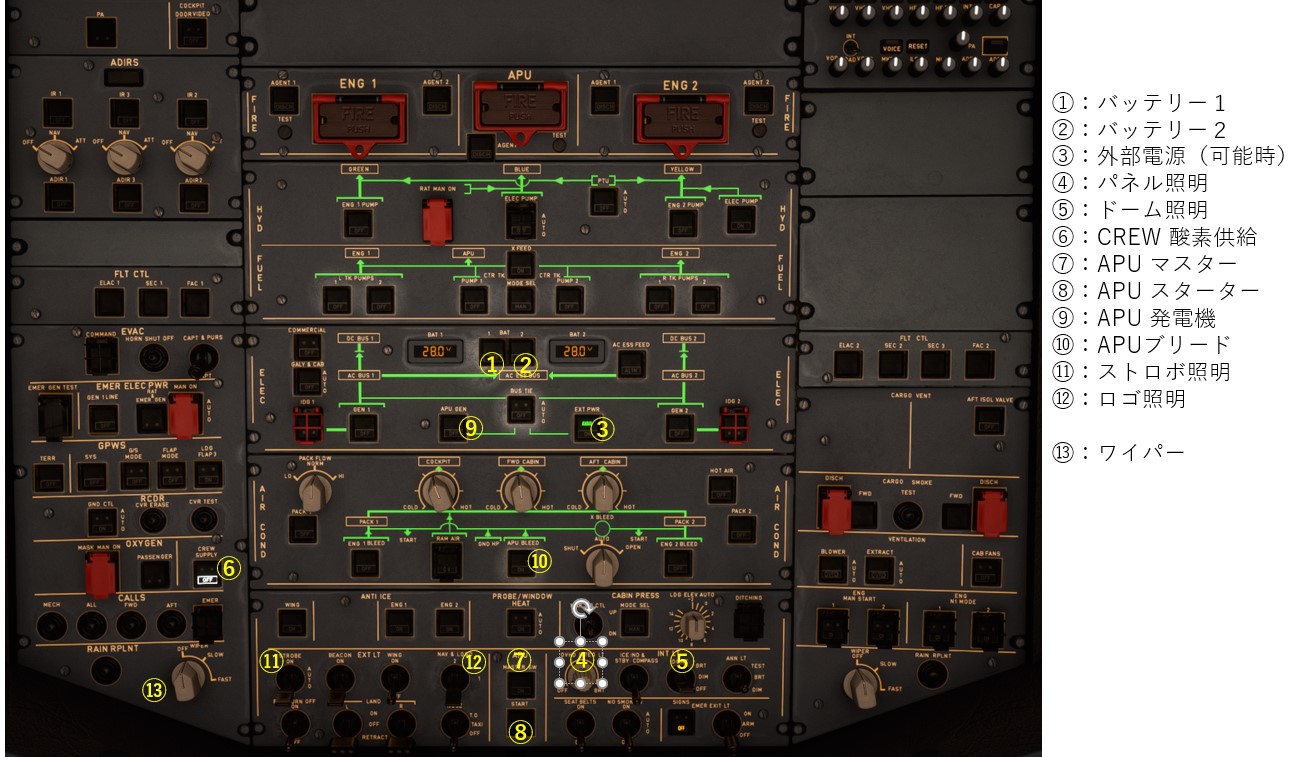
- Check OVHD panel: APU off, no lights visible under normal circumstances
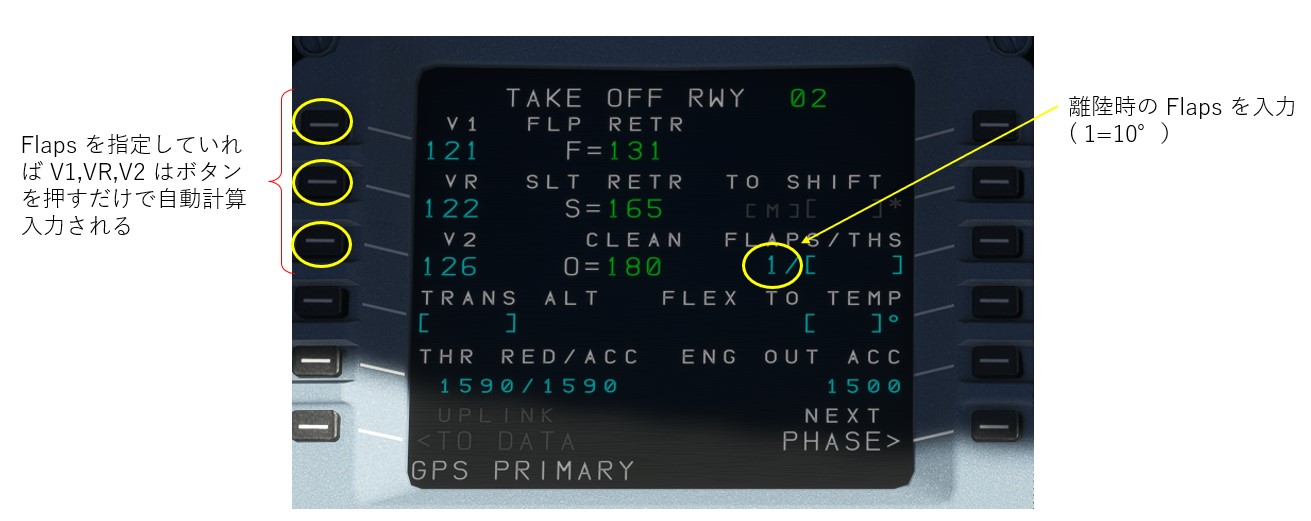
- Check correct FLAPS setting (must be in line with PERF TAKE OFF page)
- Check V1, VR, V2 speeds and also, if required, FLX temperature setting (PERF TAKE OFF page)
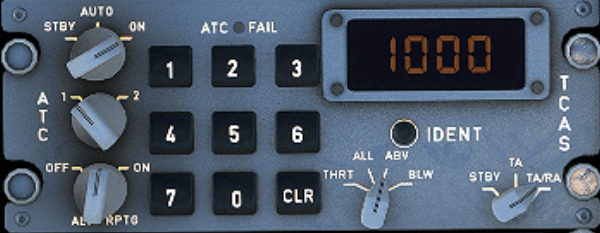
- Check Squawk ATC-TCAS
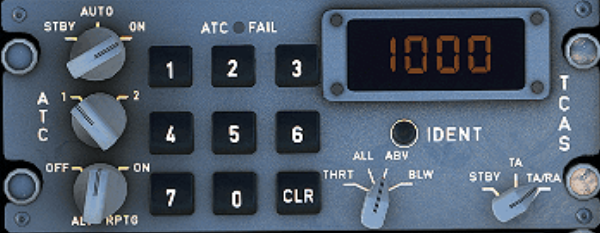
- check squawk ID number
- Set to AUTO or On
- Set ALT RPTG to ON
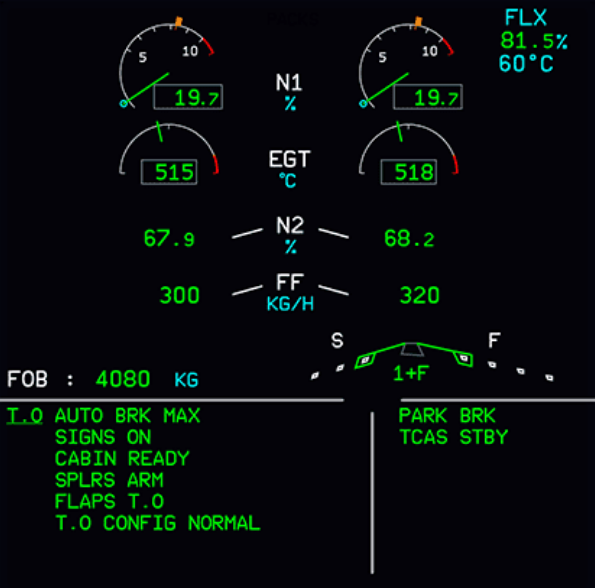
- Check ECAM (before T.O) - no blue writing should be visible for these:
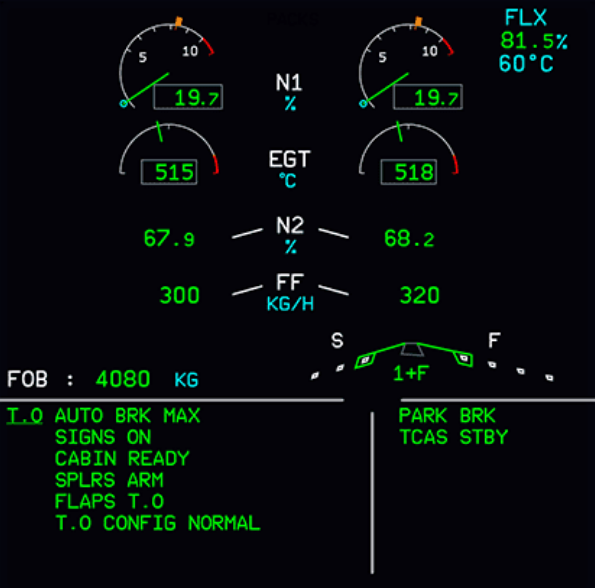
- AUTO BRK MAX
- SIGN ON
- CABIN READY
- SPLRS ARM
- FLAPS T.O
- T.O CONFIG NORMAL
- Press T.O. Config button below the ECAM to check takeoff configuration
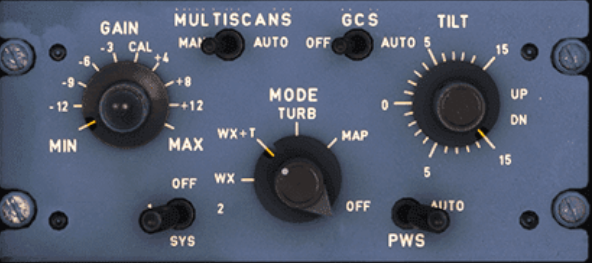
- Check radar panel:
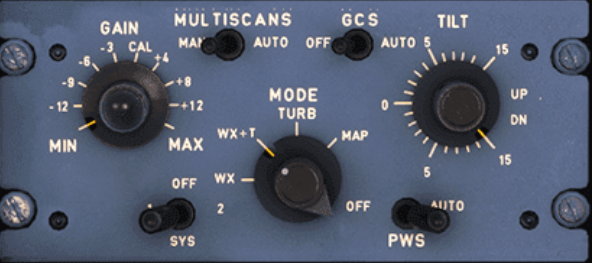
- Set Weather Radar to Sys 1 to show weather on ND
- Check if Predictive Windshear Alerts (PWS) is set to AUTO (should have been set to AUTO during TAXI)
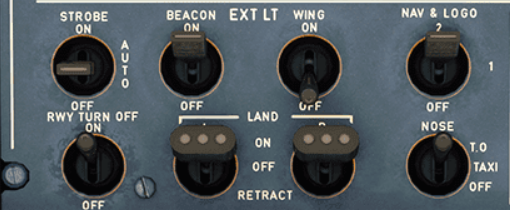
- Lights
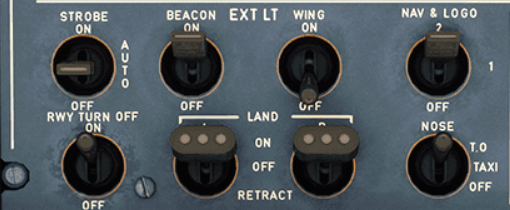
- RWY TURN OFF is ON
- NOSE light is at T.O. (T.O. = takeoff)
- LAND lights are both ON
- STROBE is on ON or AUTO
- BEACON, NAV & LOGO should have been on during taxi already
- WING is OFF. It is usually only on for wing inspection and to detect ice accretion on the wing
- Final check before take-off
- Check ENG MODE SEL as required (should be on MODE NORM)
- Set TCAS to TA or TA/RA and traffic to ALL or ABV
- Release brakes and apply FLX/MCT (=Flexible / Maximum Continuous Thrust) or TO GA power.
- Release parking brake and hold down manual brakes
- Apply thrust slowly to about 50% thrust until both engines are stabilized (N1 stays constant at around 50%) while still holding the brakes.
- Push sidestick forward half the way to put pressure on the front gear
- takeoff run

- Thrust: set to MAN FLX +60
- Vertical guidance:
- Active (green): SRS (Speed Reference System) (pitch guidance to maintain V2+10)
- Armed (blue): CLB mode (is next after SRS is done)
- Lateral guidance:
- Active: RWY (automatic runway axis follow up through ILS use)
- Armed: NAV (navigation guidance according to HDG knob)
- Autopilot, Flight Director, Autothrust:
- AP (Autopilots) are off
- FD (Flight Director) 1 and 2 are ON
- A/THR (Autothrust) is armed (not active yet)
- At about 80 knots slowly release the forward pressure on the sidestick until about 100 knots when the sidestick should be in neutral position.
- The throttle hand remains on the thrust levers until reaching V1 to be able to quickly abort the start. Remove the hand from the thrust levers at V1 to avoid accidentally aborting after V1.
- At VR apply smooth positive backward stick movement on the sidestick and aim for a rotation rate (pitch rate) of 3 deg/sec for about 5 seconds (15°-18° pitch attitude). Once airborne follow the flight director's guidance for pitch attitude.
Tip: Count one-one thousand, two-one-thousand, etc. and hit 15 deg at five-one-thousand - practice this.
- Initial Climb
- Aircraft has left the ground and is climbing at about 15°.
- Gear is up.
- Thrust levers are in FLX MCT or TO GA detent.
- Flaps are still in T.O. position
- PFD FMA now shows a flashing LVR CLB message to instruct the pilot to move thrust levers to the CL detent.
- This activates the Autothrust system (FMA shows A/THR in white now)
- Activate the Autopilot at this point by pressing the AP1 button on the FCU.
- A320は離陸後5秒か100ftを超えたら、すぐにでもオートパイロットを入れることができます
- When reaching S-speed retract flaps
課題(不具合?)†
- 飛行中(または準備中)にアビオニクスの電源が落ちる(電源SW の ON/OFF でも復帰しない)
- Windows11 と MSFS の再インストールで問題が発生しなくなった(解決)
- simBrief で作成した FS を MSFS に読ませても ⇒ MCDU への追加読み込ませが必要?
- ルートはトレースする
- 高度の自動切り替えが行われない(初期設定高度まで上昇)⇒ (解決)高度はゲーム中管制 (ATC) から指定される
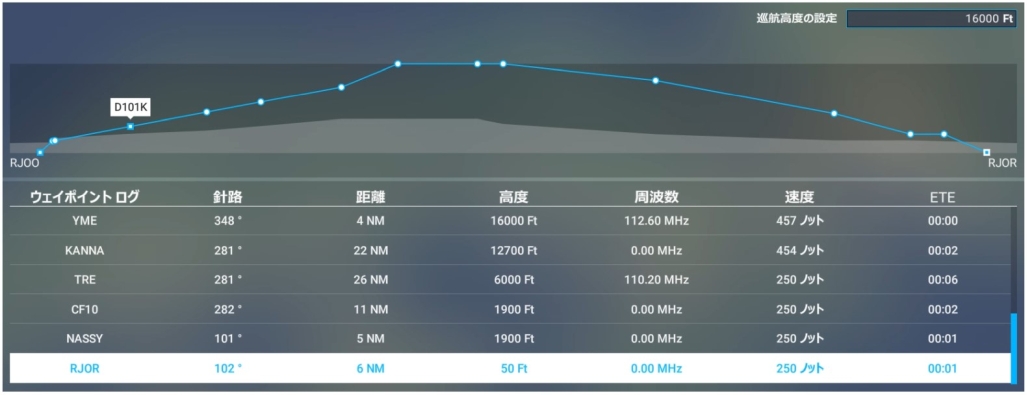
NAV LOG で巡航高度を指定するらしい → Navi Log で確認したら FP で設定された高度情報が正しく設定されていた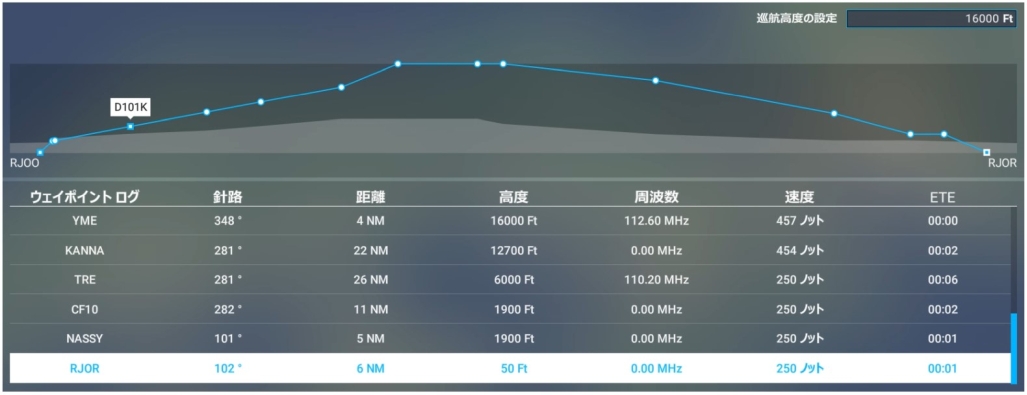
- マネージドモード( FP の設定で飛ぶ)と セレクテッドモード( マニュアル指定の値で飛ぶ)の切り替えによることがわかった
- マネージドモード と セレクテッドモードは切り替えができる(本当は押すとマネージド、引くとセレクテッド)
- 針路などが表示される窓に●がついていたらManaged(マネージドモード)、ついていなければSelected(セレクテッドモード)
- なのでマネージドモードにすれば FP で設定された高度で飛ぶはず
- マネージドモード と セレクテッドモード の切り替え (丸点の点灯/消灯)は確認できたが、マネージドモードにしても高度の設定は無効だった(バグ?)
- 英語モード + マウスアクセシビリティ設定を Legacy に戻しても、FL 設定は Managed が選べない(ドットは点消灯するが、実際には Selected のまま)
- 周波数の設定(切り替え)が行われない
- フライトプランで STAR/IAP を指定し、フライト時に LS (ILS 誘導)をONにすると GS/LOC が表示され誘導される
- ATC の無線呼びかけに応える方法がわからない
- 現状はバグっている影響らしい、AI をオフにして様子をみる
- 現状、日本語モードはバグバグのようなので当面は英語モードで運用する
- ATC Azure 音声合成が無効になる
- ATCのAzureの音声サービスがオフラインになってしまう。対処方法ご教授ください。; -- 2022-02-21 (月) 21:26:57
- 管制官の音声合成に「Azure」を使うのをやめてWindowsの音声合成機能を使う。
- まず Windowsに 合成音声(ナレーター機能)を追加する。やり方は リンク を参照してください。
- 次に MSFSのサウンド設定 TEXT-TO-SPEECH SETTINGS を OFFLINE にする -- 2022-02-22 (火) 21:30:56
- マルチモニター利用時にプライマリーディスプレイにマウスのフォーカスが当たっていないと外部コントローラーが無効(操作しても反映されない)となる。現状はコントローラ利用時にいちいちフォーカスを当て直す必要がある。
フライトプランの格納場所(MSFS2020 のデフォルト)†
- C:\Users\magu7\AppData\Local\Packages\Microsoft.FlightSimulator_8wekyb3d8bbwe\LocalState
マニュアル類†
参考 URL†
![[PukiWiki]](image/taikyoku.gif "[PukiWiki]")

 a320-normal-procedures


