![[PukiWiki]](image/taikyoku.gif "[PukiWiki]")
munakata@mythen:~ (master #)$ sudo mdadm  -D /dev/md0
/dev/md0:
        Version : 1.2
  Creation Time : Sun Dec 11 23:04:19 2011
     Raid Level : raid1
     Array Size : 3906885632 (3725.90 GiB 4000.65 GB)
  Used Dev Size : 3906885632 (3725.90 GiB 4000.65 GB)
   Raid Devices : 2
  Total Devices : 1
    Persistence : Superblock
     Update Time : Sat Jun 10 18:28:18 2017
          State : clean, degraded
 Active Devices : 1
Working Devices : 1
 Failed Devices : 0
  Spare Devices : 0

           Name : mythen:0
           UUID : 4cd693e9:dd3ad1a9:3a5a23a9:62ce3a05
         Events : 280089

    Number   Major   Minor   RaidDevice State
       0       0        0        0      removed
       2       8       17        1      active sync   /dev/sdb1
munakata@mythen:~ (master #)$ sudo smartctl -t short /dev/sda
smartctl 6.2 2013-07-26 r3841 [x86_64-linux-3.13.0-48-generic] (local build)
Copyright (C) 2002-13, Bruce Allen, Christian Franke, www.smartmontools.org

Testing has begun.
Please wait 2 minutes for test to complete.
Test will complete after Sat Jun 10 18:27:37 2017

Use smartctl -X to abort test.
munakata@mythen:~ (master #)$ sudo smartctl -l selftest /dev/sda
smartctl 6.2 2013-07-26 r3841 [x86_64-linux-3.13.0-48-generic] (local build)
Copyright (C) 2002-13, Bruce Allen, Christian Franke, www.smartmontools.org

=== START OF READ SMART DATA SECTION ===
SMART Self-test log structure revision number 1
Num  Test_Description    Status                  Remaining  LifeTime(hours)  LBA_of_first_error
# 1  Short offline       Completed without error       00%     22649         -
munakata@mythen:~ (master #)$ sudo mdadm /dev/md0 --add /dev/sda1
mdadm: added /dev/sda1
munakata@mythen:~ (master #)$ sudo mdadm  -D /dev/md0
/dev/md0:
        Version : 1.2munakata@mythen:~ (master #)$ sudo mdadm /dev/md0 --add /dev/sda1
mdadm: added /dev/sda1

  Creation Time : Sun Dec 11 23:04:19 2011
     Raid Level : raid1
     Array Size : 3906885632 (3725.90 GiB 4000.65 GB)
  Used Dev Size : 3906885632 (3725.90 GiB 4000.65 GB)
   Raid Devices : 2
  Total Devices : 2
    Persistence : Superblock is persistent

    Update Time : Sat Jun 10 19:49:34 2017
          State : clean, degraded, recovering
 Active Devices : 1
Working Devices : 2
 Failed Devices : 0
  Spare Devices : 1

 Rebuild Status : 14% complete

           Name : mythen:0
           UUID : 4cd693e9:dd3ad1a9:3a5a23a9:62ce3a05
         Events : 282261

    Number   Major   Minor   RaidDevice State
       3       8        1        0      spare rebuilding   /dev/sda1
       2       8       17        1      active sync   /dev/sdb1
munakata@mythen:~ (master #)$ sudo mdadm  -D /dev/md0
/dev/md0:
        Version : 1.2
  Creation Time : Sun Dec 11 23:04:19 2011
     Raid Level : raid1
     Array Size : 3906885632 (3725.90 GiB 4000.65 GB)
  Used Dev Size : 3906885632 (3725.90 GiB 4000.65 GB)
   Raid Devices : 2
  Total Devices : 2
    Persistence : Superblock is persistent

    Update Time : Sun Jun 11 07:40:39 2017
          State : clean
 Active Devices : 2
Working Devices : 2
 Failed Devices : 0
  Spare Devices : 0

           Name : mythen:0
           UUID : 4cd693e9:dd3ad1a9:3a5a23a9:62ce3a05
         Events : 296999

    Number   Major   Minor   RaidDevice State
       3       8        1        0      active sync   /dev/sda1
       2       8       17        1      active sync   /dev/sdb1
munakata@mythen:~ (master #)$ cat /proc/mdstat
Personalities : [linear] [multipath] [raid0] [raid1] [raid6] [raid5] [raid4] [raid10]
md0 : active raid1 sda1[3] sdb1[2]
      3906885632 blocks super 1.2 [2/2] [UU]
munakata@mythen:~ (master #)$ sudo smartctl -a /dev/sdf
smartctl 6.2 2013-07-26 r3841 [x86_64-linux-3.13.0-48-generic] (local build)
Copyright (C) 2002-13, Bruce Allen, Christian Franke, www.smartmontools.org

=== START OF INFORMATION SECTION ===
Device Model:     WDC WD40EZRZ-00WN9B0
Serial Number:    WD-WCC4E3JH7YV9
LU WWN Device Id: 5 0014ee 261da88a0

Firmware Version: 80.00A80
User Capacity:    4,000,787,030,016 bytes [4.00 TB]
Sector Sizes:     512 bytes logical, 4096 bytes physical
Rotation Rate:    5400 rpm
Device is:        Not in smartctl database [for details use: -P showall]
ATA Version is:   ACS-2 (minor revision not indicated)
SATA Version is:  SATA 3.0, 6.0 Gb/s (current: 6.0 Gb/s)
Local Time is:    Sun Jun 11 08:07:16 2017 JST
SMART support is: Available - device has SMART capability.
SMART support is: Enabled

=== START OF READ SMART DATA SECTION ===
SMART overall-health self-assessment test result: PASSED

General SMART Values:
Offline data collection status:  (0x82)	Offline data collection activity
					was completed without error.
					Auto Offline Data Collection: Enabled.
Self-test execution status:      ( 121)	The previous self-test completed having
					the read element of the test failed.
Total time to complete Offline
data collection: 		(53760) seconds.
Offline data collection
capabilities: 			 (0x7b) SMART execute Offline immediate.
					Auto Offline data collection on/off support.
					Suspend Offline collection upon new
					command.
					Offline surface scan supported.
					Self-test supported.
					Conveyance Self-test supported.
					Selective Self-test supported.
SMART capabilities:            (0x0003)	Saves SMART data before entering
					power-saving mode.
					Supports SMART auto save timer.
Error logging capability:        (0x01)	Error logging supported.
					General Purpose Logging supported.
Short self-test routine
recommended polling time: 	 (   2) minutes.
Extended self-test routine
recommended polling time: 	 ( 537) minutes.
Conveyance self-test routine
recommended polling time: 	 (   5) minutes.
SCT capabilities: 	       (0x7035)	SCT Status supported.
					SCT Feature Control supported.
					SCT Data Table supported.

SMART Attributes Data Structure revision number: 16
Vendor Specific SMART Attributes with Thresholds:
ID# ATTRIBUTE_NAME          FLAG     VALUE WORST THRESH TYPE      UPDATED  WHEN_FAILED RAW_VALUE
  1 Raw_Read_Error_Rate     0x002f   200   200   051    Pre-fail  Always       -       912
  3 Spin_Up_Time            0x0027   185   179   021    Pre-fail  Always       -       7741
  4 Start_Stop_Count        0x0032   100   100   000    Old_age   Always       -       16
  5 Reallocated_Sector_Ct   0x0033   200   200   140    Pre-fail  Always       -       0
  7 Seek_Error_Rate         0x002e   200   200   000    Old_age   Always       -       0
  9 Power_On_Hours          0x0032   081   081   000    Old_age   Always       -       14096
 10 Spin_Retry_Count        0x0032   100   253   000    Old_age   Always       -       0
 11 Calibration_Retry_Count 0x0032   100   253   000    Old_age   Always       -       0
 12 Power_Cycle_Count       0x0032   100   100   000    Old_age   Always       -       10
192 Power-Off_Retract_Count 0x0032   200   200   000    Old_age   Always       -       2
193 Load_Cycle_Count        0x0032   025   025   000    Old_age   Always       -       527334
194 Temperature_Celsius     0x0022   110   104   000    Old_age   Always       -       42
196 Reallocated_Event_Count 0x0032   200   200   000    Old_age   Always       -       0
197 Current_Pending_Sector  0x0032   200   200   000    Old_age   Always       -       4 <------- ここ
198 Offline_Uncorrectable   0x0030   200   200   000    Old_age   Offline      -       3
199 UDMA_CRC_Error_Count    0x0032   200   200   000    Old_age   Always       -       0
200 Multi_Zone_Error_Rate   0x0008   200   200   000    Old_age   Offline      -       208

SMART Error Log Version: 1
No Errors Logged
munakata@mythen:~ (master #)$ sudo smartctl -t short /dev/sdf
smartctl 6.2 2013-07-26 r3841 [x86_64-linux-3.13.0-48-generic] (local build)
Copyright (C) 2002-13, Bruce Allen, Christian Franke, www.smartmontools.org

=== START OF OFFLINE IMMEDIATE AND SELF-TEST SECTION ===
Sending command: "Execute SMART Short self-test routine immediately in off-line mode".
Drive command "Execute SMART Short self-test routine immediately in off-line mode" successful.
Testing has begun.
Please wait 2 minutes for test to complete.
Test will complete after Sun Jun 11 08:06:42 2017

Use smartctl -X to abort test.
SMART Self-test log structure revision number 1
Num  Test_Description    Status                  Remaining  LifeTime(hours)  LBA_of_first_error
# 1  Short offline       Completed: read failure       90%     14096         140218489
# 2  Extended offline    Completed: read failure       90%     14082         140218489munakata@mythen:~ (master #)$ sudo
# 3  Conveyance offline  Completed: read failure       90%     14082         140218488
# 4  Short offline       Completed: read failure       90%     14082         140218488
	<Directory /raid_vol/www/pukiwiki>
		Options +Indexes +FollowSymLinks +MultiViews
		AllowOverride None

		# ローカルネットからはパスワードなしでアクセスを許可
		Satisfy any
		Order allow,deny
		Allow from 127.0.0.1
		Allow from 192.168.1

		# それ以外からのアクセスにはワンタイムパスワードを要求
		AuthType Basic
		AuthName "OTP Authentication (Enter OTP as password)"
		AuthBasicProvider OTP
		Require valid-user
		OTPAuthUsersFile /raid_vol/www/otp/users
		OTPAuthMaxLinger 3600
		OTPAuthLogoutOnIPChange On

		#AuthType Basic
		#AuthName "KGB 奈々子"
		## nanamochahiko
		#AuthUserFile "/raid_vol/home/munakata/.htpasswd"
		#Require user munakata
	</Directory>
 otp_user_entry.sh
#!/bin/bash -e
user=${1:?Usage: $0 username}
issuer=${2:-KGB}
secret=$(cat /dev/urandom | tr -dc 'a-z0-9' | fold -w 15 | head -n 1)
secret_base16=$(python -c "import base64; print base64.b16encode('${secret}')")
secret_base32=$(python -c "import base64; print base64.b32encode('${secret}')")
otpauth_uri="otpauth://totp/${issuer}:${user}?secret=${secret_base32}&issuer=${issuer}"
otpauth_uri=$(python -c "import urllib; print urllib.quote('${otpauth_uri}')")
qrcode_url="https://chart.googleapis.com/chart?chs=300x300&cht=qr&chl=${otpauth_uri}"
file="/raid_vol/www/otp/users"
if [ ! -f "${file}" ]; then
[ -d $(dirname "$file") ] || mkdir -p $(dirname "$file")
touch ${file}
chown -R www-data:www-data $(dirname "$file")
fi
[ -w "${file}" ] || (echo "${file}: Permission denied" && exit 1)
count=$(awk "\$2 ~ /^$user}\$/" ${file} | wc -l)
if [ $count -le 0 ]; then
echo "HOTP/T30 $(printf '%-12s' $user) - ${secret_base16}" >> ${file}
echo "$qrcode_url"
else
echo "User '$user' already exists"
fi
$ ls -l
合計 68
-rw-r--r-- 1 root root 1521  9月 28  2014 AddTrustExternalCARoot.crt
-rw-r--r-- 1 root root 1952  9月 28  2014 COMODORSAAddTrustCA.crt
-rw-r--r-- 1 root root 2151  9月 28  2014 COMODORSADomainValidationSecureServerCA.crt
-rw-r--r-- 1 root root 1391  7月  6  2014 GeoTrust_intermediate_Certificate.pem
-rw-r--r-- 1 root root 1679  9月 28  2014 kgb.hmuna.com.privatekey
-rw-r--r-- 1 root root 1751  9月 24  2014 kgb.hmuna.com.privatekey-orig
-rw-r--r-- 1 root root 1895  9月 28  2014 kgb_hmuna_com.crt
-rw-r--r-- 1 root root 1005  9月 24  2014 kgbhmunaCSR.csr
-rw-r--r-- 1 root root 1743  7月  6  2014 mail.hmuna.com.privatekey
-rw-r--r-- 1 root root 1675  7月  6  2014 mail.hmuna.com.privatekey_withoutpass
-rw-r--r-- 1 root root 1009  7月  6  2014 mailhmunaCSR.csr
-rw-r--r-- 1 root root 1842  7月  6  2014 mailhmunaSSLCertificateFile2.pem
-rw-r--r-- 1 root root 3233  7月  6  2014 mailhmuna_combined.pem
-rw-r--r-- 1 root root 1751  7月  6  2014 wiki.hmuna.com.privatekey
-rw-r--r-- 1 root root 1679  7月  6  2014 wiki.hmuna.com.privatekey_passphraseless
-rw-r--r-- 1 root root 1009  7月  6  2014 wikihmunaCSR.csr
-rw-r--r-- 1 root root 1842  7月  6  2014 wikihmunaSSLCertificateFile2.pem
munakata@mythen:/etc/ssl/official2 (master *)$ openssl x509 -text -noout -in kgb_hmuna_com.crt
Certificate:
    Data:
        Version: 3 (0x2)
        Serial Number:
            71:82:44:f4:5b:6f:b9:65:dd:15:b8:e2:04:68:a7:64
    Signature Algorithm: sha256WithRSAEncryption
        Issuer: C=GB, ST=Greater Manchester, L=Salford, O=COMODO CA Limited, CN=COMODO RSA Domain Validation Secure Server
CA
        Validity
            Not Before: Sep 28 00:00:00 2014 GMT
            Not After : Sep 27 23:59:59 2019 GMT
        Subject: OU=Domain Control Validated, OU=PositiveSSL, CN=kgb.hmuna.com
        Subject Public Key Info:
            Public Key Algorithm: rsaEncryption
                Public-Key: (2048 bit)
                Modulus:
                    00:b7:d8:37:66:40:96:9f:9c:f0:96:e6:fd:9a:25:
                    d7:89:6b:6a:9e:44:67:22:24:0d:09:ad:03:36:e7:
                    65:9d:82:ed:c5:60:be:4c:a0:7c:7e:52:54:c8:84:
                    f2:9f:6d:19:d4:f4:9e:ed:9f:73:d0:a5:df:83:1f:
                    44:99:26:ab:e7:d0:ff:05:48:1e:f3:9e:2b:bd:2a:
                    ac:4a:bd:25:cb:48:d7:c0:6d:20:a0:ab:62:f8:82:
                    d7:c4:ea:5c:1c:7d:ac:19:cc:60:6a:b2:9e:e0:3b:
                    1f:cd:36:be:35:3e:27:a4:0e:cd:07:1b:1b:bc:d4:
                    5d:57:63:f5:0d:ba:bf:a9:c1:3e:f7:7c:13:6a:b7:
                    8e:14:3f:5e:43:7a:87:c4:03:68:52:73:6e:c7:d9:
                    c0:8d:8f:24:07:ce:7a:cb:b5:5f:fb:bd:47:80:08:
                    28:08:67:4e:dd:93:2e:37:16:e6:0e:f3:28:ad:0c:
                    36:11:51:b0:d3:dd:cc:9d:8b:a1:58:c6:af:64:78:
                    44:7d:42:cc:d2:40:42:c0:cb:96:11:a9:f8:50:ed:
                    89:98:de:28:3f:a5:1a:41:ad:b1:b1:88:a9:5b:90:
                    15:06:31:dc:0b:e1:24:eb:99:2f:1f:09:48:c0:f1:
                    09:9c:e5:de:cd:d5:ce:e0:b2:81:b4:61:fb:0f:61:
                    00:e5
                Exponent: 65537 (0x10001)
        X509v3 extensions:
            X509v3 Authority Key Identifier:
                keyid:90:AF:6A:3A:94:5A:0B:D8:90:EA:12:56:73:DF:43:B4:3A:28:DA:E7

            X509v3 Subject Key Identifier:
                68:03:77:22:D5:A3:CD:B6:A0:10:CF:A8:23:F4:46:63:B2:33:22:FB
            X509v3 Key Usage: critical
                Digital Signature, Key Encipherment
            X509v3 Basic Constraints: critical
                CA:FALSE
            X509v3 Extended Key Usage:
                TLS Web Server Authentication, TLS Web Client Authentication
            X509v3 Certificate Policies:
                Policy: 1.3.6.1.4.1.6449.1.2.2.7
                  CPS: https://secure.comodo.com/CPS
                Policy: 2.23.140.1.2.1

            X509v3 CRL Distribution Points:

                Full Name:
                  URI:http://crl.comodoca.com/COMODORSADomainValidationSecureServerCA.crl

            Authority Information Access:
                CA Issuers - URI:http://crt.comodoca.com/COMODORSADomainValidationSecureServerCA.crt
                OCSP - URI:http://ocsp.comodoca.com

            X509v3 Subject Alternative Name:
                DNS:kgb.hmuna.com, DNS:www.kgb.hmuna.com
    Signature Algorithm: sha256WithRSAEncryption
         46:e6:63:54:c9:5b:e3:fb:d2:5d:8e:12:4d:68:64:ee:0d:54:
         94:e2:e7:36:12:54:4c:e0:8a:17:d6:77:85:40:b1:d1:2e:e8:
         61:94:80:15:7c:bd:90:43:51:57:68:34:5a:8c:8e:86:1a:d7:
         d8:b1:b1:46:ff:1b:91:ca:77:83:c8:0a:1d:7e:aa:58:fe:6b:
         a3:38:79:9f:75:b3:e4:04:1a:c7:06:1e:95:84:24:57:34:32:
         8d:f3:3d:af:ca:be:25:68:90:c3:da:7b:63:e8:91:85:86:3c:
         1a:4a:d7:73:c6:16:60:a2:82:c7:9e:9c:7a:68:b2:9b:b5:26:
         f7:bc:31:cf:f1:33:b4:49:1b:93:c6:a1:67:47:0b:7f:87:41:
         dd:da:d3:1d:d9:92:2e:53:d0:60:99:0c:50:a3:51:81:55:2e:
         14:80:0e:da:c1:c3:b7:e6:e0:50:8d:f0:30:2f:60:e2:d9:05:
         93:e1:e2:6e:54:1e:c1:fb:e0:66:f4:e3:3b:50:c4:aa:99:1c:
         39:cf:ce:04:64:18:b1:ac:28:14:32:6c:2c:48:af:34:b2:c0:
         0e:dc:d0:51:80:d3:5a:a3:31:8e:f6:e7:4c:c8:ed:d4:5e:17:
         b8:34:ab:07:04:1e:39:af:b2:de:47:e3:eb:84:cf:7f:51:4f:
79:65:6c:cfmunakata@mythen:/etc/ssl/official2 (master *)$ openssl req -text -noout -in kgbhmunaCSR.csr
Certificate Request:
Data:
Version: 0 (0x0)
Subject: C=JP, ST=Kanagawa, L=Yokohama, O=Admin, OU=IT, CN=kgb.hmuna.com
Subject Public Key Info:
Public Key Algorithm: rsaEncryption
Public-Key: (2048 bit)
Modulus:
00:b7:d8:37:66:40:96:9f:9c:f0:96:e6:fd:9a:25:
d7:89:6b:6a:9e:44:67:22:24:0d:09:ad:03:36:e7:
65:9d:82:ed:c5:60:be:4c:a0:7c:7e:52:54:c8:84:
f2:9f:6d:19:d4:f4:9e:ed:9f:73:d0:a5:df:83:1f:
44:99:26:ab:e7:d0:ff:05:48:1e:f3:9e:2b:bd:2a:
ac:4a:bd:25:cb:48:d7:c0:6d:20:a0:ab:62:f8:82:
d7:c4:ea:5c:1c:7d:ac:19:cc:60:6a:b2:9e:e0:3b:
1f:cd:36:be:35:3e:27:a4:0e:cd:07:1b:1b:bc:d4:
5d:57:63:f5:0d:ba:bf:a9:c1:3e:f7:7c:13:6a:b7:
8e:14:3f:5e:43:7a:87:c4:03:68:52:73:6e:c7:d9:
c0:8d:8f:24:07:ce:7a:cb:b5:5f:fb:bd:47:80:08:
28:08:67:4e:dd:93:2e:37:16:e6:0e:f3:28:ad:0c:
36:11:51:b0:d3:dd:cc:9d:8b:a1:58:c6:af:64:78:
44:7d:42:cc:d2:40:42:c0:cb:96:11:a9:f8:50:ed:
89:98:de:28:3f:a5:1a:41:ad:b1:b1:88:a9:5b:90:
15:06:31:dc:0b:e1:24:eb:99:2f:1f:09:48:c0:f1:
09:9c:e5:de:cd:d5:ce:e0:b2:81:b4:61:fb:0f:61:
00:e5
Exponent: 65537 (0x10001)
Attributes:
a0:00
Signature Algorithm: sha256WithRSAEncryption
0f:54:51:bb:62:65:46:be:2a:1e:a0:f6:f9:36:97:da:b2:1a:
41:cc:43:32:ea:37:87:8d:d4:8d:dd:2e:ac:20:65:a8:6a:63:
f5:d6:b7:b3:db:20:97:20:42:b9:4f:54:fa:45:c7:00:d6:48:
40:d2:88:54:f8:eb:ae:29:ac:5a:7d:29:6c:00:ce:aa:85:1a:
2e:72:91:be:c7:5a:9a:5e:02:8e:9d:43:22:d6:f0:b9:7f:9c:
46:0f:d8:1a:03:2f:e8:25:ab:56:8b:85:f2:7c:ad:ff:3e:d5:
1e:db:96:e7:e0:f5:23:7c:22:39:87:4e:bf:58:8a:84:02:b9:
00:cd:81:4c:8e:13:f9:85:1f:2b:11:b9:89:cc:a4:3f:08:4c:
c2:ca:df:0f:45:d7:89:e4:96:de:d9:a6:cc:4e:b9:84:50:a5:
09:db:85:22:13:5b:02:4c:70:ab:30:a1:0c:4d:b1:3a:00:57:
f3:c6:22:f0:b8:ff:89:57:e0:62:c8:6e:23:3d:94:8c:c4:2d:
19:94:2e:0e:bd:10:95:ec:6c:0c:dc:45:bf:98:b1:5c:e4:67:
c1:bd:ab:f9:32:65:37:5e:b2:40:5d:5c:01:a9:14:27:87:01:
2b:ef:86:8a:e9:95:43:a7:66:4c:4a:65:ee:a4:b4:f8:c3:65:
9d:54:f4:41ORDER_15187565.eml を再確認
You can also find your PositiveSSL Certificate for kgb.hmuna.com in text format at the bottom of this email.
# 20101225 に公式の証明書(でも安い!)を導入しなおした。
# 20121211 に公式の証明書(でも安い!)を導入しなおした。
# 20140928 に wiki.hmuna.com --> kgb.hmuna.com 変更に伴い公式の証明書を導入しなおした。
# 導入経緯の説明は wiki に(https://kgb.hmuna.com:443/index.php?HomeServer6)
#   Server Certificate:
#SSLCertificateFile      /etc/ssl/official/wikihmunaSSLCertificateFile.pem
#SSLCertificateFile      /etc/ssl/official2/wikihmunaSSLCertificateFile2.pem
SSLCertificateFile      /etc/ssl/official2/kgb_hmuna_com.crt
#   Server Private Key:
#SSLCertificateKeyFile   /etc/ssl/official/wikihmunaPrivateKey.key
#SSLCertificateKeyFile   /etc/ssl/official2/wiki.hmuna.com.privatekey
SSLCertificateKeyFile   /etc/ssl/official2/kgb.hmuna.com.privatekey
#   Server Certificate Chain:
#SSLCertificateChainFile /etc/ssl/official/RapidSSL_CA_bundle.pem
#SSLCertificateChainFile /etc/ssl/official2/GeoTrust_intermediate_Certificate.pem
SSLCertificateChainFile /etc/ssl/official2/COMODORSAAddTrustCA.crt
SSLCertificateChainFile /etc/ssl/official2/COMODORSAAddTrustCA.crt
# 20140928 に wiki.hmuna.com --> kgb.hmuna.com 変更に伴い公式の証明書を導入しなおした。
# 導入経緯の説明は wiki に(https://kgb.hmuna.com:443/index.php?HomeServer6)
#   Server Certificate:
SSLCertificateFile      /etc/ssl/official2/kgb_hmuna_com.crt
#   Server Private Key:
SSLCertificateKeyFile   /etc/ssl/official2/kgb.hmuna.com.privatekey
#   Server Certificate Chain:
SSLCertificateChainFile /etc/ssl/official2/COMODORSAAddTrustCA.crt
SSLCertificateChainFile /etc/ssl/official2/COMODORSAAddTrustCA.crt
SSLCertificateChainFile /etc/ssl/official2/COMODORSAAddTrustCA.crt
SSLCertificateChainFile /etc/ssl/official2/COMODORSADomainValidationSecureServerCA.crt
munakata@muna-E450:~$ openssl s_client -connect kgb.hmuna.com:443 -showcerts
CONNECTED(00000003)
depth=2 C = GB, ST = Greater Manchester, L = Salford, O = COMODO CA Limited, CN = COMODO RSA Certification Authority
verify return:1
depth=1 C = GB, ST = Greater Manchester, L = Salford, O = COMODO CA Limited, CN = COMODO RSA Domain Validation Secure Server CA
verify return:1
depth=0 OU = Domain Control Validated, OU = PositiveSSL, CN = kgb.hmuna.com
verify return:1
---
Certificate chain
 0 s:/OU=Domain Control Validated/OU=PositiveSSL/CN=kgb.hmuna.com
   i:/C=GB/ST=Greater Manchester/L=Salford/O=COMODO CA Limited/CN=COMODO RSA Domain Validation Secure Server CA
-----BEGIN CERTIFICATE-----
MIIFSzCCBDOgAwIBAgIQcYJE9FtvuWXdFbjiBGinZDANBgkqhkiG9w0BAQsFADCB
kDELMAkGA1UEBhMCR0IxGzAZBgNVBAgTEkdyZWF0ZXIgTWFuY2hlc3RlcjEQMA4G
A1UEBxMHU2FsZm9yZDEaMBgGA1UEChMRQ09NT0RPIENBIExpbWl0ZWQxNjA0BgNV
BAMTLUNPTU9ETyBSU0EgRG9tYWluIFZhbGlkYXRpb24gU2VjdXJlIFNlcnZlciBD
QTAeFw0xNDA5MjgwMDAwMDBaFw0xOTA5MjcyMzU5NTlaMFExITAfBgNVBAsTGERv
bWFpbiBDb250cm9sIFZhbGlkYXRlZDEUMBIGA1UECxMLUG9zaXRpdmVTU0wxFjAU
BgNVBAMTDWtnYi5obXVuYS5jb20wggEiMA0GCSqGSIb3DQEBAQUAA4IBDwAwggEK
AoIBAQC32DdmQJafnPCW5v2aJdeJa2qeRGciJA0JrQM252Wdgu3FYL5MoHx+UlTI
hPKfbRnU9J7tn3PQpd+DH0SZJqvn0P8FSB7zniu9KqxKvSXLSNfAbSCgq2L4gtfE
6lwcfawZzGBqsp7gOx/NNr41PiekDs0HGxu81F1XY/UNur+pwT73fBNqt44UP15D
eofEA2hSc27H2cCNjyQHznrLtV/7vUeACCgIZ07dky43FuYO8yitDDYRUbDT3cyd
i6FYxq9keER9QszSQELAy5YRqfhQ7YmY3ig/pRpBrbGxiKlbkBUGMdwL4STrmS8f
CUjA8Qmc5d7N1c7gsoG0YfsPYQDlAgMBAAGjggHdMIIB2TAfBgNVHSMEGDAWgBSQ
r2o6lFoL2JDqElZz30O0Oija5zAdBgNVHQ4EFgQUaAN3ItWjzbagEM+oI/RGY7Iz
IvswDgYDVR0PAQH/BAQDAgWgMAwGA1UdEwEB/wQCMAAwHQYDVR0lBBYwFAYIKwYB
BQUHAwEGCCsGAQUFBwMCME8GA1UdIARIMEYwOgYLKwYBBAGyMQECAgcwKzApBggr
BgEFBQcCARYdaHR0cHM6Ly9zZWN1cmUuY29tb2RvLmNvbS9DUFMwCAYGZ4EMAQIB
MFQGA1UdHwRNMEswSaBHoEWGQ2h0dHA6Ly9jcmwuY29tb2RvY2EuY29tL0NPTU9E
T1JTQURvbWFpblZhbGlkYXRpb25TZWN1cmVTZXJ2ZXJDQS5jcmwwgYUGCCsGAQUF
BwEBBHkwdzBPBggrBgEFBQcwAoZDaHR0cDovL2NydC5jb21vZG9jYS5jb20vQ09N
T0RPUlNBRG9tYWluVmFsaWRhdGlvblNlY3VyZVNlcnZlckNBLmNydDAkBggrBgEF
BQcwAYYYaHR0cDovL29jc3AuY29tb2RvY2EuY29tMCsGA1UdEQQkMCKCDWtnYi5o
bXVuYS5jb22CEXd3dy5rZ2IuaG11bmEuY29tMA0GCSqGSIb3DQEBCwUAA4IBAQBG
5mNUyVvj+9JdjhJNaGTuDVSU4uc2ElRM4IoX1neFQLHRLuhhlIAVfL2QQ1FXaDRa
jI6GGtfYsbFG/xuRyneDyAodfqpY/mujOHmfdbPkBBrHBh6VhCRXNDKN8z2vyr4l
aJDD2ntj6JGFhjwaStdzxhZgooLHnpx6aLKbtSb3vDHP8TO0SRuTxqFnRwt/h0Hd
2tMd2ZIuU9BgmQxQo1GBVS4UgA7awcO35uBQjfAwL2Di2QWT4eJuVB7B++Bm9OM7
UMSqmRw5z84EZBixrCgUMmwsSK80ssAO3NBRgNNaozGO9udMyO3UXhe4NKsHBB45
r7LeR+PrhM9/UU95ZWzP
-----END CERTIFICATE-----
 1 s:/C=GB/ST=Greater Manchester/L=Salford/O=COMODO CA Limited/CN=COMODO RSA Domain Validation Secure Server CA
   i:/C=GB/ST=Greater Manchester/L=Salford/O=COMODO CA Limited/CN=COMODO RSA Certification Authority
-----BEGIN CERTIFICATE-----
MIIGCDCCA/CgAwIBAgIQKy5u6tl1NmwUim7bo3yMBzANBgkqhkiG9w0BAQwFADCB
hTELMAkGA1UEBhMCR0IxGzAZBgNVBAgTEkdyZWF0ZXIgTWFuY2hlc3RlcjEQMA4G
A1UEBxMHU2FsZm9yZDEaMBgGA1UEChMRQ09NT0RPIENBIExpbWl0ZWQxKzApBgNV
BAMTIkNPTU9ETyBSU0EgQ2VydGlmaWNhdGlvbiBBdXRob3JpdHkwHhcNMTQwMjEy
MDAwMDAwWhcNMjkwMjExMjM1OTU5WjCBkDELMAkGA1UEBhMCR0IxGzAZBgNVBAgT
EkdyZWF0ZXIgTWFuY2hlc3RlcjEQMA4GA1UEBxMHU2FsZm9yZDEaMBgGA1UEChMR
Q09NT0RPIENBIExpbWl0ZWQxNjA0BgNVBAMTLUNPTU9ETyBSU0EgRG9tYWluIFZh
bGlkYXRpb24gU2VjdXJlIFNlcnZlciBDQTCCASIwDQYJKoZIhvcNAQEBBQADggEP
ADCCAQoCggEBAI7CAhnhoFmk6zg1jSz9AdDTScBkxwtiBUUWOqigwAwCfx3M28Sh
bXcDow+G+eMGnD4LgYqbSRutA776S9uMIO3Vzl5ljj4Nr0zCsLdFXlIvNN5IJGS0
Qa4Al/e+Z96e0HqnU4A7fK31llVvl0cKfIWLIpeNs4TgllfQcBhglo/uLQeTnaG6
ytHNe+nEKpooIZFNb5JPJaXyejXdJtxGpdCsWTWM/06RQ1A/WZMebFEh7lgUq/51
UHg+TLAchhP6a5i84DuUHoVS3AOTJBhuyydRReZw3iVDpA3hSqXttn7IzW3uLh0n
c13cRTCAquOyQQuvvUSH2rnlG51/ruWFgqUCAwEAAaOCAWUwggFhMB8GA1UdIwQY
MBaAFLuvfgI9+qbxPISOre44mOzZMjLUMB0GA1UdDgQWBBSQr2o6lFoL2JDqElZz
30O0Oija5zAOBgNVHQ8BAf8EBAMCAYYwEgYDVR0TAQH/BAgwBgEB/wIBADAdBgNV
HSUEFjAUBggrBgEFBQcDAQYIKwYBBQUHAwIwGwYDVR0gBBQwEjAGBgRVHSAAMAgG
BmeBDAECATBMBgNVHR8ERTBDMEGgP6A9hjtodHRwOi8vY3JsLmNvbW9kb2NhLmNv
bS9DT01PRE9SU0FDZXJ0aWZpY2F0aW9uQXV0aG9yaXR5LmNybDBxBggrBgEFBQcB
AQRlMGMwOwYIKwYBBQUHMAKGL2h0dHA6Ly9jcnQuY29tb2RvY2EuY29tL0NPTU9E
T1JTQUFkZFRydXN0Q0EuY3J0MCQGCCsGAQUFBzABhhhodHRwOi8vb2NzcC5jb21v
ZG9jYS5jb20wDQYJKoZIhvcNAQEMBQADggIBAE4rdk+SHGI2ibp3wScF9BzWRJ2p
mj6q1WZmAT7qSeaiNbz69t2Vjpk1mA42GHWx3d1Qcnyu3HeIzg/3kCDKo2cuH1Z/
e+FE6kKVxF0NAVBGFfKBiVlsit2M8RKhjTpCipj4SzR7JzsItG8kO3KdY3RYPBps
P0/HEZrIqPW1N+8QRcZs2eBelSaz662jue5/DJpmNXMyYE7l3YphLG5SEXdoltMY
dVEVABt0iN3hxzgEQyjpFv3ZBdRdRydg1vs4O2xyopT4Qhrf7W8GjEXCBgCq5Ojc
2bXhc3js9iPc0d1sjhqPpepUfJa3w/5Vjo1JXvxku88+vZbrac2/4EjxYoIQ5QxG
V/Iz2tDIY+3GH5QFlkoakdH368+PUq4NCNk+qKBR6cGHdNXJ93SrLlP7u3r7l+L4
HyaPs9Kg4DdbKDsx5Q5XLVq4rXmsXiBmGqW5prU5wfWYQ//u+aen/e7KJD2AFsQX
j4rBYKEMrltDR5FL1ZoXX/nUh8HCjLfn4g8wGTeGrODcQgPmlKidrv0PJFGUzpII
0fxQ8ANAe4hZ7Q7drNJ3gjTcBpUC2JD5Leo31Rpg0Gcg19hCC0Wvgmje3WYkN5Ap
lBlGGSW4gNfL1IYoakRwJiNiqZ+Gb7+6kHDSVneFeO/qJakXzlByjAA6quPbYzSf
+AZxAeKCINT+b72x
-----END CERTIFICATE-----
---
Server certificate
subject=/OU=Domain Control Validated/OU=PositiveSSL/CN=kgb.hmuna.com
issuer=/C=GB/ST=Greater Manchester/L=Salford/O=COMODO CA Limited/CN=COMODO RSA Domain Validation Secure Server CA
---
No client certificate CA names sent
Peer signing digest: SHA512
Server Temp Key: ECDH, P-256, 256 bits
---
SSL handshake has read 3601 bytes and written 431 bytes
---
New, TLSv1/SSLv3, Cipher is ECDHE-RSA-AES256-GCM-SHA384
Server public key is 2048 bit
Secure Renegotiation IS supported
Compression: NONE
Expansion: NONE
No ALPN negotiated
SSL-Session:
    Protocol  : TLSv1.2
    Cipher    : ECDHE-RSA-AES256-GCM-SHA384
    Session-ID: 7A9F11F070145BD4C77E8B3ABF8034697BE71B290ACB287C4ED3E8053F9223BD
    Session-ID-ctx:
    Master-Key: 528FD41DC441663C3ED83D3E9442E260F9526C5C13A699BBBE889CBF3813084E0CFC86BB688492B97915B047C76F6BC7
    Key-Arg   : None
    PSK identity: None
    PSK identity hint: None
    SRP username: None
    TLS session ticket lifetime hint: 300 (seconds)
    TLS session ticket:
    0000 - 00 4b 4e 02 87 e4 ec 03-40 34 cd e1 2e 6d 51 33   .KN.....@4...mQ3
    0010 - 08 70 b8 07 5c 9f 9c e6-76 d3 57 ed b9 03 30 c3   .p..\...v.W...0.
    0020 - 3b 43 29 5c cd f8 f0 f9-fa 4e 0e 39 8e 34 21 e8   ;C)\.....N.9.4!.
    0030 - 46 44 74 5a 51 98 76 81-ec 1c af b1 84 76 16 a4   FDtZQ.v......v..
    0040 - e9 09 d4 39 e3 bc f3 85-b6 01 5f 8e b1 fa 2b 2f   ...9......_...+/
    0050 - c0 de 25 b9 11 cc c9 53-f5 84 4e 14 47 79 60 a5   ..%....S..N.Gy`.
    0060 - f9 75 e6 9f d4 a3 62 7f-a4 ad a9 aa 40 9f 67 78   .u....b.....@.gx
    0070 - 7d 6c 06 ee 1b 2c 1d e3-73 71 e7 f8 de 45 89 33   }l...,..sq...E.3
    0080 - 86 a6 85 92 03 21 22 f9-7c 07 4e f6 00 31 af a7   .....!".|.N..1..
    0090 - d0 34 ba 93 bc 11 93 02-cd 75 87 a6 20 a0 b9 1a   .4.......u.. ...
    00a0 - a4 64 6f ba e6 16 9b fb-11 3d ec ff c9 fc 60 02   .do......=....`.
    00b0 - 9d 28 5f 79 85 f7 ad 43-2d aa 60 c5 83 f0 f2 23   .(_y...C-.`....#

    Start Time: 1501092236
    Timeout   : 300 (sec)
    Verify return code: 0 (ok)
---いくつかの PC で kgb.hmuna.com の証明書が失効しているとエラーになる(ならないPCもあるには不思議だが)ので、証明書を新規に1年購入して更新してみる
Namecheap.com Order Summary.emlkgb_hmuna_com.zip$CONF['database_type'] = 'mysql'; $CONF['database_host'] = 'localhost'; $CONF['database_user'] = 'mail-admin'; $CONF['database_password'] = 'admin7785'; $CONF['database_name'] = 'mail';
maildb_backup_20170825.sql
mail-admin@mail:~$ mysqldump -u root -p mail > maildb_backup_20170825.sql
Enter password:   <---- mysqladmin
mysql> use mail;

mysql> show tables;
+-----------------------+
| Tables_in_mail        |
+-----------------------+
| admin                 |
| alias                 |
| alias_domain          |
| config                |
| domain                |
| domain_admins         |
| fetchmail             |
| log                   |
| mailbox               |
| quota                 |
| quota2                |
| vacation              |
| vacation_notification |
+-----------------------+

mysql> describe mailbox;
+------------+--------------+------+-----+---------------------+-------+
| Field      | Type         | Null | Key | Default             | Extra |
+------------+--------------+------+-----+---------------------+-------+
| username   | varchar(255) | NO   | PRI | NULL                |       |
| password   | varchar(255) | NO   |     | NULL                |       |
| name       | varchar(255) | NO   |     | NULL                |       |
| maildir    | varchar(255) | NO   |     | NULL                |       |
| quota      | bigint(20)   | NO   |     | 0                   |       |
| local_part | varchar(255) | NO   |     | NULL                |       |
| domain     | varchar(255) | NO   | MUL | NULL                |       |
| created    | datetime     | NO   |     | 0000-00-00 00:00:00 |       |
| modified   | datetime     | NO   |     | 0000-00-00 00:00:00 |       |
| active     | tinyint(1)   | NO   |     | 1                   |       |
+------------+--------------+------+-----+---------------------+-------+

mysql> select * from mailbox;
+------------------------+------------------------------------+----------------+-------------------------+-------+--------------+-----------+---------------------+---------------------+--------+
| username               | password                           | name           | maildir                 | quota | local_part   | domain    | created             | modified            | active |
+------------------------+------------------------------------+----------------+-------------------------+-------+--------------+-----------+---------------------+---------------------+--------+
| munakata@hmuna.com     | $1$9975d93d$7uKDdKNnb6DAYdugiIWeN0 | hisao munakata | munakata@hmuna.com/     |     0 | munakata     | hmuna.com | 2014-07-04 00:50:46 | 2014-07-04 00:50:46 |      1 |
| mail-admin@hmuna.com   | $1$773730f1$tE55MxG5mxTZPrYETPJcK0 | mail admin     | mail-admin@hmuna.com/   |     0 | mail-admin   | hmuna.com | 2014-07-04 00:50:04 | 2014-07-04 00:50:04 |      1 |
| public_mail@hmuna.com  | $1$045a718c$7weHeSb7EN0EtnV14e1xF. | hisao munakata | public_mail@hmuna.com/  |     0 | public_mail  | hmuna.com | 2014-07-04 00:51:24 | 2014-07-04 00:51:24 |      1 |
| server-admin@hmuna.com | $1$7f1c42b7$UzPUtxsgMAwwHpB3G40Ay0 | server admin   | server-admin@hmuna.com/ |     0 | server-admin | hmuna.com | 2014-07-04 00:51:48 | 2014-07-04 00:51:48 |      1 |
| yuko@hmuna.com         | $1$4b287f90$7Zott.IlT053.SxHveM.M0 | yuko           | yuko@hmuna.com/         |     0 | yuko         | hmuna.com | 2014-07-04 00:52:50 | 2014-07-04 00:52:50 |      1 |
| purple@hmuna.com       | $1$2c52aa21$9a0F8dRCzBWrebrJriY5r/ | yuko           | purple@hmuna.com/       |     0 | purple       | hmuna.com | 2014-07-04 00:53:17 | 2014-07-04 00:53:17 |      1 |
+------------------------+------------------------------------+----------------+-------------------------+-------+--------------+-----------+---------------------+---------------------+--------+
[AWS] ubuntu:~$ mysql -umail-admin -padmin7785 mail < maildb_backup_20170825.sql
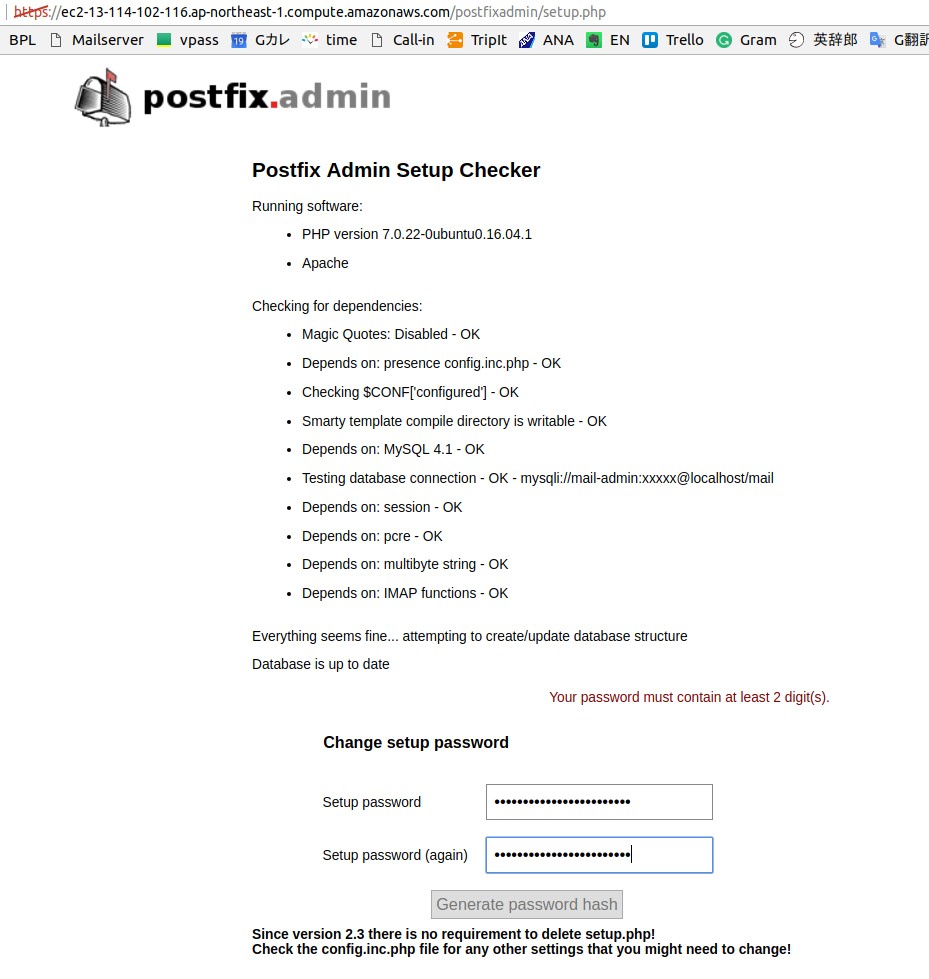
−− postfixadmin setup password = admin7785
$CONF['setup_password'] = '7a2fe61fbf7489dd008233a32adda46e:02d599a3ae5255b7993dcaaf52f4df1aeeb64c5f';